
Participant
August 4, 2021

P: Color Distortion When Opening Images saved from Facebook in Photoshop 26.5

  • August 4, 2021
  • 73 replies
  • 27487 views

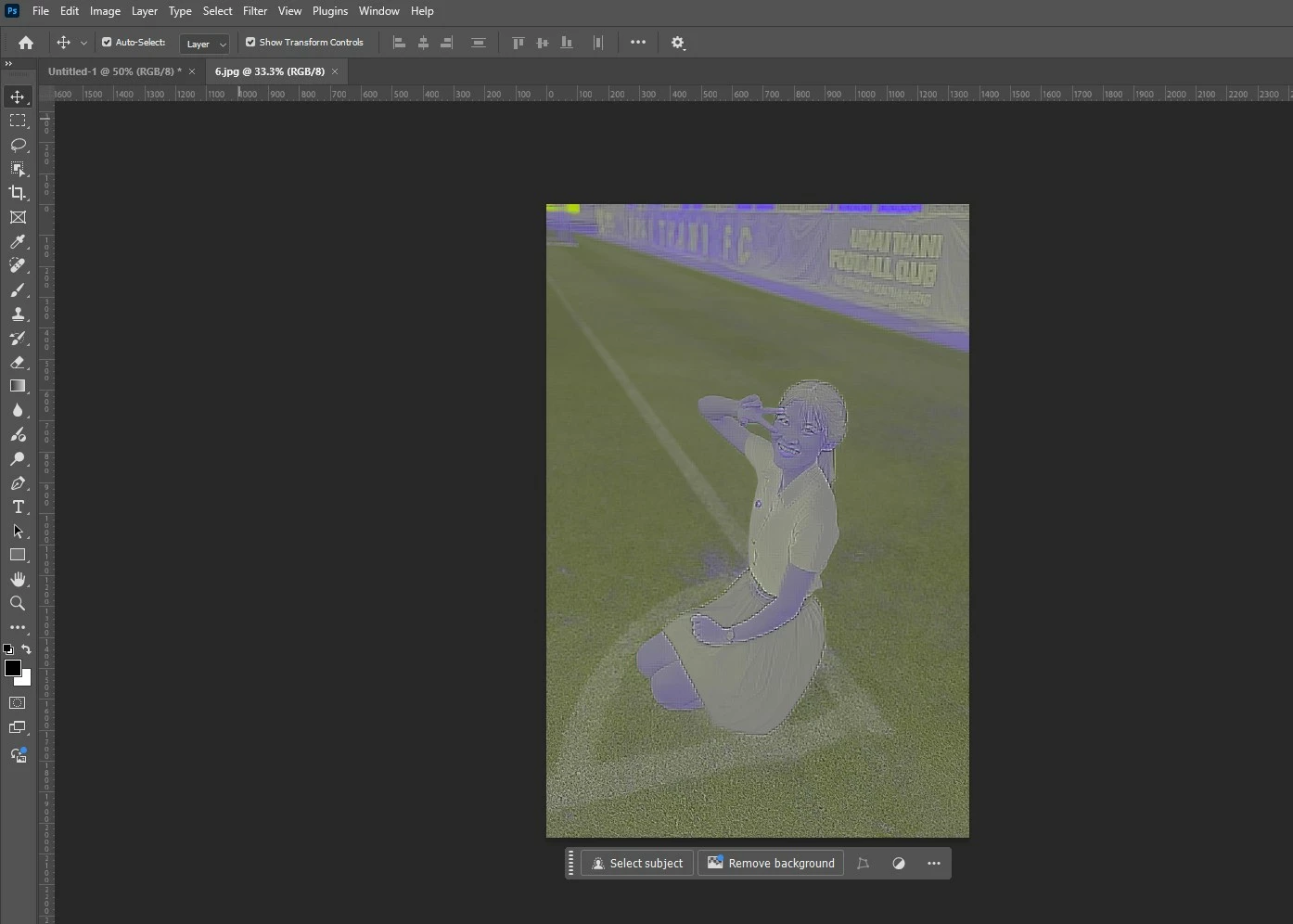
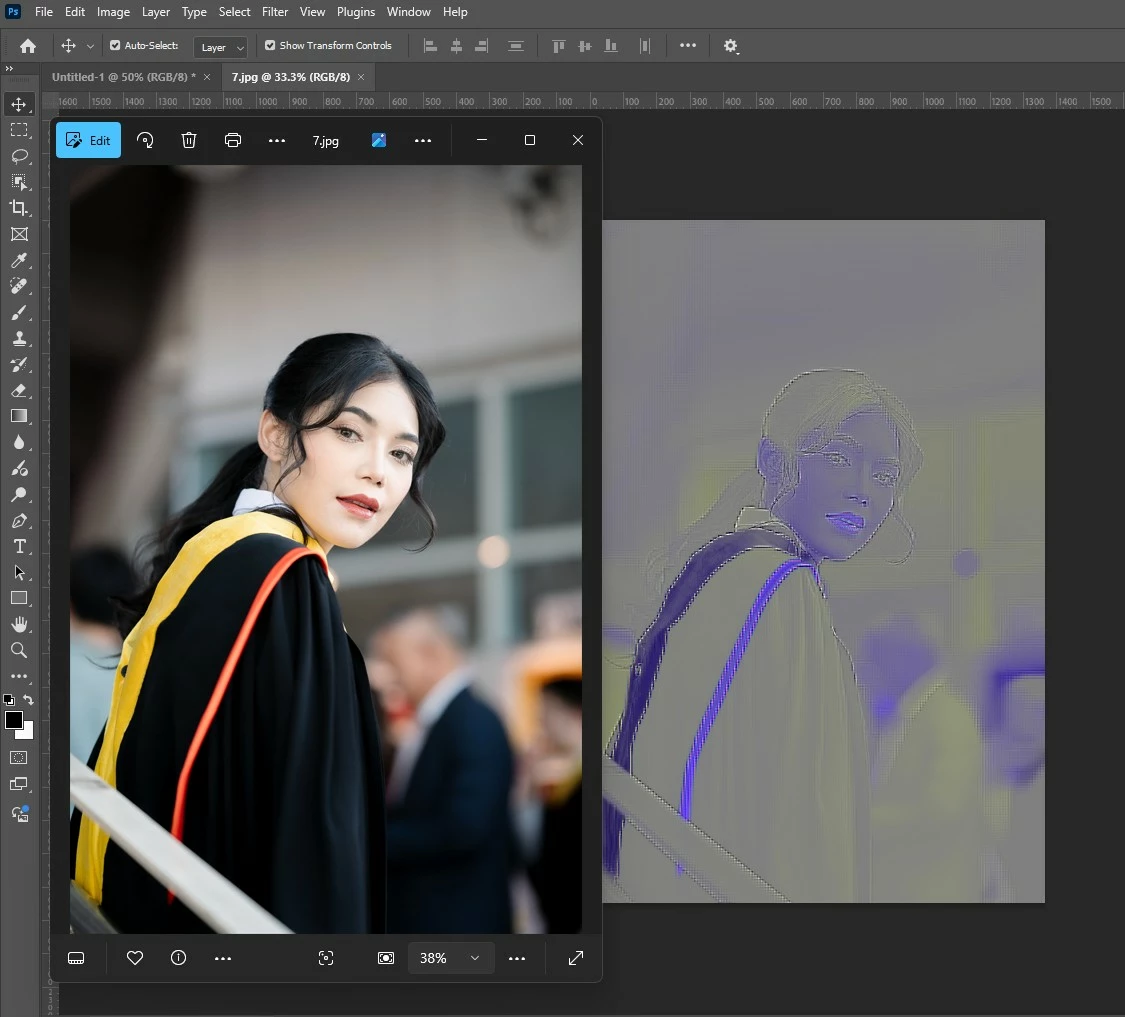
After updating to the latest version of Photoshop, we encountered an issue where images saved from Facebook from the previous year display color distortions when opened in the program. However, images saved recently from Facebook open without any issues and display correctly.


73 replies

Participant
April 22, 2025

Pictures importet from facebook looking like inversed and pixelated but is just rend out 

After convertet at Paint are OK.

original and screenshot in pohotoshop. 

Anshul_Saini
Community Manager
Community Manager
April 23, 2025

Hi @optimistic_skill_av,


Thanks for the update and sharing the screenshots!


In addition to what Stephen said, it would be helpful for us to investigate this rendering issue further. Could you please do the following:

  • Attach the original image file (which appears distorted in Photoshop).

  • Share your system’s GPU details

  • Go to Photoshop > Help > System Info, copy the entire content, paste it into a text editor (like Notepad or TextEdit), and attach the file here.

  • Try temporarily turning off GPU acceleration in Photoshop (go to Preferences > Performance and uncheck Use Graphics Processor). Let us know if that changes how the image renders.

This information will help us determine whether the issue is a GPU rendering issue, a JPEG decoding bug, or something else.


Appreciate your help!


Best,

Anshul Saini

Participant
April 24, 2025

Hello!

Unfortunately disabling GPU didn't help.

It is the same - again I attach original Photo at FB 

Here is system info.


Adobe Photoshop Version: 26.5.0 20250318.r.16 0a154be  x64
Number of Launches: 60
Operating System: Windows 11 64-bit
Version: 11 or greater 10.0.26100.3775
System architecture: Intel CPU Family:6, Model:7, Stepping:1, AVX2, AVX-VNNI, HybridCPU(8:16), HyperThreading
Physical processor count: 24
Logical processor count: 32
Processor speed: 2995 MHz
Built-in memory: 65277 MB
Free memory: 41865 MB
Memory available to Photoshop: 51198 MB
Memory used by Photoshop: 70 %
Crash Handler: Adobe
DCX Version: 8.20.0
SAM SDK Version: 12.1.1
ACP.local Status:
 - SDK Version: 5.3.0
 - Core Sync Status: Reachable and compatible
 - Core Sync Running: 7.4.0.31
 - Min Core Sync Required: 4.3.66.28
Live Edit Client SDK Version: v5.0.0-beta.11
Adobe Firefly: Please use any generative AI feature to view the latest version.
OpenColorIO version: 2.4.0
C2PA library version: adobe_c2pa/0.14.2 c2pa-rs/0.43.0
NGL Version: 1.40.0.10
Chalkboard: Disabled.
Chalkboard Doc Create: Disabled.
D3D12Warp renderer: Disabled.
Precise Color Management for HDR Display: Disabled.
Alias Layers: Disabled.
Highbeam: Enabled.
Image tile size: 1024K
Image cache levels: 4
Font Preview: Medium
HarfBuzz Version: 8.4.0
TextEngine: Unified Text Engine
 ======= GPU
Native API stable: True
OpenCL API stable: True
GPUDeny:               0
GPUForce:              0
useGPU:                1
useOpenCL:             1
isGPUCapable:          1
isGPUAllowed:          1
GPUName:               Radeon RX 580 Series
GPUVendor:             AMD
Radeon RX 580 Series  UNKNOWN, AMD
IsNativeGPUCapable:    1
IsOpenCLGPUCapable:    1
HasSufficientRAM:      1
  GPU accessible RAM:                 8,135 MB
  Required GPU accessible RAM:        1,500 MB
UseGraphicsProcessorChecked:   1
UseOpenCLChecked:              1
Windows remote desktop:  0
Windows available feature level:     12.0
Windows required feature level:      12.0
Windows has required feature level:  1
Display: 1
  Display Bounds: (0, 0) -> (1920, 1080)
  Display scale: 1
  Main Display
  Display Type: SDR
  Display Profile: DELL SE2717H/HX Color Profile,D65
 ------- Sniffer output
[0 ms]
  Launch GPUSnifferThread

[1 ms]
  Start RunAllAPIs

[1 ms]
  C:\Program Files\Adobe\Adobe Photoshop 2025\sniffer.exe -baseTimeMS=95101795 -comment=Photoshop Version: Adobe Photoshop 26.5.0 20250318.r.16 0a154be x64

[1 ms]
  Start GetSnifferResult

[953 ms]
  Start sniffer 2025-04-23 14:30:12
  # Photoshop Version: Adobe Photoshop 26.5.0 20250318.r.16 0a154be x64
  C:\Program Files\Adobe\Adobe Photoshop 2025\sniffer.exe -baseTimeMS=95101795 -comment=Photoshop Version: Adobe Photoshop 26.5.0 20250318.r.16 0a154be x64
  
  {158 ms}
  Start platform native
    # displays:                   1
    Display 0
      Display:                      \\.\DISPLAY1
      Main:                         TRUE
      Built in:                     FALSE
      Stereo:                       FALSE
      Bounds:                       (0, 0) -> (1,920, 1,080)
      Dimensions:                   (1,920 1,080)
      Display scale:                1
      Physical size:                (0 0)
      Pixel size:                   (0 0)
      Dynamic range:                (0 1)
      Attached Device:              (DeviceID name=Radeon RX 580 Series index=0)
    
    # devices:                    1
    Device 0
      Name:                         Radeon RX 580 Series
      Preferred:                    TRUE
      Power Envelope:               UNKNOWN
      Attachment:                   UNKNOWN
      # attached displays:          1
        \\.\DISPLAY1
      GPU accessible RAM:                8,135 MB
      VRAM:                              8,135 MB
      Dedicated System RAM:                  0 MB
      Shared System RAM:                34,223 MB
      API version:                  12.0 (12.0)
      Device version:               12.0 (12.0)
      Vendor name:                  AMD
      Driver date:                  2024-08-19  000000.000000-000
      Driver age:                   8 months
      Driver version:               31.0.21921.1000
      Supports UMA:                 UNSUPPORTED
      D3D-ID:                       26591
  End platform native
  {259 ms}
  
  {259 ms}
  Start platform OpenCL
    # displays:                   0
    
    # devices:                    1
    Device 0
      Name:                         Ellesmere
      Preferred:                    TRUE
      Power Envelope:               DISCRETE
      Attachment:                   UNKNOWN
      # attached displays:          0
      GPU accessible RAM:                8,589 MB
      VRAM:                              8,589 MB
      Dedicated System RAM:                  0 MB
      Shared System RAM:                     0 MB
      API version:                  2.1 (OpenCL 2.1 AMD-APP (3584.0))
      Device version:               2.0 (OpenCL 2.0 AMD-APP (3584.0))
      Vendor name:                  AMD
      Driver date:                  UNKNOWN
      Driver age:                   UNKNOWN
      Driver version:               UNKNOWN
      Bandwidth:                    191 GB / s
      Compute score:                2,762.13
      Device name string:           Ellesmere   
      Device vendor string:         Advanced Micro Devices, Inc.
      Platform name string:         AMD Accelerated Parallel Processing
      Platform vendor string:       Advanced Micro Devices, Inc.
  End platform OpenCL
  {835 ms}
  
  Exit code kExitNormal
  End sniffer 2025-04-23 14:30:13
[kStatusNormal, kExitNormal]

[953 ms]
  Finish RunAllAPIs

[957 ms]
  Finish GetSnifferResult

 ------- Sniffer output
 ======= GPU
License Type: Subscription
Serial number: 94070944388732728236
GUIDBucket: 
Composite Core GPU (comp_core_gpu): on 
Composite Core Threads (MultithreadedCompositing): on 
Composite Core UI (CompositingDocumentTabUI): off 
Composite Core Feature Prefs (CompCoreFeaturePrefs): off 

Application folder: C:\Program Files\Adobe\Adobe Photoshop 2025\
Temporary file path: C:\Users\alexa\AppData\Local\Temp\
Photoshop scratch has async I/O enabled
Scratch volume(s):
  Startup, 464,9G, 72,0G free
Required Plugins folder: C:\Program Files\Adobe\Adobe Photoshop 2025\Required\Plug-ins\
Primary Plugins folder: C:\Program Files\Adobe\Adobe Photoshop 2025\Plug-ins\

Installed components:
   ACE.dll   ACE 2025/03/04-17:39:58   171.ed70209   171.ed70209
   act_tracing.dll   Copyright (c) 2021 Adobe. All Rights Reserved   1.0.58   
   AdobeLinguistic.dll   Adobe Linguistic Library   1d87f11   
   AdobeOwl.dll   Adobe Owl   5.5.0   
   AdobePDFL.dll   PDFL 2025/02/14-12:47:25   79.9bd8d90   79.9bd8d90
   AdobePIP.dll   Adobe Product Improvement Program   8.2.0.16   
   AdobeSVGAGM.dll   AdobeSVGAGM   79.6336193   79.6336193
   AdobeXMP.dll   Adobe XMP Core 2025/02/11-19:10:08   79.78b7638   79.78b7638
   AdobeXMPFiles.dll   Adobe XMP Files 2025/02/11-19:10:08   79.78b7638   79.78b7638
   AdobeXMPScript.dll   Adobe XMP Script 2025/02/11-19:10:08   79.78b7638   79.78b7638
   AGM.dll   AGM 2025/03/04-17:39:58   171.ed70209   171.ed70209
   AID.dll   AID DLL   1.0.0.58   
   AIDE.dll   AIDE 2025/02/07-19:06:43   79.1b6aebc   79.1b6aebc
   aifm.dll   AIFM   1.0   23.68434
   AILib.dll   Adobe Illustrator 2024   29.0.0   
   aiport.dll   AIPort   1.0   23.68434
   ARE.dll   ARE 2025/03/04-17:39:58   171.ed70209   171.ed70209
   AXE8SharedExpat.dll   AXE8SharedExpat 2025/01/14-12:18:39   79.b88f22e   79.b88f22e
   AXEDOMCore.dll   AXEDOMCore 2025/01/14-12:18:39   79.b88f22e   79.b88f22e
   BIB.dll   BIB 2025/03/04-17:39:58   171.ed70209   171.ed70209
   BIBUtils.dll   BIBUtils 2025/03/04-17:39:58   171.ed70209   171.ed70209
   CoolType.dll   CoolType 2025/03/04-17:39:58   171.ed70209   171.ed70209
   CRClient.dll   Adobe Crash Reporter Client DLL   16.7.0.202408221003_c7c60a5   
   DirectML.dll   DirectML Redistributable Library   1.13.1+240111-2204.1.dml-1.13.9b0890f   
   dnssd.dll   Bonjour   3,0,0,2   
   dvaaccelerate.dll   Adobe DVA 2025   25.2.0   
   dvaadameve.dll   Adobe DVA 2025   25.2.0   
   dvaappsupport.dll   Adobe DVA 2025   25.2.0   
   dvaaudiodevice.dll   Adobe DVA 2025   25.2.0   
   dvaaudiotoolkit.dll   Adobe DVA 2025   25.2.0   
   dvacore.dll   Adobe DVA 2025   25.2.0   
   dvacrashhandler.dll   Adobe DVA 2025   25.2.0   
   dvaevefactory.dll   Adobe DVA 2025   25.2.0   
   dvamarshal.dll   Adobe DVA 2025   25.2.0   
   dvamediatypes.dll   Adobe DVA 2025   25.2.0   
   dvametadata.dll   Adobe DVA 2025   25.2.0   
   dvametadataapi.dll   Adobe DVA 2025   25.2.0   
   dvametadataUI.dll   Adobe DVA 2025   25.2.0   
   dvanet.dll   Adobe DVA 2025   25.2.0   
   dvaplayer.dll   Adobe DVA 2025   25.2.0   
   dvascripting.dll   Adobe DVA 2025   25.2.0   
   dvastorage.dll   Adobe DVA 2025   25.2.0   
   dvatemporalxmp.dll   Adobe DVA 2025   25.2.0   
   dvatransport.dll   Adobe DVA 2025   25.2.0   
   dvaui.dll   Adobe DVA 2025   25.2.0   
   dvauxphost.dll   Adobe DVA 2025   25.2.0   
   dvauxpui.dll   Adobe DVA 2025   25.2.0   
   dvavulcansupport.dll   Adobe DVA 2025   25.2.0   
   dvaworkspace.dll   Adobe DVA 2025   25.2.0   
   dynamic-torqnative.dll   Unified Extensibility Platform   uxp-8.1.1-0-d5ce2d1   
   dynamiclink.dll   Adobe DVA 2025   25.2.0   
   ExtendScript.dll   ExtendScript 2022/08/18-12:50:45   82.4   82.4
   filterport.dll   FilterPort   1.1   O
   icucnv74.dll   International Components for Unicode    Build 14.0.1.04ee3a5   
   icuin74.dll   International Components for Unicode    Build 14.0.1.04ee3a5   
   icuuc74.dll   International Components for Unicode    Build 14.0.1.04ee3a5   
   ippcc.dll   ippCC. Intel(R) Integrated Performance Primitives. Color Conversion.   2021.6 (r0xbffe3c5b)   
   ippcck0.dll   ippCC. Intel(R) Integrated Performance Primitives. Color Conversion.   2021.6 (r0xbffe3c5b)   
   ippccl9.dll   ippCC. Intel(R) Integrated Performance Primitives. Color Conversion.   2021.6 (r0xbffe3c5b)   
   ippccy8.dll   ippCC. Intel(R) Integrated Performance Primitives. Color Conversion.   2021.6 (r0xbffe3c5b)   
   ippcore.dll   core. Intel(R) Integrated Performance Primitives. Core Library.   2021.6 (r0xbffe3c5b)   
   ippcv.dll   ippCV. Intel(R) Integrated Performance Primitives. Computer Vision.   2021.6 (r0xbffe3c5b)   
   ippcvk0.dll   ippCV. Intel(R) Integrated Performance Primitives. Computer Vision.   2021.6 (r0xbffe3c5b)   
   ippcvl9.dll   ippCV. Intel(R) Integrated Performance Primitives. Computer Vision.   2021.6 (r0xbffe3c5b)   
   ippcvy8.dll   ippCV. Intel(R) Integrated Performance Primitives. Computer Vision.   2021.6 (r0xbffe3c5b)   
   ippi.dll   ippIP. Intel(R) Integrated Performance Primitives. Image Processing.   2021.6 (r0xbffe3c5b)   
   ippik0.dll   ippIP. Intel(R) Integrated Performance Primitives. Image Processing.   2021.6 (r0xbffe3c5b)   
   ippil9.dll   ippIP. Intel(R) Integrated Performance Primitives. Image Processing.   2021.6 (r0xbffe3c5b)   
   ippiy8.dll   ippIP. Intel(R) Integrated Performance Primitives. Image Processing.   2021.6 (r0xbffe3c5b)   
   ipps.dll   ippSP. Intel(R) Integrated Performance Primitives. Signal Processing.   2021.6 (r0xbffe3c5b)   
   ippsk0.dll   ippSP. Intel(R) Integrated Performance Primitives. Signal Processing.   2021.6 (r0xbffe3c5b)   
   ippsl9.dll   ippSP. Intel(R) Integrated Performance Primitives. Signal Processing.   2021.6 (r0xbffe3c5b)   
   ippsy8.dll   ippSP. Intel(R) Integrated Performance Primitives. Signal Processing.   2021.6 (r0xbffe3c5b)   
   ippvm.dll   ippVM. Intel(R) Integrated Performance Primitives. Vector Math.   2021.6 (r0xbffe3c5b)   
   ippvmk0.dll   ippVM. Intel(R) Integrated Performance Primitives. Vector Math.   2021.6 (r0xbffe3c5b)   
   ippvml9.dll   ippVM. Intel(R) Integrated Performance Primitives. Vector Math.   2021.6 (r0xbffe3c5b)   
   ippvmy8.dll   ippVM. Intel(R) Integrated Performance Primitives. Vector Math.   2021.6 (r0xbffe3c5b)   
   JP2KLib.dll   JP2KLib 2024/11/13-19:07:24   79.6111b85   79.6111b85
   libcrypto-3-x64.dll   The OpenSSL Toolkit   3.0.14   
   libifcoremd.dll   Intel(r) Visual Fortran Compiler   10.0 (Update A)   
   libiomp5md.dll   Intel(R) OpenMP* Runtime Library   5.0   
   libmmd.dll   Intel(R) C/C++/Fortran Compiler   Mainline   
   libssl-3-x64.dll   The OpenSSL Toolkit   3.0.14   
   LogSession.dll   LogSession   8.2.0.16   
   mediacoreif.dll   Adobe DVA 2025   25.2.0   
   Microsoft.AI.MachineLearning.dll   Microsoft® Windows® Operating System   1.17.20240223.4.8f5c79c   
   mkl_avx2.2.dll   Intel(R) oneAPI Math Kernel Library   2022.1   
   mkl_avx512.2.dll   Intel(R) oneAPI Math Kernel Library   2022.1   
   mkl_core.2.dll   Intel(R) oneAPI Math Kernel Library   2022.1   
   mkl_def.2.dll   Intel(R) oneAPI Math Kernel Library   2022.1   
   mkl_mc3.2.dll   Intel(R) oneAPI Math Kernel Library   2022.1   
   mkl_sequential.2.dll   Intel(R) oneAPI Math Kernel Library   2022.1   
   mkl_vml_avx2.2.dll   Intel(R) oneAPI Math Kernel Library   2022.1   
   mkl_vml_avx512.2.dll   Intel(R) oneAPI Math Kernel Library   2022.1   
   mkl_vml_def.2.dll   Intel(R) oneAPI Math Kernel Library   2022.1   
   mkl_vml_mc3.2.dll   Intel(R) oneAPI Math Kernel Library   2022.1   
   MPS.dll   MPS 2025/02/19-17:35:19   79.a6debab   79.a6debab
   onnxruntime.dll   Microsoft® Windows® Operating System   1.17.20240223.4.8f5c79c   
   opencv_world452.dll   OpenCV library   4.5.2   
   pdfport.dll   PDFPort 2020/11/19-11:34:27   79.625377   79.625377
   Plugin.dll   Adobe Photoshop 2025   26.5   
   PlugPlugExternalObject.dll   Adobe(R) CEP PlugPlugExternalObject Standard Dll (64 bit)   12.0.0   
   PlugPlugOwl.dll   Adobe(R) CSXS PlugPlugOwl Standard Dll (64 bit)   12.0.0.14   
   PSCloud.dll                                                   1.0.0.1   
   PSRes.dll   Adobe Photoshop 2025   26.5   
   PSViews.dll   Adobe Photoshop 2025   26.5   
   ScCore.dll   ScCore 2022/08/18-12:50:45   82.4   82.4
   SVGRE.dll   SVGRE   79.020f82e   79.020f82e
   svml_dispmd.dll   Intel(R) C/C++/Fortran Compiler   Mainline   
   VulcanControl.dll   Vulcan Application Control Library   7.2.0.34   
   VulcanMessage5.dll   Vulcan Message Library   7.2.0.34   
   WinRTSupport.dll   Adobe Photoshop Windows RT Support   1.0.1.0   
   Unified Extensibility Platform  uxp-8.1.1-0-d5ce2d1
   UPIC  2.6.0


Required plugins:

   Accented Edges 26.5 - from the file “Filter Gallery.8bf”
   Adaptive Wide Angle 26.5 - from the file “Adaptive Wide Angle.8bf”
   Angled Strokes 26.5 - from the file “Filter Gallery.8bf”
   Average 26.5 - from the file “Average.8bf”
   Bas Relief 26.5 - from the file “Filter Gallery.8bf”
   BMP 26.5 - from the file “Standard MultiPlugin.8bf”
   Camera Raw 17.2 - from the file “Camera Raw.8bi”
   Camera Raw Filter 17.2 - from the file “Camera Raw.8bi”
   Chalk && Charcoal 26.5 - from the file “Filter Gallery.8bf”
   Charcoal 26.5 - from the file “Filter Gallery.8bf”
   Chrome 26.5 - from the file “Filter Gallery.8bf”
   Cineon 26.5 - from the file “Cineon.8bi”
   Clouds 26.5 - from the file “Clouds.8bf”
   Color Halftone 26.5 - from the file “Standard MultiPlugin.8bf”
   Colored Pencil 26.5 - from the file “Filter Gallery.8bf”
   Conté Crayon 26.5 - from the file “Filter Gallery.8bf”
   Craquelure 26.5 - from the file “Filter Gallery.8bf”
   Crop and Straighten Photos 26.5 - from the file “CropPhotosAuto.8li”
   Crop and Straighten Photos Filter 26.5 - from the file “Standard MultiPlugin.8bf”
   Crosshatch 26.5 - from the file “Filter Gallery.8bf”
   Crystallize 26.5 - from the file “Standard MultiPlugin.8bf”
   Cutout 26.5 - from the file “Filter Gallery.8bf”
   Dark Strokes 26.5 - from the file “Filter Gallery.8bf”
   De-Interlace 26.5 - from the file “Standard MultiPlugin.8bf”
   Dicom 26.5 - from the file “Dicom.8bi”
   Difference Clouds 26.5 - from the file “Clouds.8bf”
   Diffuse Glow 26.5 - from the file “Filter Gallery.8bf”
   Displace 26.5 - from the file “Standard MultiPlugin.8bf”
   Dry Brush 26.5 - from the file “Filter Gallery.8bf”
   Entropy 26.5 - from the file “statistics.8ba”
   Export Color Lookup Tables 26.5 - from the file “Export3DLUT.8be”
   Extrude 26.5 - from the file “Standard MultiPlugin.8bf”
   FastCore Routines 26.5 - from the file “FastCore.8bx”
   Fibers 26.5 - from the file “Standard MultiPlugin.8bf”
   Film Grain 26.5 - from the file “Filter Gallery.8bf”
   Filter Gallery 26.5 - from the file “Filter Gallery.8bf”
   Fresco 26.5 - from the file “Filter Gallery.8bf”
   Glass 26.5 - from the file “Filter Gallery.8bf”
   Glowing Edges 26.5 - from the file “Filter Gallery.8bf”
   Grain 26.5 - from the file “Filter Gallery.8bf”
   Graphic Pen 26.5 - from the file “Filter Gallery.8bf”
   Halftone Pattern 26.5 - from the file “Filter Gallery.8bf”
   Halide Bottlenecks 26.5 - from the file “HalideBottlenecks.8bx”
   HDRMergeUI 26.5 - from the file “HDRMergeUI.8bf”
   HSB/HSL 26.5 - from the file “Standard MultiPlugin.8bf”
   IFF Format 26.5 - from the file “Standard MultiPlugin.8bf”
   Ink Outlines 26.5 - from the file “Filter Gallery.8bf”
   JPEG 2000 26.5 - from the file “JPEG2000.8bi”
   Kurtosis 26.5 - from the file “statistics.8ba”
   Lens Blur 26.5 - from the file “Lens Blur.8bf”
   Lens Correction 26.5 - from the file “Lens Correction.8bf”
   Lens Flare 26.5 - from the file “Standard MultiPlugin.8bf”
   Liquify 26.5 - from the file “Liquify.8bf”
   Matlab Operation 26.5 - from the file “ChannelPort.8bf”
   Maximum 26.5 - from the file “statistics.8ba”
   Mean 26.5 - from the file “statistics.8ba”
   Measurement Core 26.5 - from the file “MeasurementCore.8me”
   Median 26.5 - from the file “statistics.8ba”
   Mezzotint 26.5 - from the file “Standard MultiPlugin.8bf”
   Minimum 26.5 - from the file “statistics.8ba”
   MMXCore Routines 26.5 - from the file “MMXCore.8bx”
   Mosaic Tiles 26.5 - from the file “Filter Gallery.8bf”
   Multiprocessor Support 26.5 - from the file “MultiProcessor Support.8bx”
   Neon Glow 26.5 - from the file “Filter Gallery.8bf”
   Note Paper 26.5 - from the file “Filter Gallery.8bf”
   NTSC Colors 26.5 - from the file “NTSC Colors.8bf”
   Ocean Ripple 26.5 - from the file “Filter Gallery.8bf”
   OpenEXR 26.5 - from the file “Standard MultiPlugin.8bf”
   Paint Daubs 26.5 - from the file “Filter Gallery.8bf”
   Palette Knife 26.5 - from the file “Filter Gallery.8bf”
   Parametric Filter NO VERSION - from the file “MaterialFilter.8bf”
   Patchwork 26.5 - from the file “Filter Gallery.8bf”
   Paths to Illustrator 26.5 - from the file “Standard MultiPlugin.8bf”
   PCX 26.5 - from the file “PCX.8bi”
   Photocopy 26.5 - from the file “Filter Gallery.8bf”
   Picture Package Filter 26.5 - from the file “ChannelPort.8bf”
   Pinch 26.5 - from the file “Standard MultiPlugin.8bf”
   Pixar 26.5 - from the file “Pixar.8bi”
   Plaster 26.5 - from the file “Filter Gallery.8bf”
   Plastic Wrap 26.5 - from the file “Filter Gallery.8bf”
   Pointillize 26.5 - from the file “Standard MultiPlugin.8bf”
   Polar Coordinates 26.5 - from the file “Standard MultiPlugin.8bf”
   Portable Bit Map 26.5 - from the file “PBM.8bi”
   Poster Edges 26.5 - from the file “Filter Gallery.8bf”
   Radial Blur 26.5 - from the file “Standard MultiPlugin.8bf”
   Radiance 26.5 - from the file “Radiance.8bi”
   Range 26.5 - from the file “statistics.8ba”
   Render Color Lookup Grid 26.5 - from the file “Export3DLUT.8be”
   Reticulation 26.5 - from the file “Filter Gallery.8bf”
   Ripple 26.5 - from the file “Standard MultiPlugin.8bf”
   Rough Pastels 26.5 - from the file “Filter Gallery.8bf”
   Save for Web 26.5 - from the file “Save for Web.8be”
   ScriptingSupport 26.5 - from the file “ScriptingSupport.8li”
   Shear 26.5 - from the file “Standard MultiPlugin.8bf”
   Skewness 26.5 - from the file “statistics.8ba”
   Smart Blur 26.5 - from the file “Standard MultiPlugin.8bf”
   Smudge Stick 26.5 - from the file “Filter Gallery.8bf”
   Solarize 26.5 - from the file “Solarize.8bf”
   SP Substance Suite NO VERSION - from the file “MaterialSuite.8li”
   Spatter 26.5 - from the file “Filter Gallery.8bf”
   Spherize 26.5 - from the file “Standard MultiPlugin.8bf”
   Sponge 26.5 - from the file “Filter Gallery.8bf”
   Sprayed Strokes 26.5 - from the file “Filter Gallery.8bf”
   Stained Glass 26.5 - from the file “Filter Gallery.8bf”
   Stamp 26.5 - from the file “Filter Gallery.8bf”
   Standard Deviation 26.5 - from the file “statistics.8ba”
   Substance 3D Viewer NO VERSION - from the file “Substance3DViewerForPs.8bi”
   Sumi-e 26.5 - from the file “Filter Gallery.8bf”
   Summation 26.5 - from the file “statistics.8ba”
   Targa 26.5 - from the file “Standard MultiPlugin.8bf”
   Texturizer 26.5 - from the file “Filter Gallery.8bf”
   Tiles 26.5 - from the file “Standard MultiPlugin.8bf”
   Torn Edges 26.5 - from the file “Filter Gallery.8bf”
   Twirl 26.5 - from the file “Standard MultiPlugin.8bf”
   Underpainting 26.5 - from the file “Filter Gallery.8bf”
   Vanishing Point 26.5 - from the file “VanishingPoint.8bf”
   Variance 26.5 - from the file “statistics.8ba”
   Water Paper 26.5 - from the file “Filter Gallery.8bf”
   Watercolor 26.5 - from the file “Filter Gallery.8bf”
   Wave 26.5 - from the file “Standard MultiPlugin.8bf”
   WIA Support 26.5 - from the file “WIASupport.8li”
   Wind 26.5 - from the file “Standard MultiPlugin.8bf”
   Wireless Bitmap 26.5 - from the file “WBMP.8bi”
   ZigZag 26.5 - from the file “Standard MultiPlugin.8bf”

Optional and third party plugins: NONE


Duplicate and Disabled plugins: NONE


Plugins that failed to load: NONE

Unified Extensibility Platform - Extensions:

   Home Screen (Loaded) 9.0.0.122 - from the file "C:\Program Files\Common Files\Adobe/UXP/Extensions\com.adobe.ccx.start-9.0.0\"
   CmdN: 1.24.7
    	UAB: 2.18.0-8
		UAB4: npm:@ccac/universal-asset-browser@5.9.0
      Loaded at: 268 ms - launch time impact: 59 ms
   ccx-timeline (Prepared) 3.1.12.0 - from the file "Required Folder"
   CCX Commenting UXP Webview (Loaded) 30.7.0.0 - from the file "Required Folder"
      Loaded at: 40099 ms - launch time impact: 0 ms
   CCX Sharesheet UXP (Prepared) 30.24.0.0 - from the file "Required Folder"
   In app notifications (Loaded) 2.0.25.0 - from the file "Required Folder"
      Loaded at: 272 ms - launch time impact: 0 ms
   Content Credentials (Loaded) 0.51.4.0 - from the file "Required Folder"
      Loaded at: 40718 ms - launch time impact: 0 ms
   CC Libraries Panel (Prepared) 4.10.74.0 - from the file "C:\Program Files\Common Files\Adobe/CEP/Extensions\CC_LIBRARIES_PANEL_EXTENSION_4_10_74\"
   CAPTURE: 2.0.41  STOCK: 4.2.6
   Parametric Filter (Prepared) 1.0.0.0 - from the file "Required Folder"
   Photoshop Adjustments Panel (Loaded) 2.3.4.0 - from the file "Required Folder"
      Loaded at: 40100 ms - launch time impact: 1 ms
   Photoshop UXP Export-As (Prepared) 5.12.1.0 - from the file "Required Folder"
   Photoshop In App Messaging (Loaded) 4.5.4.0 - from the file "Required Folder"
      Loaded at: 40100 ms - launch time impact: 0 ms
   Information Alert (Prepared) 0.5.0.0 - from the file "Required Folder"
   Photoshop Selection Feedback (Prepared) 0.5.0.0 - from the file "Required Folder"
   Share Panel (Prepared) 1.0.12.0 - from the file "Required Folder"
   Plugins Panel (Prepared) 1.6.9.0 - from the file "Required Folder"
   Substance 3D Viewer Plugin for Photoshop (Prepared) 1.0.0.0 - from the file "C:\Program Files\Common Files\Adobe/UXP/Extensions\com.adobe.substance-3d.viewer.ps\"
   IC popup message (Loaded) 1.0.0.0
      Loaded at: 5013 ms - launch time impact: 0 ms
   Multilayer Protection (Loaded) 1.0.0.0
      Loaded at: 5014 ms - launch time impact: 0 ms
   Discover Panel (Loaded) 2502.118.0.9 - from the file "Required Folder"
      Loaded at: 40103 ms - launch time impact: 14 ms
   Neural Filters (Registered) 1.15.0.102 - from the file "Required Folder"
   Scan time: 0 ms - entries: 40 

Extensions:

   Libraries  1.0.0 - from the file “C:\Program Files\Common Files\Adobe\CEP\extensions\CC_LIBRARIES_PANEL_EXTENSION_4_10_74\index.html”
   com.adobe.stock.panel.licensing-embedded  4.0.35 - from the file “C:\Program Files\Common Files\Adobe\CEP\extensions\CC_LIBRARIES_PANEL_EXTENSION_4_10_74\extensions\stock-panel-licensing\index.html”
   com.adobe.capture.extension  2.0.41 - from the file “C:\Program Files\Common Files\Adobe\CEP\extensions\CC_LIBRARIES_PANEL_EXTENSION_4_10_74\extensions\capture\capture.html”
   QRCode Maker Pro  2.0.3 - from the file “C:\Program Files (x86)\Common Files\Adobe\CEP\extensions\net.sytes.chuwa.qrcodemakerpro\index.html”
   Export As  4.8.16 - from the file “C:\Program Files\Adobe\Adobe Photoshop 2025\Required\CEP\extensions\com.adobe.photoshop.crema\index.html”
   Export As  4.8.16 - from the file “C:\Program Files\Adobe\Adobe Photoshop 2025\Required\CEP\extensions\com.adobe.photoshop.crema\index.html”
   com.adobe.cclibraries.manager  1.0.0 - from the file “C:\Program Files\Common Files\Adobe\CEP\extensions\CC_LIBRARIES_PANEL_EXTENSION_4_10_74\manager.html”

Installed TWAIN devices: NONE


Today I install update, but the same problem is on it - Photoshop 26.6.0

Participant
April 22, 2025

Same exact thing happening to me with PS 2025 on a fairly new and completely updated Mac Mini.

Anshul_Saini
Community Manager
Community Manager
April 23, 2025

Hi @Carl237604068he1,


Thanks for the update and sharing the screenshots!


In addition to what Stephen said, it would be helpful for us to investigate this rendering issue further. Could you please do the following:

  • Attach the original image file (which appears distorted in Photoshop).

  • Share your system’s GPU details

  • Go to Photoshop > Help > System Info, copy the entire content, paste it into a text editor (like Notepad or TextEdit), and attach the file here.

  • Try temporarily turning off GPU acceleration in Photoshop (go to Preferences > Performance and uncheck Use Graphics Processor). Let us know if that changes how the image renders.

This information will help us determine whether the issue is a GPU rendering issue, a JPEG decoding bug, or something else.


Appreciate your help!


Best,

Anshul Saini

Known Participant
April 18, 2025

That's okay, feel free to moderate however you find fit, just as I'll air my grievances as an All Apps Suite paying customer and being forced to make almost monthly visits to the Adobe Community whenever I update an app and something breaks.

EdenTaylor
Participating Frequently
April 17, 2025

I’m experiencing a persistent issue with image rendering in Photoshop 26.5 on macOS Sequoia 15.4.1, using an M1 Max MacBook Pro (top spec, 2021). Whenever I import images—whether JPEG or PNG—they appear distorted in Photoshop: washed out colors, horizontal banding, and a noticeable shift in tones. The original files are totally fine and display perfectly in Preview and other apps.

Here’s what I’ve tried so far:

  • Fully uninstalled and reinstalled Photoshop (including removing preferences)

  • Disabled "Use Graphics Processor" in Preferences

  • Disabled OpenCL and any Metal rendering (when available)

  • Ran Photoshop in Rosetta mode (issue still persists)

  • Updated to the latest macOS (15.4.1 Sequoia)

  • Tested with multiple image formats and brand-new documents

  • Verified it's not template- or file-specific

  • Reset color settings to sRGB IEC61966-2.1

The issue has been ongoing for a few weeks and affects all images regardless of source. It also existed in the previous Photoshop version I had installed before updating to 26.5.

I’m currently installing Photoshop Beta to see if the issue is resolved there, but this feels like a deeper rendering bug specific to M1/M2 systems or the Sequoia update.

Would love any input or a timeline on a fix—this is seriously impacting my workflow.

Thanks!

Community Manager
April 17, 2025

Hi @EdenTaylor! Welcome to the community!

I'm sorry to hear about the issues you're having with Photoshop. If the problem persists even after disabling "use graphics processor," it likely isn't related to your graphics card. Do you have any third-party plug-ins or fonts installed? Sometimes, outdated or incompatible ones can cause various issues.

Could you also share your System Info with us? You can find it in Photoshop under Help > System Info. Just copy the info to a text file and attach it to your response, or share it through Google Drive, WeTransfer, or another file-sharing platform.

Thanks a lot! 😊

Alek

*(If you mention me with an @, like @Aleke, I’ll get a notification and can respond faster.)*
EdenTaylor
Participating Frequently
April 17, 2025

HI @Aleke

Thank you for the reply. I was able to fix this issue by installing and using Photoshop Beta and disabling use Graphics Processor, but it did not work in regular Photoshop. 


No third-party plug-ins or fonts installed. 

Here is my system info, attached. 

Known Participant
April 17, 2025

@CMass, no it's not "so curious", it's "so frustrating". This is why people pirate your products and forfeit updating. Adobe products are unreliable as professional tools due to updates almost consistently breaking things.


This shouldn't be happening with stable Photoshop versions. I just discovered this issue when saving a few Facebook images from my clients' FB page and at first thought it was either a RAM, GPU or disk issue. But no, it's good old Photoshop f*cking up after another update.


Do tell the team about the curious, cute, ha-ha issue. It reads the data as uRGB and causes massive artefacting and misplaced color. All of us paying for the All Apps Suite sure are idiots..


CMass
Community Manager
Community Manager
April 17, 2025

Hey @5449385, 


Totally hear you—this kind of thing is frustrating, especially when you're just trying to get work done and an update throws a wrench in it. A bug has already been filed with the team. I've also added more context to the bug based on your experience with artifacting and color. Please follow this thread for updates. In the meantime, if the issue wasn’t present in the previous version of Photoshop, I recommend rolling back to that version for now: https://adobe.ly/3YCdiGW


Please also remember that it's okay to express your frustrations and that we appreciate constructive feedback; however, we will enforce the Community Guidelines.

^CM

Participating Frequently
April 16, 2025

My system: Mac Ventura 13.7.1 / Photoshop Beta 26.6.0

Colleagues system: Windows 10 / Photoshop 26.5.0


My colleague and I over the last week or so have found that some Jpegs given to us to work with are opening with a strange purple, liney hue. We're both experiencing the issue with the same files, but don't know what it is that's causing it or how to remedy it. This is probably the 4th Jpeg image this week we've had this issue with, so it's not limited to this file.


I found an identical thread here from 2021.


It doesn't happen with all images, and the affected images look normal in the file picker thumbnails.


I tried the top solution in the old thread, changing the Camera Raw settings so it auto loads it, but that gives me an error, so I reverted those settings. 


Currently, we're screenshotting previews of the images as low res placeholders but need to fix this to finish the projects properly.

Sameer K
Community Manager
Community Manager
April 16, 2025

Hey, @DhallNash. Welcome to the Photoshop Community. I'll need more info to help you figure this out. 


What is the source of these images? The team is investigating a recent behavior with images downloaded from the internet, such as Facebook: https://adobe.ly/3Epfbju


Additionally, I've also seen a few reports with a similar distortion pattern with horizontal lines reported here:

https://community.adobe.com/t5/photoshop-ecosystem-discussions/opening-old-amp-new-jpegs-distort-in-photoshop/m-p/15153939#M853521


https://adobe.ly/4jF4wjP


Could you share a few sample images that appear as corrupted with me via direct message? Upload a few sample images to any cloud file-sharing service & share a public link with me. 


Thanks!
Sameer K

(Type '@' and type my name to mention me when you reply)

TheBeatnikHimself
Known Participant
April 9, 2025

When opening images in Photoshop from Lightroom useing the AdobeRGB color space the images noticeably change in shadow areas where the blacks become washed out and lose detail. This issue also occurs when switching between the Develop and Library modules in Lightroom when the HDR option is disabled in library. Disabling GPU acceleration in Lightroom's performance settings results in poor quality across the board. Enabling the HDR in Library option helps maintain consistency in Lightroom, but the black details still wash out after exporting to Photoshop when using the AdobeRGB color space.


The only time my images look correct is in the Develop module with GPU enabled or in the Library with HDR turned on; this does not carry over to Photoshop or during exports in AdobeRGB, even with GPU enabled for exports.


My monitor is calibrated using hardware calibration tools, and I’ve ensured that I have the proper monitor profile selected before opening LR or PS and the color profiles match in both programs. I've tried various monitor calibration profiles to rule out corrupted ICC files..

I'm using a Mac M2 Studio, OS 15.4, Lightroom version 14.2, and Photoshop version 26.5.


EDIT: As May 29th 2025 I have spent 2 months working with the Adobe representatives and engineers. Countless hours have gone into this issue on my end, but no solution or public statement has been provided form the people at Adobe.


D Fosse
Community Expert
Community Expert
April 9, 2025

This has been reported by some Mac users over the last couple of months.


See this thread, which includes very simple steps to determine which version is correct:

https://community.adobe.com/t5/photoshop-ecosystem-discussions/photoshop-not-showing-correct-colors-update-after-3-weeks-of-troubleshooting/td-p/14600182 


There are two known workarounds, which may or may not work. They don't solve it, but they let you keep working.


One is to make sure you are not using table-based (LUT-based) monitor profiles. It does not work well in MacOS. Some calibration software make LUT profiles by default, but then there will always be an option to switch to (much safer) matrix-based profiles. Similarly, avoid v4. Use v2.


The other is to switch from Adobe Color Engine to Apple Color Engine. That will in some cases reduce the difference (if not eliminate it entirely). It's still a bug, it should obviously be correctly treated in both.


TheBeatnikHimself
Known Participant
April 9, 2025

Thank you for your response.


I appreciate the information and have already reviewed the thread you linked. I've checked my monitor calibration settings and experimented with both LUT and matrix-based profiles, ensuring I am set to V2, though I also tested V4 without noticing any improvements. Additionally, I have bypassed all calibration and used generic profiles, but unfortunately, this too did not lead to any changes. I also switched the conversion engine from Adobe to Mac, yet still did not see a difference.


This issue is significantly impacting my image production and, consequently, my business. As a professional software, I believe Adobe should be held to high standards, especially given the investment in subscription fees for these critical tools. 


I feel that Adobe needs to addresses this bug so those of us who pay their wages can get back to work so we can continue to do so.. Thank you for your attention to this matter; but I have found no solutions, and I feel a working editing platform is crucial for many users like myself.

Per Berntsen
Community Expert
Community Expert
April 2, 2025

@Chanitpon370485241xu8 

@Brandilio_VA 


Please post sample jgps here so we can examine them.

Participant
April 2, 2025

It's just images from Facebook that are causing issues.  Do you want us to just repost images downloaded from Facebook?  You can just grab any image uploaded to Adobe's facebook recently and see it for yourself, if you're curious.  For example, this image that promotes turbo-actress Awkwafina.  If you download it and try to bring it into an up-to-date version of Photoshop, it'll do the purple-ish green-ish distortion.

As far as I can see, it's exclusively happening with Facebook images.

Per Berntsen
Community Expert
Community Expert
April 2, 2025

The image displays correctly in Photoshop 26.4.1, and reports the embedded profile to be Adobe RGB.

It also looks fine in Lightroom Classic 14.2.

After updating to PS 26.5, the image displays as you describe, and the embedded profile is now reported as uRGB, which apparently is a variant of sRGB created by Meta.

Converting to sRGB or Adobe RGB does not fix it. I have no idea what's going on here.

@CMass Can you pass this on to the Photoshop team please?


Participant
April 2, 2025

I'm having this issue as well.  It's an issue with the way Photoshop reads facebook images.  This is entirely on Adobe, and there's little you can do about it.

I've had success with running images through media converters online (the kinds that convert annoying formats like AVIF into something actually useable) and turning them into .png files.  But yeah, this is for Adobe to fix.  There's nothing you can currently do.  And despite what Adobe Support will tell you, the person on the other end who has 8 years of photoshop experince and has dealt with this issue several times is lying about both of those things.

CMass
Community Manager
Community Manager
March 28, 2025

Hey @Chanitpon370485241xu8

Can you share what your color space is? You can find that by going to Edit > Convert to Profile and looking at the Source Space. Does it do this only to these images? 


^CM
