


Participant
January 6, 2020
Answered

HAND TOOL [2020]

  • January 6, 2020
  • 3 replies
  • 2670 views

Hello All, after some 5 minutes of working on a file the cursor freezes on HAND TOOL eventhough I have not selected HAND TOOL ... tried to relaunch photoshop, don't work .. only restarting my mac did it reset only to freeze back to hand tool after some 5 minutes .. I have the 2020 version and running it on a MacBook Air OS Catalina, since two weeks and it only recently happened. What do I do? 


Thanks

Peter


This topic has been closed for replies.
Correct answer happie_97

Peter,

Someone had a similar issue in 2010 and the resolution came in 2018. Here is the link to the thread. https://community.adobe.com/t5/photoshop-elements/curser-stuck-on-hand-tool/td-p/2702301 


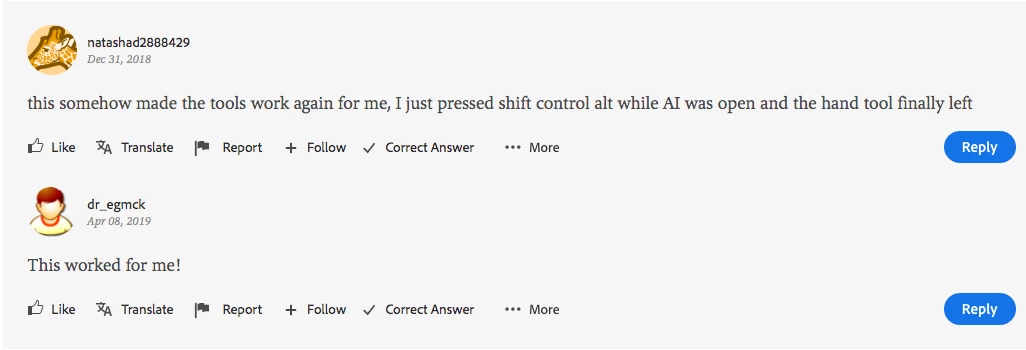
Also a screenshot of the answer. 

Try these techniques. Hope it works for you. 🙂

3 replies

Participant
April 7, 2024

i use a HUION KAMVAS. the pen was the problem. if you have standard button bindings. the lower button acts like the space bar (hand tool). just press it again

happie_97
Community Expert
happie_97Community ExpertCorrect answer
Community Expert
January 6, 2020

Peter,

Someone had a similar issue in 2010 and the resolution came in 2018. Here is the link to the thread. https://community.adobe.com/t5/photoshop-elements/curser-stuck-on-hand-tool/td-p/2702301 


Also a screenshot of the answer. 

Try these techniques. Hope it works for you. 🙂

Participant
January 6, 2020

Happie 97 - thanks alot, you saved my day .. the link did it .. thanks again 

Cheers 

Peter

happie_97
Community Expert
Community Expert
January 6, 2020

So awesome Peter! Cheers! 🙂

happie_97
Community Expert
Community Expert
January 6, 2020

I personally haven't had this issue. I will try to research and find a possible fix.