Okan5CA7
Inspiring
September 23, 2022
Answered

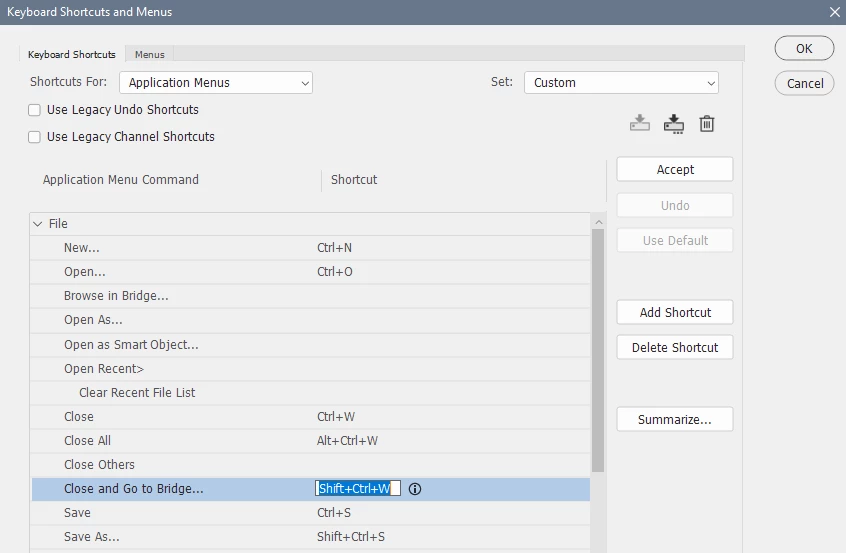
How can i find the shortcut for this "Close a file in Photoshop and open Bridge" in Shortcuts panel?

  • September 23, 2022
  • 2 replies
  • 820 views

I can't find it in the Shortcuts panel. Because there is no "Search" panel!

I'm glad it if anyone can help me.

This topic has been closed for replies.
Correct answer Per Berntsen


2 replies

Stephen Marsh
Community Expert
Community Expert
September 23, 2022

It's in the file menu...


Stephen Marsh
Community Expert
Community Expert
September 23, 2022

The following related script may be of interest and can also be put into a keyboard shortcut:


https://community.adobe.com/t5/photoshop-ecosystem-discussions/how-do-i-start-adobe-bridge-in-photoshop/td-p/12782971/page/2#U12825913


Per Berntsen
Community Expert
Per BerntsenCommunity ExpertCorrect answer
Community Expert
September 23, 2022


Stephen Marsh
Community Expert
Community Expert
September 23, 2022

@Per Berntsen – Haha, there was no reply when I started combining and annotating the screenshot!

Per Berntsen
Community Expert
Community Expert
September 23, 2022

🙂