

Participant
February 13, 2023
Question

How to have Color panel report in gray levels instead of K

  • February 13, 2023
  • 1 reply
  • 2960 views

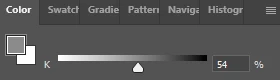
I'm working with an 8-bit gray scale image.  I'd like to work in normal 0-255 valued gray levels just like we do for color images.  However when the image mode is Grayscale, the color panel shows the brightness value of the pixel in K, which has values of 0-100 and is the opposite of gray levels, meaning a bigger number is a darker color rather than a brighter gray level.  How can I switch from reporting brightness in K units to the normal 0-255 gray level units?  And is there a way to make that the default so I don't have to switch unit every session?
This topic has been closed for replies.

1 reply

TheDigitalDog
Inspiring
February 13, 2023

Best you can do is switch the Info to read in 0-256:


And you can select via 0-256 from here:


Author “Color Management for Photographers" & "Photoshop CC Color Management/pluralsight"
Participant
February 15, 2023

OK thanks @TheDigitalDog .  I guess that might be the only way - view it in RGB values - since no one else has offered up anything different.

By the way, my options panel looks a little different.  I'm using version 24.1.1 and then I call "Panel Options..." from the Info panel's pancake menu in the upper right, it looks like this:

I wish they would let you specify the gray level on the Color tab but I guess this will have to do.  Seems strange that they've added in some image processing capabilities and yet don't really have a convenient way to specify intensities in gray levels like nearly all other programs do, plus even Photoshop lets you do if you're using RGB.

TheDigitalDog
Inspiring
February 15, 2023
Author “Color Management for Photographers" & "Photoshop CC Color Management/pluralsight"