Participant
April 29, 2025

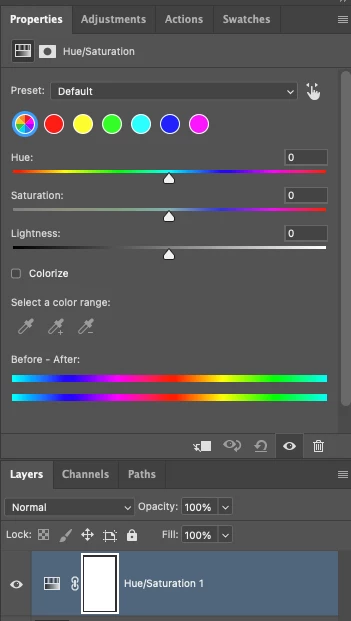
P: Adjusting layer properties doesn't work for Hue/Saturation/lum. HSL layers

  • April 29, 2025
  • 71 replies
  • 12652 views

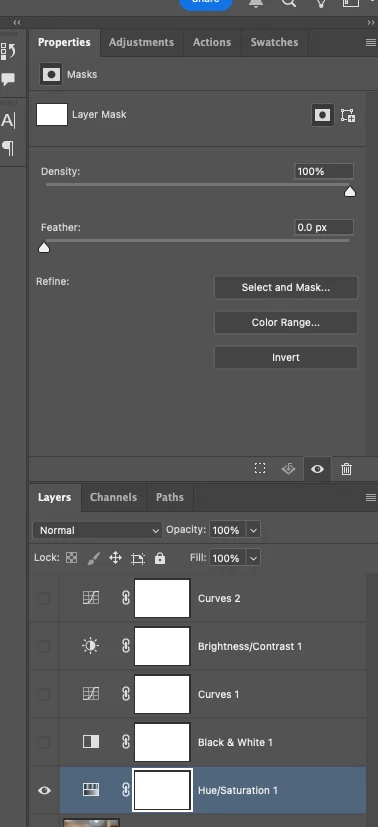
The tab to click on and change the properties for an adjustment layer randomly disappears. Quitting and re-opening the app solves the issue, but it will happen again within minutes, usually when switching between different projects or different app on the computer. 

On Photoshop v26.6 - Mac Mini M4 pro, 32gb ram, 1tb ssd.


Any help would be appreciated!
ss

71 replies

Participating Frequently
May 28, 2025

PS 26.7.0 running on Mac OSX Sequoia 15.4.1:


Creating a new Hue/Sat adjustment layer intermittently results in a layer whose Properties panel includes ONLY a mask, and no properties. 

PS must be re-launched in order to access the hue/sat controls. 


Additionally, the "direct selection" tool can on longer be selected by use of a keyboard shortcut. I.e. the key board shortcut is in place, but the key fails to select the tool. 

Participating Frequently
May 28, 2025

Yes, this is a bug only introduced with 26.7.0.

Reseting preferences has not solved the issue. 

Participating Frequently
May 28, 2025

Hey @antonioi21376345

We haven’t been able to reproduce this on our end just yet, so I’m going to move this back over to Discussions for now—this way, more folks can take a look and chime in.

In the meantime, could you help us out by sharing a bit more info?


Go to Help > System Info, copy and paste that into a text file, and attach it to your response.

If possible, a step-by-step of how you’re running into the issue—or even a quick screen recording—would go a long way in helping us understand what’s going on.


Thanks again for flagging this!


^CM


Hi CMass, thanks for the reply. System info below.
Sort of difficult to get a screen recording since the trouble is intermittenet. The pattern seems to be: I'm working on a .PSD image without difficulty. I open a second, or then maybe a third .PSD and while working in that file, when I go to add a Hue/Sat adjustment layer, I get one of these corrupt layers without properties (only a mask). It does not matter if I use the adjustment layer icon in the layers panel or go through the menus: once the corrupt layers start, the only workaround is to save, quit, relaunch. 
 
Let me know if I can add anything else. 
 
 
Adobe Photoshop Version: 26.7.0 20250513.r.15 e861f5e  arm64
Number of Launches: 264
Operating System: Mac OS 15.4.1
System architecture: Apple M3 Max, DOTPROD, HybridCPU(10:4)
Physical processor count: 14
Built-in memory: 98304 MB
Free memory: 60792 MB
Memory available to Photoshop: 92900 MB
Memory used by Photoshop: 70 %
Crash Handler: Adobe
DCX Version: 8.20.0
SAM SDK Version: 12.1.1
ACP.local Status:
 - SDK Version: 5.3.0
 - Core Sync Status: Reachable and compatible
 - Core Sync Running: 7.4.0.31
 - Min Core Sync Required: 4.3.66.28
Live Edit Client SDK Version: v5.0.0-beta.11
Adobe Firefly: Please use any generative AI feature to view the latest version.
OpenColorIO version: 2.4.0
C2PA library version: adobe_c2pa/0.14.2 c2pa-rs/0.43.0
NGL Version: 1.40.0.10
Chalkboard: Disabled.
Chalkboard Doc Create: Disabled.
Precise Color Management for HDR Display: Disabled.
Alias Layers: Disabled.
Highbeam: Enabled.
Touch Bar Property Feedback: Disabled.
Image tile size: 1024K
Image cache levels: 4
Font Preview: Medium
HarfBuzz Version: 8.4.0
TextEngine: ATE 7.9.0 (4b65665)
 ======= GPU
Native API stable: True
OpenCL API stable: True
GPUDeny:               0
GPUForce:              0
useGPU:                1
useOpenCL:             1
isGPUCapable:          1
isGPUAllowed:          1
GPUName:               Apple M3 Max
GPUVendor:             APPLE
Apple M3 Max  UNKNOWN, APPLE
IsNativeGPUCapable:    1
IsOpenCLGPUCapable:    1
HasSufficientRAM:      1
  GPU accessible RAM:                77,309 MB
  Required GPU accessible RAM:        1,500 MB
UseGraphicsProcessorChecked:   1
UseOpenCLChecked:              1
Display: 1
  Display Bounds: (0, 0) -> (3840, 2160)
  Display scale: 2
  High DPI Monitor
  Main Display
  Display Type: WCG
 ------- Sniffer output
[0 ms]
  Launch GPUSnifferThread
 
[0 ms]
  Start RunAllAPIs
 
[0 ms]
  Start GetSnifferResult
 
[0 ms]
  /Applications/Adobe Photoshop 2025/Adobe Photoshop 2025.app/Contents/MacOS/sniffer -baseTimeMS=623714476 -comment=Photoshop Version: Adobe Photoshop 26.7.0 20250513.r.15 e861f5e arm64
 
[161 ms]
  Start sniffer 2025-05-28 14:29:33
  # Photoshop Version: Adobe Photoshop 26.7.0 20250513.r.15 e861f5e arm64
  sniffer -baseTimeMS=623714476 -comment=Photoshop Version: Adobe Photoshop 26.7.0 20250513.r.15 e861f5e arm64
  
  {12 ms}
  Start platform native
    # displays:                   1
    Display 0
      Display:                      4
      Main:                         TRUE
      Built in:                     FALSE
      Stereo:                       FALSE
      Bounds:                       (0, 0) -> (3,840, 2,160)
      Dimensions:                   (3,840 2,160)
      Display scale:                2
      Physical size:                (711.942 400.467)
      Pixel size:                   (0.185401 0.185401)
      Dynamic range:                (0 1)
      Attached Device:              (DeviceID name=Apple M3 Max index=0)
    
    # devices:                    1
    Device 0
      Name:                         Apple M3 Max
      Preferred:                    TRUE
      Power Envelope:               DISCRETE
      Attachment:                   EMBEDDED
      # attached displays:          1
        4
      GPU accessible RAM:               77,309 MB
      VRAM:                                  0 MB
      Dedicated System RAM:                  0 MB
      Shared System RAM:                77,309 MB
      API version:                  1.0 (1.0)
      Device version:               1.0 (1.0)
      Vendor name:                  APPLE
      Driver date:                  UNKNOWN
      Driver age:                   UNKNOWN
      Driver version:               UNKNOWN
  End platform native
  {114 ms}
  
  {114 ms}
  Start platform OpenCL
    # displays:                   0
    
    # devices:                    1
    Device 0
      Name:                         Apple M3 Max
      Preferred:                    TRUE
      Power Envelope:               INTEGRATED
      Attachment:                   UNKNOWN
      # attached displays:          0
      GPU accessible RAM:               77,309 MB
      VRAM:                             77,309 MB
      Dedicated System RAM:                  0 MB
      Shared System RAM:                     0 MB
      API version:                  1.2 (OpenCL 1.2 (Mar  7 2025 21:04:06))
      Device version:               1.2 (OpenCL 1.2 )
      Vendor name:                  APPLE
      Driver date:                  UNKNOWN
      Driver age:                   UNKNOWN
      Driver version:               UNKNOWN
      Bandwidth:                    3,831 GB / s
      Compute score:                23,358.6
      Device name string:           Apple M3 Max
      Device vendor string:         Apple       
      Platform name string:         Apple       
      Platform vendor string:       Apple       
  End platform OpenCL
  {156 ms}
  
  Exit code kExitNormal
  End sniffer 2025-05-28 14:29:33
[kStatusNormal, kExitNormal]
 
[161 ms]
  Finish RunAllAPIs
 
[162 ms]
  Finish GetSnifferResult
 
 ------- Sniffer output
 ======= GPU
License Type: Subscription
Serial number: 90970487246775031352
GUIDBucket: 
Composite Core GPU (comp_core_gpu): on 
Composite Core Threads (MultithreadedCompositing): on 
Composite Core UI (CompositingDocumentTabUI): off 
Composite Core Feature Prefs (CompCoreFeaturePrefs): off 
 
Application folder: /Applications/Adobe Photoshop 2025/
Photoshop scratch has async I/O enabled
Scratch volume(s):
  Startup, 926.4G, 355.7G free
Required Plugins folder: /Applications/Adobe Photoshop 2025/Adobe Photoshop 2025.app/Contents/PlugIns/Required/
Primary Plugins folder: /Applications/Adobe Photoshop 2025/Plug-ins/
 
Installed components:
 
   dvametadata.framework   dvametadata   25.2.0.1   
   AdobeXMPScript.framework   AdobeXMPScript   79.9690a87fc   79.9690a87fc
   libdynamic-napi.framework   Torq Native   local   
   ICUUnicode.framework   ICUUnicode      14.2.2.6bc0507
   ICUConverter.framework   ICUConverter      14.2.2.6bc0507
   AdobeCrashReporter.framework   AdobeCrashReporter   16.6.0.202408200234_79b4529   
   boost_system.framework   boost_system   1   
   AdobeACE.framework   AdobeACE   6.0.1   79.ffa74136341.
   dvanet.framework   dvanet   25.2.0.1   
   AdobeOwl.framework   AdobeOwl      
   MediaCoreIF.framework   MediaCoreIF   25.2.0.1   
   dvascripting.framework   dvascripting   25.2.0.1   
   dvatemporalxmp.framework   dvatemporalxmp   25.2.0.1   
   dvaappsupport.framework   dvaappsupport   25.2.0.1   
   AdobeAXE8SharedExpat.framework   AdobeAXE8SharedExpat   6.1.1   79.4abff3a.
   AIDE.framework   AIDE   6.4.0   79.0edcdaae
   dynamiclink.framework   dynamiclink   25.2.0.1   
   dvaaccelerate.framework   dvaaccelerate   25.2.0.1   
   dvametadataui.framework   dvametadataui   25.2.0.1   
   AdobeARE.framework   AdobeARE      
   AdobePDFPort.framework   AdobePDFPort      
   dvaevefactory.framework   dvaevefactory   25.2.0.1   
   dvastorage.framework   dvastorage   25.2.0.1   
   ICUInternationalization.framework   ICUInternationalization      14.2.1.6317df5
   boost_filesystem.framework   boost_filesystem   1   
   dvaworkspace.framework   dvaworkspace   25.2.0.1   
   AdobeBIB.framework   AdobeBIB   4.0.0   79.ffa74136341.
   AdobeXMPFiles.framework   AdobeXMPFiles   79.9690a87fc   79.9690a87fc
   AdobeLinguistic.framework      16.1.0.792708d   
   dvaplayer.framework   dvaplayer   25.2.0.1   
   filterport.framework   filterport   29.0.0.2   
   PlugPlugOwl.framework   PlugPlugOwl   12.0.0.14   
   dvaaudiotoolkit.framework   dvaaudiotoolkit   25.2.0.1   
   AdobeAGM.framework   AdobeAGM   7.1.0   79.ffa74136341.
   dvaadameve.framework   dvaadameve   25.2.0.1   
   AdobeSVGRE.framework   AdobeSVGRE   9.3.0   "79.5724c48."
   AdobePDFL.framework   AdobePDFL   17.0.0   79 . 3325af6e
   dvavulcansupport.framework   dvavulcansupport   25.2.0.1   
   dvacore.framework   dvacore   25.2.0.1   
   aiport.framework   aiport   29.0.0.2   
   AdobePIP.framework   AdobePIP   8.2.0.16   
   AdobePDFSettings.framework   AdobePDFSettings   1.7   
   AdobeAXEDOMCore.framework   AdobeAXEDOMCore   6.1.1   79.4abff3a.
   dvatransport.framework   dvatransport   25.2.0.1   
   xerces.framework   xerces   3.2.3.0   
   exo.framework   exo   25.2.0.1   
   AdobeXMP.framework   AdobeXMPCore   79.9690a87fc   79.9690a87fc
   AdobeJP2K.framework   AdobeJP2K   4.0.3   79.6311509
   dvaaudiodevice.framework   dvaaudiodevice   25.2.0.1   
   LogSession.framework   LogSession   8.2.0.16   
   PlugPlugExternalObject.framework      12.0.0.14   
   utest.framework   utest   1   
   AdobeSVGAGM.framework   AdobeSVGAGM   4.0.0   79.6336193.
   dvametadataapi.framework   dvametadataapi   25.2.0.1   
   AdobeBIBUtils.framework   AdobeBIBUtils   4.0.0   79.ffa74136341.
   CloudAILib.framework   CloudAILib   29.0.0.2   
   SPBasic.framework   SPBasic   29.0.0.2   
   dvacaptioning.framework   dvacaptioning   25.2.0.1   
   AdobeCoolType.framework   AdobeCoolType   10.0.3   79.ffa74136341.
   boost_regex.framework   boost_regex   1   
   boost_program_options.framework   boost_program_options   1   
   dvamediatypes.framework   dvamediatypes   25.2.0.1   
   AdbePM.framework   AdbePM   1   
   boost_date_time.framework   boost_date_time   1   
   dvauxpui.framework   dvauxpui   25.2.0.1   
   dynamic-torqnative.framework   Torq Native   local   
   AdobeMPS.framework   AdobeMPS   9.0.0.56718   79.a22178b4
   dvaui.framework   dvaui   25.2.0.1   
   dvauxphost.framework   dvauxphost   25.2.0.1   
   MacMemory.framework   MacMemory   29.0.0.2   
   boost_thread.framework   boost_thread   1   
   AILib.framework   AILib   29.0.0.2   
   ICUData.framework   ICUData      14.2.2.6bc0507
   dvamarshal.framework   dvamarshal   25.2.0.1   
   aifm.framework   aifm   29.0.0.2   
   Unified Extensibility Platform  uxp-8.1.4-2
   UPIC  2.6.0
 
 
Required plugins:
 
   Accented Edges 26.7.0, © 1991-2025 Adobe. All rights reserved. - from the file “Filter Gallery.plugin”
   Adaptive Wide Angle 26.7.0, © 2014-2025 Adobe. All rights reserved. - from the file “Adaptive Wide Angle.plugin”
   Angled Strokes 26.7.0, © 1991-2025 Adobe. All rights reserved. - from the file “Filter Gallery.plugin”
   Average 26.7 © 1993-2025 Adobe. All rights reserved. - from the file “Average.plugin”
   Bas Relief 26.7.0, © 1991-2025 Adobe. All rights reserved. - from the file “Filter Gallery.plugin”
   BMP 26.7.0, © 2003-2025 Adobe. All rights reserved. - from the file “Standard Multiplugin.plugin”
   Camera Raw 17.3.1 (2227), Copyright © 2025 Adobe Systems Incorporated - from the file “Camera Raw.plugin”
   Camera Raw Filter 17.3.1 (2227), Copyright © 2025 Adobe Systems Incorporated - from the file “Camera Raw.plugin”
   Chalk & Charcoal 26.7.0, © 1991-2025 Adobe. All rights reserved. - from the file “Filter Gallery.plugin”
   Charcoal 26.7.0, © 1991-2025 Adobe. All rights reserved. - from the file “Filter Gallery.plugin”
   Chrome 26.7.0, © 1991-2025 Adobe. All rights reserved. - from the file “Filter Gallery.plugin”
   Cineon 26.7 © 2002-2025 Adobe. All rights reserved. - from the file “Cineon.plugin”
   Clouds 26.7 © 1993-2025 Adobe. All rights reserved. - from the file “Clouds.plugin”
   Color Halftone 26.7.0, © 2003-2025 Adobe. All rights reserved. - from the file “Standard Multiplugin.plugin”
   Colored Pencil 26.7.0, © 1991-2025 Adobe. All rights reserved. - from the file “Filter Gallery.plugin”
   Conté Crayon 26.7.0, © 1991-2025 Adobe. All rights reserved. - from the file “Filter Gallery.plugin”
   Craquelure 26.7.0, © 1991-2025 Adobe. All rights reserved. - from the file “Filter Gallery.plugin”
   Crop and Straighten Photos 26.7 © 2003-2025 Adobe. All rights reserved. - from the file “CropPhotosAuto.plugin”
   Crop and Straighten Photos Filter 26.7.0, © 2003-2025 Adobe. All rights reserved. - from the file “Standard Multiplugin.plugin”
   Crosshatch 26.7.0, © 1991-2025 Adobe. All rights reserved. - from the file “Filter Gallery.plugin”
   Crystallize 26.7.0, © 2003-2025 Adobe. All rights reserved. - from the file “Standard Multiplugin.plugin”
   Cutout 26.7.0, © 1991-2025 Adobe. All rights reserved. - from the file “Filter Gallery.plugin”
   Dark Strokes 26.7.0, © 1991-2025 Adobe. All rights reserved. - from the file “Filter Gallery.plugin”
   De-Interlace 26.7.0, © 2003-2025 Adobe. All rights reserved. - from the file “Standard Multiplugin.plugin”
   Dicom 26.7 © 2003-2025 Adobe. All rights reserved. - from the file “dicom.plugin”
   Difference Clouds 26.7 © 1993-2025 Adobe. All rights reserved. - from the file “Clouds.plugin”
   Diffuse Glow 26.7.0, © 1991-2025 Adobe. All rights reserved. - from the file “Filter Gallery.plugin”
   Displace 26.7.0, © 2003-2025 Adobe. All rights reserved. - from the file “Standard Multiplugin.plugin”
   Dry Brush 26.7.0, © 1991-2025 Adobe. All rights reserved. - from the file “Filter Gallery.plugin”
   Entropy 26.7 © 2006-2025 Adobe. All rights reserved. - from the file “statistics.plugin”
   Export Color Lookup Tables 26.7 © 2012-2025 Adobe. All rights reserved. - from the file “Export3DLUT.plugin”
   Extrude 26.7.0, © 2003-2025 Adobe. All rights reserved. - from the file “Standard Multiplugin.plugin”
   FastCore Routines 26.7 © 1990-2025 Adobe. All rights reserved. - from the file “FastCore.plugin”
   Fibers 26.7.0, © 2003-2025 Adobe. All rights reserved. - from the file “Standard Multiplugin.plugin”
   Film Grain 26.7.0, © 1991-2025 Adobe. All rights reserved. - from the file “Filter Gallery.plugin”
   Filter Gallery 26.7.0, © 1991-2025 Adobe. All rights reserved. - from the file “Filter Gallery.plugin”
   Fresco 26.7.0, © 1991-2025 Adobe. All rights reserved. - from the file “Filter Gallery.plugin”
   Glass 26.7.0, © 1991-2025 Adobe. All rights reserved. - from the file “Filter Gallery.plugin”
   Glowing Edges 26.7.0, © 1991-2025 Adobe. All rights reserved. - from the file “Filter Gallery.plugin”
   Grain 26.7.0, © 1991-2025 Adobe. All rights reserved. - from the file “Filter Gallery.plugin”
   Graphic Pen 26.7.0, © 1991-2025 Adobe. All rights reserved. - from the file “Filter Gallery.plugin”
   Halftone Pattern 26.7.0, © 1991-2025 Adobe. All rights reserved. - from the file “Filter Gallery.plugin”
   Halide Bottlenecks 26.7 © 2024-2025 Adobe. All rights reserved. - from the file “HalideBottlenecks.plugin”
   HDRMergeUI 26.7, Copyright © 2002-2025 Adobe. All rights reserved. - from the file “HDRMergeUI.plugin”
   HSB/HSL 26.7.0, © 2003-2025 Adobe. All rights reserved. - from the file “Standard Multiplugin.plugin”
   IFF Format 26.7.0, © 2003-2025 Adobe. All rights reserved. - from the file “Standard Multiplugin.plugin”
   Ink Outlines 26.7.0, © 1991-2025 Adobe. All rights reserved. - from the file “Filter Gallery.plugin”
   JPEG 2000 26.7 © 2001-2025 Adobe. All rights reserved. - from the file “JPEG2000.plugin”
   Kurtosis 26.7 © 2006-2025 Adobe. All rights reserved. - from the file “statistics.plugin”
   Lens Blur 26.7.0, © 2002-2025 Adobe. All rights reserved. - from the file “Lens Blur.plugin”
   Lens Correction 26.7.0, © 2002-2025 Adobe. All rights reserved. - from the file “Lens Correct.plugin”
   Lens Flare 26.7.0, © 2003-2025 Adobe. All rights reserved. - from the file “Standard Multiplugin.plugin”
   Liquify 26.7.0, © 2001-2025 Adobe. All rights reserved. - from the file “Liquify.plugin”
   Matlab Operation 26.7 © 1993-2025 Adobe. All rights reserved. - from the file “ChannelPort.plugin”
   Maximum 26.7 © 2006-2025 Adobe. All rights reserved. - from the file “statistics.plugin”
   Mean 26.7 © 2006-2025 Adobe. All rights reserved. - from the file “statistics.plugin”
   Measurement Core 26.7 © 1993-2025 Adobe. All rights reserved. - from the file “MeasurementCore.plugin”
   Median 26.7 © 2006-2025 Adobe. All rights reserved. - from the file “statistics.plugin”
   Mezzotint 26.7.0, © 2003-2025 Adobe. All rights reserved. - from the file “Standard Multiplugin.plugin”
   Minimum 26.7 © 2006-2025 Adobe. All rights reserved. - from the file “statistics.plugin”
   MMXCore Routines 26.7 © 1990-2025 Adobe. All rights reserved. - from the file “MMXCore.plugin”
   Mosaic Tiles 26.7.0, © 1991-2025 Adobe. All rights reserved. - from the file “Filter Gallery.plugin”
   Multiprocessor Support 26.7 © 1990-2025 Adobe. All rights reserved. - from the file “MultiProcessor Support.plugin”
   Neon Glow 26.7.0, © 1991-2025 Adobe. All rights reserved. - from the file “Filter Gallery.plugin”
   Note Paper 26.7.0, © 1991-2025 Adobe. All rights reserved. - from the file “Filter Gallery.plugin”
   NTSC Colors 26.7 © 1993-2025 Adobe. All rights reserved. - from the file “NTSC Colors.plugin”
   Ocean Ripple 26.7.0, © 1991-2025 Adobe. All rights reserved. - from the file “Filter Gallery.plugin”
   OpenEXR 26.7.0, © 2003-2025 Adobe. All rights reserved. - from the file “Standard Multiplugin.plugin”
   Paint Daubs 26.7.0, © 1991-2025 Adobe. All rights reserved. - from the file “Filter Gallery.plugin”
   Palette Knife 26.7.0, © 1991-2025 Adobe. All rights reserved. - from the file “Filter Gallery.plugin”
   Parametric Filter 21.0 © 2019 Adobe. All rights reserved. - from the file “MaterialFilter.plugin”
   Patchwork 26.7.0, © 1991-2025 Adobe. All rights reserved. - from the file “Filter Gallery.plugin”
   Paths to Illustrator 26.7.0, © 2003-2025 Adobe. All rights reserved. - from the file “Standard Multiplugin.plugin”
   PCX 26.7 © 1989-2025 Adobe. All rights reserved. - from the file “PCX.plugin”
   Photocopy 26.7.0, © 1991-2025 Adobe. All rights reserved. - from the file “Filter Gallery.plugin”
   Picture Package Filter 26.7 © 1993-2025 Adobe. All rights reserved. - from the file “ChannelPort.plugin”
   Pinch 26.7.0, © 2003-2025 Adobe. All rights reserved. - from the file “Standard Multiplugin.plugin”
   Pixar 26.7 © 1989-2025 Adobe. All rights reserved. - from the file “Pixar.plugin”
   Plaster 26.7.0, © 1991-2025 Adobe. All rights reserved. - from the file “Filter Gallery.plugin”
   Plastic Wrap 26.7.0, © 1991-2025 Adobe. All rights reserved. - from the file “Filter Gallery.plugin”
   Pointillize 26.7.0, © 2003-2025 Adobe. All rights reserved. - from the file “Standard Multiplugin.plugin”
   Polar Coordinates 26.7.0, © 2003-2025 Adobe. All rights reserved. - from the file “Standard Multiplugin.plugin”
   Portable Bit Map 26.7 © 1989-2025 Adobe. All rights reserved. - from the file “PBM.plugin”
   Poster Edges 26.7.0, © 1991-2025 Adobe. All rights reserved. - from the file “Filter Gallery.plugin”
   Radial Blur 26.7.0, © 2003-2025 Adobe. All rights reserved. - from the file “Standard Multiplugin.plugin”
   Radiance 26.7 © 2003-2025 Adobe. All rights reserved. - from the file “Radiance.plugin”
   Range 26.7 © 2006-2025 Adobe. All rights reserved. - from the file “statistics.plugin”
   Render Color Lookup Grid 26.7 © 2012-2025 Adobe. All rights reserved. - from the file “Export3DLUT.plugin”
   Reticulation 26.7.0, © 1991-2025 Adobe. All rights reserved. - from the file “Filter Gallery.plugin”
   Ripple 26.7.0, © 2003-2025 Adobe. All rights reserved. - from the file “Standard Multiplugin.plugin”
   Rough Pastels 26.7.0, © 1991-2025 Adobe. All rights reserved. - from the file “Filter Gallery.plugin”
   Save for Web 26.7.0, © 1999-2025 Adobe. All rights reserved. - from the file “Save for Web.plugin”
   ScriptingSupport 26.7, © 2002-2025 Adobe. All rights reserved. - from the file “ScriptingSupport.plugin”
   Shear 26.7.0, © 2003-2025 Adobe. All rights reserved. - from the file “Standard Multiplugin.plugin”
   Skewness 26.7 © 2006-2025 Adobe. All rights reserved. - from the file “statistics.plugin”
   Smart Blur 26.7.0, © 2003-2025 Adobe. All rights reserved. - from the file “Standard Multiplugin.plugin”
   Smudge Stick 26.7.0, © 1991-2025 Adobe. All rights reserved. - from the file “Filter Gallery.plugin”
   Solarize 26.7 © 1993-2025 Adobe. All rights reserved. - from the file “Solarize.plugin”
   SP Substance Suite 21.0 © 2019 Adobe. All rights reserved. - from the file “MaterialSuite.plugin”
   Spatter 26.7.0, © 1991-2025 Adobe. All rights reserved. - from the file “Filter Gallery.plugin”
   Spherize 26.7.0, © 2003-2025 Adobe. All rights reserved. - from the file “Standard Multiplugin.plugin”
   Sponge 26.7.0, © 1991-2025 Adobe. All rights reserved. - from the file “Filter Gallery.plugin”
   Sprayed Strokes 26.7.0, © 1991-2025 Adobe. All rights reserved. - from the file “Filter Gallery.plugin”
   Stained Glass 26.7.0, © 1991-2025 Adobe. All rights reserved. - from the file “Filter Gallery.plugin”
   Stamp 26.7.0, © 1991-2025 Adobe. All rights reserved. - from the file “Filter Gallery.plugin”
   Standard Deviation 26.7 © 2006-2025 Adobe. All rights reserved. - from the file “statistics.plugin”
   Substance 3D Viewer 0.24.0 © 2024 Adobe. All rights reserved. - from the file “Substance3DViewerForPs.plugin”
   Sumi-e 26.7.0, © 1991-2025 Adobe. All rights reserved. - from the file “Filter Gallery.plugin”
   Summation 26.7 © 2006-2025 Adobe. All rights reserved. - from the file “statistics.plugin”
   Targa 26.7.0, © 2003-2025 Adobe. All rights reserved. - from the file “Standard Multiplugin.plugin”
   Texturizer 26.7.0, © 1991-2025 Adobe. All rights reserved. - from the file “Filter Gallery.plugin”
   Tiles 26.7.0, © 2003-2025 Adobe. All rights reserved. - from the file “Standard Multiplugin.plugin”
   Torn Edges 26.7.0, © 1991-2025 Adobe. All rights reserved. - from the file “Filter Gallery.plugin”
   Twirl 26.7.0, © 2003-2025 Adobe. All rights reserved. - from the file “Standard Multiplugin.plugin”
   Underpainting 26.7.0, © 1991-2025 Adobe. All rights reserved. - from the file “Filter Gallery.plugin”
   Vanishing Point 26.7.0, © 2003-2025 Adobe. All rights reserved. - from the file “VanishingPoint.plugin”
   Variance 26.7 © 2006-2025 Adobe. All rights reserved. - from the file “statistics.plugin”
   Water Paper 26.7.0, © 1991-2025 Adobe. All rights reserved. - from the file “Filter Gallery.plugin”
   Watercolor 26.7.0, © 1991-2025 Adobe. All rights reserved. - from the file “Filter Gallery.plugin”
   Wave 26.7.0, © 2003-2025 Adobe. All rights reserved. - from the file “Standard Multiplugin.plugin”
   Wind 26.7.0, © 2003-2025 Adobe. All rights reserved. - from the file “Standard Multiplugin.plugin”
   Wireless Bitmap 26.7 © 1989-2025 Adobe. All rights reserved. - from the file “WBMP.plugin”
   ZigZag 26.7.0, © 2003-2025 Adobe. All rights reserved. - from the file “Standard Multiplugin.plugin”
 
Optional and third party plugins: NONE
 
 
Duplicate and Disabled plugins: NONE
 
 
Plugins that failed to load: NONE
 
Unified Extensibility Platform - Extensions:
 
   Home Screen (Loaded) 9.0.0.122 - from the file "/Library/Application Support/Adobe/UXP/extensions/com.adobe.ccx.start-9.0.0/"
   CmdN: 1.24.7
    UAB: 2.18.0-8
UAB4: npm:@ccac/universal-asset-browser@5.9.0
      Loaded at: 72 ms - launch time impact: 0 ms
   ccx-timeline (Prepared) 3.1.12.0 - from the file "Required Folder"
   CCX Commenting UXP Webview (Loaded) 30.7.0.0 - from the file "Required Folder"
      Loaded at: 7273 ms - launch time impact: 0 ms
   CCX Sharesheet UXP (Prepared) 30.24.0.0 - from the file "Required Folder"
   CC Libraries Panel (Prepared) 4.11.87.0 - from the file "/Library/Application Support/Adobe/CEP/extensions/CC_LIBRARIES_PANEL_EXTENSION_4_11_87/"
   CAPTURE: 2.0.41  STOCK: 4.2.7
   In app notifications (Loaded) 2.0.25.0 - from the file "Required Folder"
      Loaded at: 73 ms - launch time impact: 0 ms
   Logi Options+ Ps (Loading) 1.82.0.0 - from the file "Plugin Marketplace"
      Loaded at: 11471 ms - launch time impact: 0 ms
   Content Credentials (Loaded) 0.51.4.0 - from the file "Required Folder"
      Loaded at: 1065 ms - launch time impact: 0 ms
   Parametric Filter (Prepared) 1.0.0.0 - from the file "Required Folder"
   Photoshop Adjustments Panel (Loaded) 2.3.4.0 - from the file "Required Folder"
      Loaded at: 7274 ms - launch time impact: 0 ms
   Photoshop UXP Export-As (Prepared) 5.12.1.0 - from the file "Required Folder"
   Photoshop In App Messaging (Loaded) 4.5.12.0 - from the file "Required Folder"
      Loaded at: 7274 ms - launch time impact: 0 ms
   Information Alert (Prepared) 0.5.0.0 - from the file "Required Folder"
   Photoshop Selection Feedback (Prepared) 0.5.0.0 - from the file "Required Folder"
   Share Panel (Prepared) 1.0.13.0 - from the file "Required Folder"
   Plugins Panel (Prepared) 1.6.9.0 - from the file "Required Folder"
   Substance 3D Viewer Plugin for Photoshop (Prepared) 1.0.0.0 - from the file "/Library/Application Support/Adobe/UXP/extensions/com.adobe.substance-3d.viewer.ps/"
   IC popup message (Loaded) 1.0.0.0
      Loaded at: 1065 ms - launch time impact: 0 ms
   Multilayer Protection (Loaded) 1.0.0.0
      Loaded at: 1065 ms - launch time impact: 0 ms
   Discover Panel (Loaded) 2503.120.0.15 - from the file "Required Folder"
      Loaded at: 7274 ms - launch time impact: 0 ms
   Neural Filters (Registered) 1.15.0.102 - from the file "Required Folder"
   Scan time: 0 ms - entries: 41 
 
Installed TWAIN devices: NONE


Participating Frequently
May 27, 2025

Hi there

I don't know in which comunity I'm supposed to post this.

I'm having this bug with photoshop Hue And Saturation. It does not happen all the time so I don't know the pattern/reason. The change color is all white, and the properties box does not have any colors. I don't know how to explain the issue as English is not my first language. I attached a screenshot. 

MassC
Legend
May 27, 2025

Hey @Monroe23977549yy9g

Try clicking on the hue adjustment layer, not the mask, and select the preset to default. Does that help? 


^CM

Participating Frequently
May 27, 2025

Hi CMass

If you check the screenshot, you'll see that I'm clicking on it. This was the first thing I tried unfortuntely. It didn't work

Srishti_Bali
Legend
May 26, 2025

Hi @Sam Singleton @LEMONardo 


Sorry to hear you're facing issues with the adjustment layer. We recently addressed similar problems in our latest release (version 26.7). I’d recommend updating to this version and letting us know if the issue persists. Looking forward to your response!


Regards,

Srishti

Participating Frequently
May 12, 2025

Before the most recent update I ran, when working with a Hue/Sat Adjustment Layer, any time you clicked on the layer you would see the Main/Defualt/Master/All colors view, you could then switch to and modify a channel, but when you came back to the layer it would take you to All Colors page again.


Now, when you navigate to a different channel, leave the layer, come back, it will just be on the last channel that was open (not the last channel that was modified) until you close the file.

This means that I can never assume I know which channel is active when I click on a Hue/Sat Layer, which sucks when you're trying to work quickly and in a flow state.  Yeah, clicking off the layer and back when you were in a specific channel is anoying, but not functioning in a realiable and consistant manner is much more anoying.


Please rethink this functionality.  It needs to work in a more predicatable way.


PS 26.6.0, MacOS 15.4.1


[Six topics that do not apply removed by moderator]


c.pfaffenbichler
Community Expert
Community Expert
May 14, 2025

Could you post screenshots just to make sure? 

Hue/Saturation does not operate on channels per se, so what do you mean by »which channel is active« exactly? 


If I understand correctly the old behaviour (displaying »Master« in the Properties Panel on reselecting the Hue/Saturation Layer) did not indicate the last edited range, either, so how would that be better than the current one? 

Participant
May 9, 2025

This is an intermitent problem for me running photoshop 26.6.0. When making a Hue/Sat adjustment layer the tool in the Properties panel will only show the mask adjustments and not the Hue/Sat tools. Restarting the program seems to fix this issue for a time and then when swtiching between adjustment layers it occurs again.


melissapiccone
Community Expert
Community Expert
May 9, 2025

Try resetting your preferences. 

Melissa Piccone | Adobe Trainer | Online Courses Author | Fine Artist
Participant
May 9, 2025

Latest PS 2025 intermittant bug issue with Hue Sat adjustment layer. 

Loading a new Hue Sat adjustment layer into a layer stack, intermittantly the H/S layer does not show the adjustable propeties as it should ie the properties area is blank. The ajustable Hue Sat propeties is only visible and accessible once you quit PS and restart. 

Community Expert
May 9, 2025

In a first step try to reset the preferences of Photoshop using the steps described here:

https://helpx.adobe.com/photoshop/using/preferences.html#reset-preferences

It's recommended to backup your settings before resetting the preferences.

See here:  https://helpx.adobe.com/photoshop/using/preferences.html#backup-photoshop-preferences


If this doesn't help, try to disable the option to "Use Graphics Procesor" from Photoshop by going to Preferences, then Performance. Once done, quit & relaunch Photoshop to check if that helps.

If it helps, you can check out the steps suggested here:  https://helpx.adobe.com/photoshop/kb/troubleshoot-gpu-graphics-card.html


My System: Intel i7-8700K - 64GB RAM - NVidia Geforce RTX 3060 - Windows 11 Pro 25H2 -- LR-Classic 15 - Photoshop 27 - Nik Collection 9 - PureRAW 6 - Topaz Photo AI
nazameijide
Participant
May 8, 2025

Hola a todos,

Actualicé hace unos dáis a la última versión de Photoshop, la 26.6.0, y han cambiado la interfaz de funcionamiento de tono y saturación. 


El problema es que, después de un rato de estar trabajando con la aplicación, no se abre la opción de propiedades en dicho ajuste y no puede usarse.

A alguien más le pasa?


Además hubiera agradecido que en la nueva versión hubieran añadido la opción de transición a la herramienta quitar (la tirita con función generativa) o poder poner, por fin, un comando a la opción de enmascarar.


Mil gracias!


melissapiccone
Community Expert
Community Expert
May 8, 2025

Hue Saturation hasn't changed, are you using an Adjustment layer in the Adjustment panel or from the Image > Adjustments drop down?


If you are using the Adjustment panel maybe you are selecting the Mask icon instead of the adjustment icon? Screenshots would help me understand the problem. 


For the second comment - are you saying you want to be able to add a prompt to the remove tool? That isn't what it's for. If you want to make a selection and add a prompt, use the new selection brush tool to paint over the area and you can add a prompt. 

Melissa Piccone | Adobe Trainer | Online Courses Author | Fine Artist
Known Participant
May 30, 2025

The layer is bugged. I have a couple projects that it won't load the layer at all, but it will in others.

Even attempting to copy paste the layer from a working project to the other one breaks it. Between working projects, copies fine.

Inspiring
May 6, 2025

I have been running into the exact same problem. Yet to figure out how to reproduce it.


At first I blamed my outdated Intel iMac, because it does tend to happen during heavy workloads, as the whole system gets laggy. But now I see that it happens on the latest Apple Silicon as well.


I could add:

1. It returns to normal just after you close and re-open the PSD, without having to restart Photoshop.

2. If you try "Refresh prominent colors" from the contextual bar, you see an error says 'Could not complete the Refresh prominent colors command because of a program error."

Participating Frequently
May 3, 2025

BUG:


Maybe I'm doing something wrong but when I use the 'default' colors and adjust my yellows to change the hue (using the slider) I see a change to both the image and the circle thumbnail. BUT when I use the 'prominent' colors and adjust the yellow nothing happens to the thumbnail and the image ONLY gets partially adjusted: the photo's yellow tones shift with my adjustments but the solid block of yellow remains unmodified - the hue does not shift to pink. This is contrary to changes we see using the 'default' color choices.


Secondary example when I use the 'prominent' color and adjust the beige thumbnail you see a color adjustment to both the image and the circular thumbnail. So in this instance the beige gets adjusted and the thumbnail shows a split for before and after colors.


NOTE: the bear and yellow block are one layer - not stacked layers. something seems broken here.


please see the attached snaps for reference.

c.pfaffenbichler
Community Expert
Community Expert
May 5, 2025

Please provide the file with the Adjustment Layers. 

Community Manager
April 29, 2025

Hi @Sam Singleton! Welcome to the community!

I tried testing around but couldn't reproduce this issue, unfortunately. Have you found any way to consistently cause the adjustment layer properties to disappear? Is this only happening with the Hue/Saturation adjustment layers?


For now, one thing we could try is resetting preferences. This will restore Photoshop to its default state and often helps with miscellaneous errors. Just make sure to create a backup beforehand, as it will reset your workspaces, brushes, and other settings.

Thank you! 

Alek

*(If you mention me with an @, like @Aleke, I’ll get a notification and can respond faster.)*