


Inspiring
November 30, 2022
Answered

Photoshop 2023 - missing settings (preferences) on M1 MacBook Pro - Ventura

  • November 30, 2022
  • 9 replies
  • 7103 views

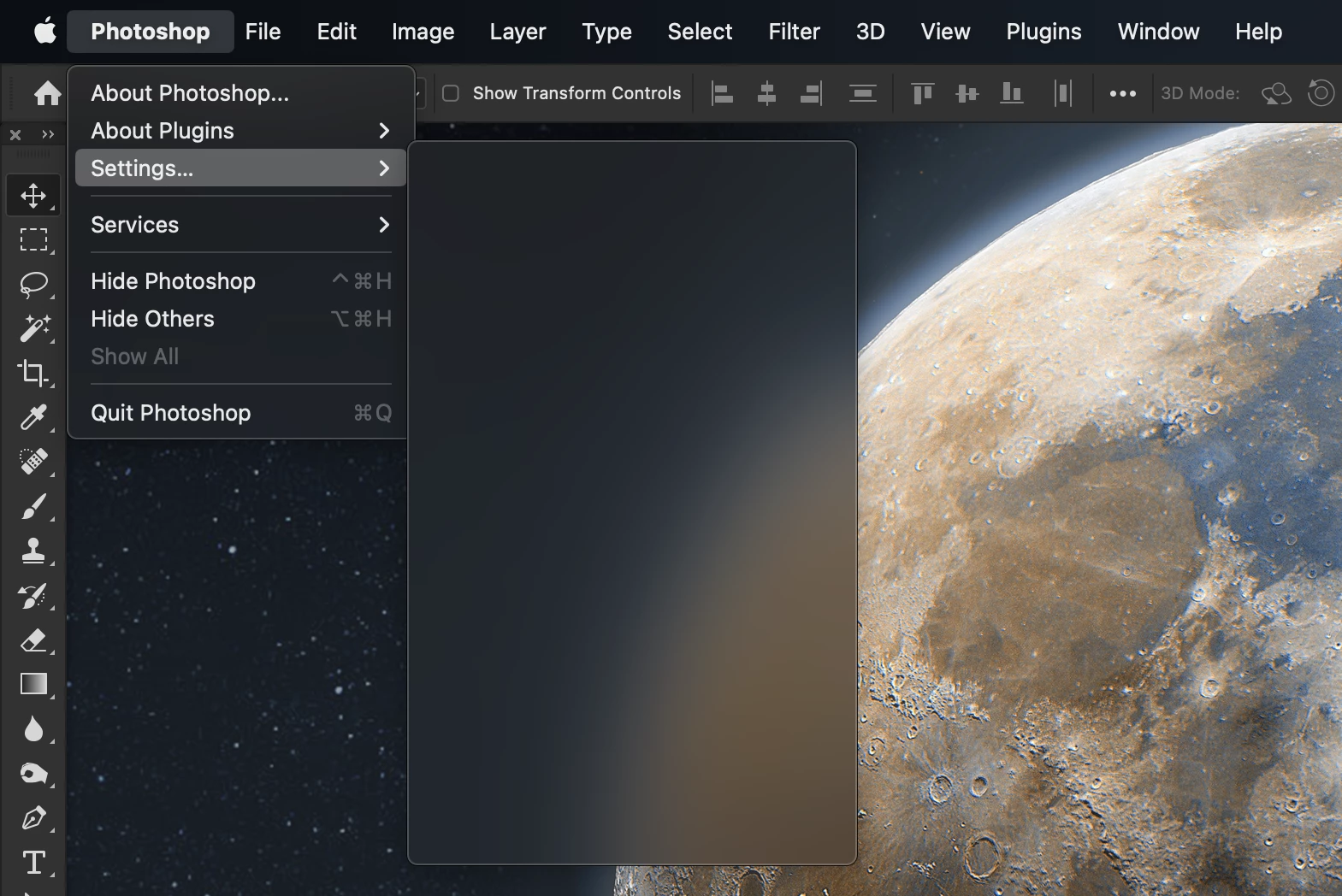
Not seeing this reported anywhere else so maybe a one off problem. Not that I go in to Photoshop Preferences often (referred to as Settings now in Ventura) but they are completely MISSING now, screenshot attached. 

Would like to confirm with other M1 Macs running Ventura and Photoshop 2023 that they do or don't have this issue. I can't say when it started, I just noticed today when going in to settings on version 24.0.0 that they were missing, restarting the app, restarting the Mac did not bring them back. I ran the update to version 24.0.1 of Photoshop and problem still there. 

Thanks
 

This topic has been closed for replies.
Correct answer Kevin Stohlmeyer

It's a known issue with Ventura. The team is working with Apple to address:

https://community.adobe.com/t5/photoshop-ecosystem-bugs/preferences-menu-is-blank-on-macos/idc-p/13384517#M69852

9 replies

Participant
December 27, 2024

Well now they are saying preferences can be found under "Edit" but it's not there.  I guess trhey just got rid of it?  Very frustrating.


clif_CROPAuthor
Inspiring
December 28, 2024

I believe you are mistaken. Apple a year ago change the MacOS to call Preferences "Settings" as the default lable. While running beta of the OS this broke accessing preferences because Photoshop hadn't been updated yet to support the new labeling but it got addressed quickly. Now in Photoshop you go to the "Photoshop 2025" menu item and select "Settings" from the drop down to access the settings window and its sub tab windows. 


As far as "preferences" under edit, there are a few. Such as your preferences for keyboard shortcuts, Menus and Toolbars if that is what you are looking for. 

clif_CROPAuthor
Inspiring
January 3, 2023

Let it be know this has been fixed in current version of Photoshop, 24.1.0

Legend
January 3, 2023

I have not seen this on my Ventura M1 machine.

clif_CROPAuthor
Inspiring
January 3, 2023

Oh really? This is what I see on my M1 MacBook Pro running Ventura...ahh but I'm running 13.2(a) Ventura beta so maybe it was the combo of an Apple and Adobe fix. I was on 13.1 beta at the time of seeing the problem. I thought I updated Photshop and saw it fixed BEFORE I installed 13.2 but very likely I was on 13.2 and then did the 24.1.0 Photoshop. 

TheDigitalDog
Inspiring
November 30, 2022
quote

With 13.1 "Preferenes" will be called "Settings" across all apps


Who's applications? 

I'm on macOS 13.0.1. I see Preferences and the menu items.

IF you're using a beta of  macOS 13.1 and Apple has 'altered' Adobe's menu to Settings, and it is blank, well that's an issue working with a beta OS and a released application that isn't built for it. Is that the case here? 

Author “Color Management for Photographers" & "Photoshop CC Color Management/pluralsight"
clif_CROPAuthor
Inspiring
November 30, 2022

Hey @TheDigitalDog brace yourself. With 13.1 "Preferenes" will be called "Settings" across all apps. Nearly 40 years of precident change with a snap of a finger!

clif_CROPAuthor
Inspiring
November 30, 2022

Thanks Kevin, I searched the community first and didn't come across the previous thread but probably because it was referring to it as a Preferenes problem in subject vs. Settings so must have been why it didn't come up for me.  

TheDigitalDog
Inspiring
November 30, 2022

MacBook Pro 16" M1, last released version of Photoshop macOS 13.0.1: I see Preferences listed and items. But occasionally, I'm launching Photoshop, and there are NO palettes or toolbar seen; clicking the Tab key makes no difference. If I go into Window>Workspace and pick another,  everything reappears, and I can toggle back to my saved workspace. 

What's so odd is that Settings is shown with a blank dialog of items when it should say "Preferences."

Author “Color Management for Photographers" & "Photoshop CC Color Management/pluralsight"
Kevin Stohlmeyer
Community Expert
Kevin StohlmeyerCommunity ExpertCorrect answer
Community Expert
November 30, 2022

It's a known issue with Ventura. The team is working with Apple to address:

https://community.adobe.com/t5/photoshop-ecosystem-bugs/preferences-menu-is-blank-on-macos/idc-p/13384517#M69852

clif_CROPAuthor
Inspiring
November 30, 2022

MIGHT have just figured out the issue. I'm running Ventura 13.1 beta on this particular Mac so this may still be a bug to address ahead of 13.1 wide release. Apps need to have an update that changes Preferences to Settings in app code. 

clif_CROPAuthor
Inspiring
November 30, 2022

Oh and forgot to add, I even turned on Rosetta as a test and that didn't fix it either.