Participating Frequently
December 23, 2016
Answered

Photoshop javascript: How to change LAB value of multiple rectangles with a script

  • December 23, 2016
  • 2 replies
  • 3008 views

Hello,

I am completely new into scripting for photoshop and I am looking for the following:

I have a document with 81 layers, each containing one rectangle. Through a popup/prompt screen I would like to set the lab value of my first layer/rectangle.

Based on this "master value" the script needs to add 0,1 on the L value of each layer/rectangle e.g

Prompt L =10,00

             A = 10,00

              B =10,00

Rectangle1 L=10,00, A = 10,00, B= 10,00

Rectangle2 L=10,10, A = 10,00, B= 10,00

Rectangle3 L=10,20, A = 10,00, B= 10,00

Rectangle4 L=10,30, A = 10,00, B= 10,00

...

Rectangle81

Is there somebody who can help me out here?

Thanks in advance!

This topic has been closed for replies.
Correct answer pixxxelschubser

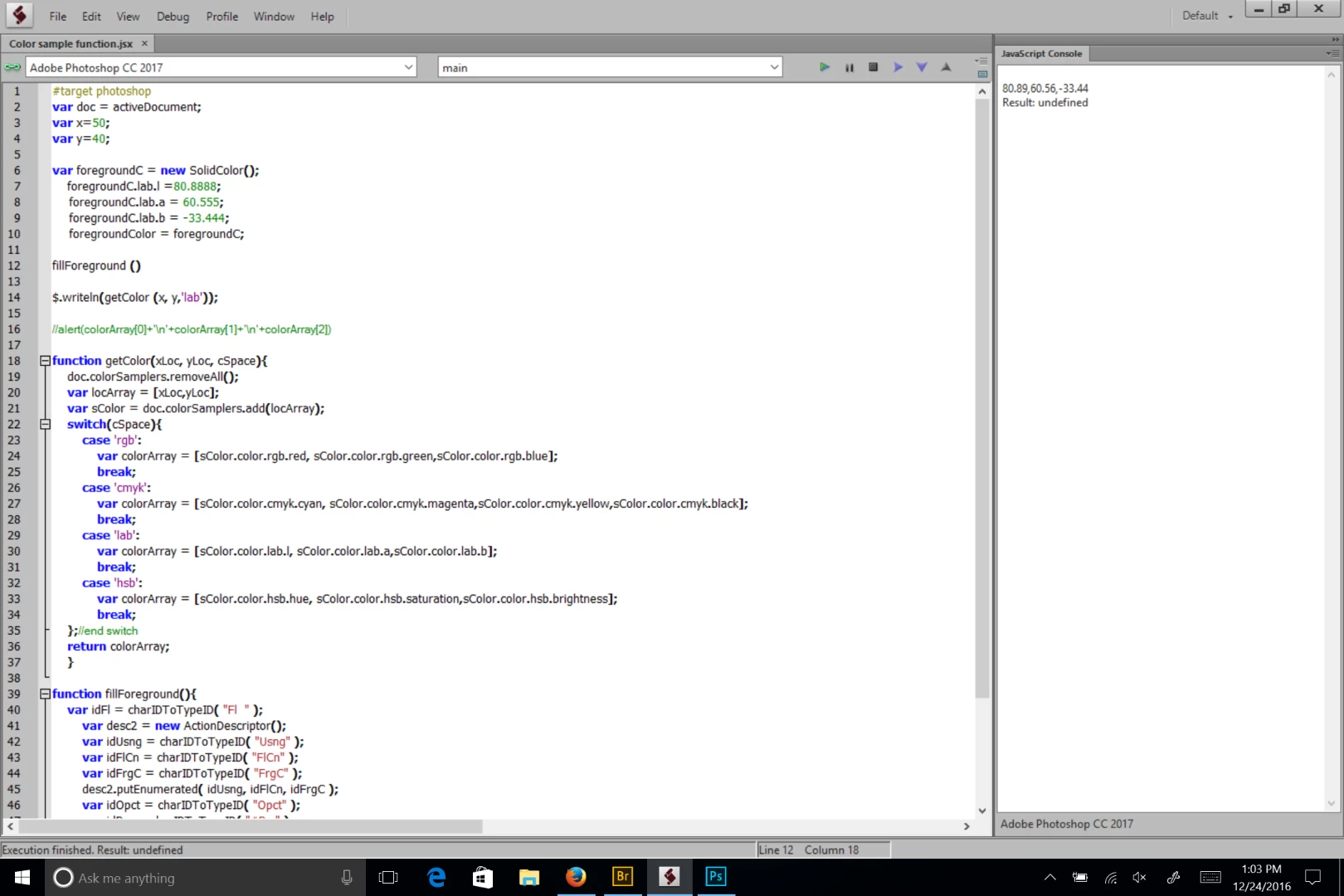
If you use L*A*B* in 16 bit color, you can use non-integer values. I did a little test. The below script will set the foreground color and read spot in an open image back to the ESTK console. I can get non integer values.

#target photoshop

var doc = activeDocument;

var x=50;

var y=40;

var foregroundC = new SolidColor();

    foregroundC.lab.l =80.8888;

    foregroundC.lab.a = 60.555;

    foregroundC.lab.b = -33.444;

    foregroundColor = foregroundC;

fillForeground ()

$.writeln(getColor (x, y,'lab'));

//alert(colorArray[0]+'\n'+colorArray[1]+'\n'+colorArray[2])

function getColor(xLoc, yLoc, cSpace){

    doc.colorSamplers.removeAll();

    var locArray = [xLoc,yLoc];

    var sColor = doc.colorSamplers.add(locArray);

    switch(cSpace){

        case 'rgb':

            var colorArray = [sColor.color.rgb.red, sColor.color.rgb.green,sColor.color.rgb.blue];

            break;

        case 'cmyk':

            var colorArray = [sColor.color.cmyk.cyan, sColor.color.cmyk.magenta,sColor.color.cmyk.yellow,sColor.color.cmyk.black];

            break;  

        case 'lab':

            var colorArray = [sColor.color.lab.l, sColor.color.lab.a,sColor.color.lab.b];

            break;  

        case 'hsb':

            var colorArray = [sColor.color.hsb.hue, sColor.color.hsb.saturation,sColor.color.hsb.brightness];

            break;           

    };//end switch

    return colorArray;

    }

function fillForeground(){

    var idFl = charIDToTypeID( "Fl  " );

        var desc2 = new ActionDescriptor();

        var idUsng = charIDToTypeID( "Usng" );

        var idFlCn = charIDToTypeID( "FlCn" );

        var idFrgC = charIDToTypeID( "FrgC" );

        desc2.putEnumerated( idUsng, idFlCn, idFrgC );

        var idOpct = charIDToTypeID( "Opct" );

        var idPrc = charIDToTypeID( "#Prc" );

        desc2.putUnitDouble( idOpct, idPrc, 100.000000 );

        var idMd = charIDToTypeID( "Md  " );

        var idBlnM = charIDToTypeID( "BlnM" );

        var idNrml = charIDToTypeID( "Nrml" );

        desc2.putEnumerated( idMd, idBlnM, idNrml );

    executeAction( idFl, desc2, DialogModes.NO );

    }


Hi Chuck Uebele​,

nice try.

But the example file has shape layers. Your code works with pixel layers only.

IMHO dennism44706796 needs something more like this

// fillColor_setFillColorOfShapeLayer_withPrompt.jsx

// https://forums.adobe.com/thread/2254273

// regards pixxxel schubser

// Dec. 2016

// document needs the same structure like example file

var aDoc = app.activeDocument;

var Len = aDoc.layers.length;

aDoc.activeLayer = aDoc.layers[Len-2];

main ();

function main() {

    var prmt = prompt ("L    0...100,\na  -128...127,\nb  -128...127", "50,0,0", "LAB-Werte eingeben");

    if (prmt) {

    arr = prmt.split(",");

    } else {

        alert ("cancelled");

        return;

        }


    var sColor =  new SolidColor;

    sColor.lab.l =  eval(arr[0]);

    sColor.lab.a =  eval(arr[1]);

    sColor.lab.b =  eval(arr[2]);

    if (sColor.lab.l + Len > 100) {

        alert ("The last " + (sColor.lab.l + (Len -1) - 100) + " layers will have same color.");

        }

    for (x=Len-2; x>=0; x--) {

        aDoc.activeLayer = aDoc.layers;

        setNewColor2Shape( sColor );

        sColor.lab.l ++;

        if (x%10 == 0) {

        app.refresh();

        }

    }

}

function setNewColor2Shape( sColor ) {

    var desc = new ActionDescriptor();

        var ref = new ActionReference();

        ref.putEnumerated( stringIDToTypeID( "contentLayer" ), charIDToTypeID( "Ordn" ), charIDToTypeID( "Trgt" ) );

    desc.putReference( charIDToTypeID( "null" ), ref );

        var theFillColor = new ActionDescriptor();

            var colorValue = new ActionDescriptor();

            colorValue.putDouble( charIDToTypeID("Lmnc"), sColor.lab.l);

            colorValue.putDouble( charIDToTypeID("A   "), sColor.lab.a);

            colorValue.putDouble( charIDToTypeID("B   "), sColor.lab.b);

        theFillColor.putObject( charIDToTypeID( "Clr " ), charIDToTypeID( "LbCl" ), colorValue );

    desc.putObject( charIDToTypeID( "T   " ), stringIDToTypeID( "solidColorLayer" ), theFillColor );

    executeAction( charIDToTypeID( "setd" ), desc, DialogModes.NO );

    }

Have fun

2 replies

Participating Frequently
December 28, 2016

Good afternoon,

It took a while but i managed to make it work as described above.

Thanks for all the help pixxxel schubser

Regards

pixxxelschubser
Community Expert
December 28, 2016

Glad to help you.

pixxxelschubser
Community Expert
December 23, 2016

Hi,

there are pixel or vector rectangles?

Can you upload an example file please?

Participating Frequently
December 23, 2016

Hi,

many thanks for your reaction.

You can download the file from the following link:

WeTransfer

I just used the rectangle tool from the console the make the rectangle shapes.

pixxxelschubser
Community Expert
December 23, 2016

One question:

You know that L value required an integer value?