


- Accueil
- Photoshop ecosystem
- Discussions
- Re: "write permissions error" in Photoshop
- Re: "write permissions error" in Photoshop

Copier le lien dans le Presse-papiers
Copié
I'm trying to make some adjustments in a .cr2 file, that I'm opening within Photoshop, but whenever I click "done" or try to save the file as a JPEG, I get "there was a write permissions error." I'm on a Mac running High Sierra, and recently updated Photoshop to the latest version (v 21.2). I have tried the following fixes:
• creating a new admin account to test whether the error would recur for another user (it did)
• installing the updated Camera Raw plug-in, downloaded from the Adobe website
• deleting a third-party plug-in that I thought might be interfering
• throwing away the Camera Raw preferences
• switching the preferences between "Ignore sidecar XMP files" and "Embed XMP" (I have no idea what this means, but some commenter on another thread suggested trying it)
• restarting Photoshop
• restarting my computer
• making sure the file is unlocked
None of these things helped, and I obviously can't complete the job if I can't save the changes I made to the file. Any other ideas I could try? Thanks!


 2 bonnes réponses
Eight days later, I finally figured out the problem. The folder I had my files in had come directly from a camera memory card, and it apparently had some kind of lock on it (even though I'm the administrator on my machine). I had unlocked individual files, but not the entire folder. I just created a new folder and copied the files into it, and voila! I can work on the files and save them--no "write permissions" errors. I thought I should post here in case anybody else has the same issue in futur
...

Just tried this from another thread...
Dropbox is apparently the issue!
Worked for me.
But still Adobe, make it work a few people are using dropbox.

Découvrir d’autres tutoriels et articles connexes
 21
Réponses
21
21
Réponses
21

Copier le lien dans le Presse-papiers
Copié
Eight days later, I finally figured out the problem. The folder I had my files in had come directly from a camera memory card, and it apparently had some kind of lock on it (even though I'm the administrator on my machine). I had unlocked individual files, but not the entire folder. I just created a new folder and copied the files into it, and voila! I can work on the files and save them--no "write permissions" errors. I thought I should post here in case anybody else has the same issue in future.

Copier le lien dans le Presse-papiers
Copié
THANK YOU SO MUCH! Saved me so many headaches with your solution - you rock!

Copier le lien dans le Presse-papiers
Copié
I didn't manage to solve the same error when trying to export a GIF (from a png sequence from AE) in Photoshop. But, I manage to click the Globe button on the Export options box (Preview the optimized image in a browser) and could save it from there. Not a solution, just a work around in this particular case.

Copier le lien dans le Presse-papiers
Copié
this was a great workaround ! Thank you for sharing.

Copier le lien dans le Presse-papiers
Copié
This is an amazing workaround. Just found it and saving me hours of messing about.
Thank you.

Copier le lien dans le Presse-papiers
Copié
Thank you for your help)

Copier le lien dans le Presse-papiers
Copié
This was a great workaround! I was searching for solutions since yesterday when I first encountered this problem. Thank you!

Copier le lien dans le Presse-papiers
Copié
THANK YOU!! Never knew about that little globe feature but it's definitely saving me on this very busy day.
Copier le lien dans le Presse-papiers
Copié
I didn't know either! I just start clicking around everything when I can't find what I want hehe
Great to see this is healping many ppl 🙂
Copier le lien dans le Presse-papiers
Copié
Agree - GREAT work around thanks for posting 0

Copier le lien dans le Presse-papiers
Copié
Thank you!!! The only thing that worked.
Copier le lien dans le Presse-papiers
Copié
Hi all,
This is a potential solution for not being able to "save for web" (and also "export as") and getting write issues for animated GIFs as an example.
One thing I noticed was that every time I pressed save, the folder in the finder window would always be the "Documents" folder which I never use. Is this consistent with everyone else's issues?
With this in mind, I went into systems preferences and gave Photoshop "Full Disc Access" which it did not have (see below). After saving and resetting Photoshop, the issues still occurred but after about 10 minutes everything worked. Maybe a proper reset would solve this quicker.
Please give this a try (and give it a little time) and see whether it works 🙂

Copier le lien dans le Presse-papiers
Copié
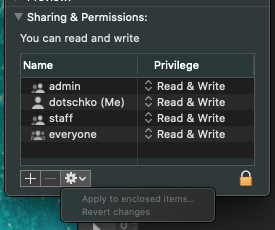
I did this in conjunction with changing the write permissions on the project folder whilst also adding read/ write access for the admin account. Make sure to click "Apply to enclosed items".

Copier le lien dans le Presse-papiers
Copié
This worked for me! Thanks!

Copier le lien dans le Presse-papiers
Copié
For anyone who's looking and doesn't need the newest version of PS, I re-installed ver 22.2.9 and it works fine. Not sure how old it is but at least I don't get the "write permissions error." Hopefully, Adobe will see these threads and get the latest version fixed as I had no issues until the last update. 😞
Copier le lien dans le Presse-papiers
Copié
I've tried all suggested solutions. Why is this still a topic? Adobe? Where are you? This is not a minor error it is frustrating and a key fundction in the our workday. Come on... please.
Copier le lien dans le Presse-papiers
Copié
True! Even when I need to explain to my co-workers they have a hard time believing this is an issue... Cause you wouldn't expect this from Adobe.
Copier le lien dans le Presse-papiers
Copié
Just tried this from another thread...
Dropbox is apparently the issue!
Worked for me.
But still Adobe, make it work a few people are using dropbox.

Copier le lien dans le Presse-papiers
Copié
Totally agree. We pay the fee (£50 a month) to use a program that is clearly not fit for purpose! Life is too short for us (the client) to work out 'why', 'what is not working' and give them 'log files of the error'. Will be demanding a refund if this continues.
Copier le lien dans le Presse-papiers
Copié
One thing that helped me to those still looking for a solution - in the save for web dialog box, there is a place for METADATA - make sure it is not blank and has "Copyrigh and Contact Info" listed in there - I never changed this but it was changed by itself to a blank and would not let me save files until I changed this back. Hope that helps - I literally tried everything listed here and this was the problem. Adobe changed my setting and I had to change it back.
Copier le lien dans le Presse-papiers
Copié
I couldn't save my work in my new version... didn't have permission to write... figured it out after adjusting preferences, etc. all afternoon... click on main folder of Photoshop and go to Get info... turn on write the whole file... it works!


Trouvez plus d’idées, d’événements et de ressources dans la nouvelle communauté Adobe
Explorer maintenant
 AdChoices