


Participant
February 9, 2021
Question

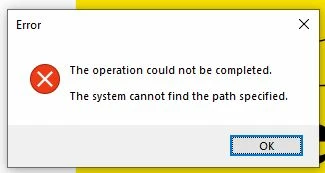
Save for web error meassage PS2021 on PC Windows 10

  • February 9, 2021
  • 2 replies
  • 197 views

I am getting the following error message when I use the save for web function. The save for web dialogue box does not come up at all only this error. Can anyone suggest a solution please. I have already tried changing security settings, redirecting where the save for web function points to in the PS app folder and resetting preferences, none of which have worked so far. 

Thanks in advance for your help!
    This topic has been closed for replies.

    2 replies

    February 9, 2021

    Hi

    Go into Windows security > Virus & threat protection > Virus & threat protection settings > Manage settings

    Then click on Controlled folder access

    You can either turn this off or leave it on, if you leave it on, select Allow an app through controlled folder access

    Select Add an allowed app > Browse all apps and browse to C:\Program Files\Adobe\Adobe Photoshop 2021 and select Photoshop.exe


    February 9, 2021

    Moving thread to the Photoshop forum from Using the Community