


Participating Frequently
May 19, 2020

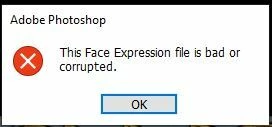
P: This Face Expression File is bad or corrupted

  • May 19, 2020
  • 93 respuestas
  • 177521 visualizaciones

I keep gettting the following error when I launch Photoshop 2020 on a Windows 10 64bit machine


This Face Expression File is bad or corrupted


I assume it relates to the Default Face Expression Presets.p3f file, which a scan reveals to be OK. The application launches after I click OK but how can I get rid of the error?


I have reinstalled, tried the clean up tool and there has even been an update since it started but still it persists. Is there anywhere I can find a replacement file?


Thanks in advance


Steve


93 respuestas

Participant
October 31, 2025

Thank you! It is sad that this error still here after all these years. This is very annoying error because in my case the window appears behind the starting screen and I should close the app then close the window and then start the app again. This thread helped me

Participant
April 22, 2025

@larry_vh You sir are a genius. I did all other method and this error still show up. But when I try your way it work did solve the problem immediately. Thank you so much

Participating Frequently
March 16, 2025

How you doing, folks?
I keep facing the error “The Face Expression file is bad or corrupted” in Photoshop. Renaming the Face Expression file to 'FaceExpressionPresets.psp.old' in the Adobe Roaming folder temporarily resolves it, but the issue keeps returning. I’ve also tried different versions, including 25_12, various 25 releases, and even a 22.x, but the error persists.


Any suggestions for a permanent fix would be greatly appreciated! Thank you in advance for your help.

Participant
November 3, 2024

Quale file hai rinominato? scrivilo

c.pfaffenbichler
Community Expert
Community Expert
July 30, 2024

@Michael329894065w5v , you might not quite appreciate the issue. 

If you are experiencing the problem despite having performed the mentioned trouble-shooting routines please read this (in particular the section titled "Supply pertinent information for more timely and effective answers”):
https://community.adobe.com/t5/using-the-community/community-how-to-guide-tips-amp-best-practices/td-p/11601738?page=1

Participant
July 12, 2024

you are genius bro , you save my life, i deleted all teemporary file , and i could'nt access to photoshop , thanks a lot 

Participant
July 11, 2024

Genius - it worked perfectly. Thanks a lot!

Participant
July 10, 2024

Hi there guys! I have a minor problem when I start Photoshop... There is a pop up window "This face Expression file is bad or corrupted" How can I get rid of it??? Thanks in advance

kglad
Community Expert
Community Expert
July 10, 2024

in the future, to find the best place to post your message, use the list here, https://community.adobe.com/

p.s. i don't think the adobe website, and forums in particular, are easy to navigate, so don't spend a lot of time searching that forum list. do your best and we'll move the post (like this one has already been moved) if it helps you get responses.


<"moved from using the community bugs">
Participant
July 11, 2024

thanks !

Known Participant
July 9, 2024

Is there any permanent solution for this?
I don't want to have to hack that file with every update over and over again.

Participant
July 6, 2024

Anyone coming here 4 years later, save yourself a few steps, close PS and just type "faceexpressionpresets" in the search bar of the C Drive, and add ".old". Problem was solved for me!