Exit
  • Global community
    • Language:
      • Deutsch
      • English
      • Español
      • Français
      • Português
  • 日本語コミュニティ
  • 한국 커뮤니티
1

Inaccurate 'inch' ruler marks in Photoshop Web

Community Beginner ,
Aug 20, 2025 Aug 20, 2025

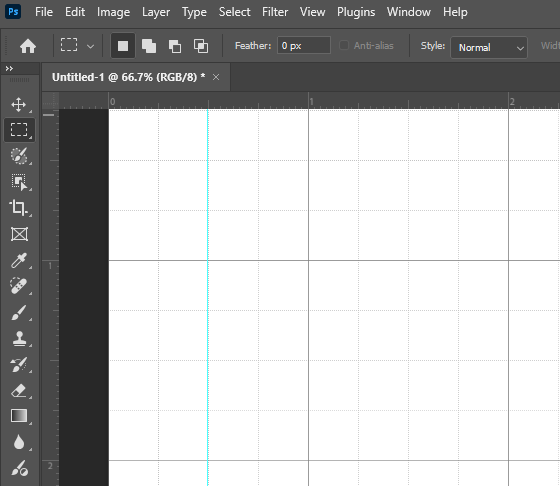
When using the ruler in inches in Photoshop Web, there are five section to an inch (Attachment 1), as opposed to the inch ruler in the Photoshop desktop, which accurately depicts an inch with four sections (Attachment 2). Also, notice the size of the ruler marks in both version.


As a high school photography teacher, im certian this inconistancy will confuse students and make simple measurement or readings uneccesarily difficult and push students away form using the web version of Photoshop.


I'm recommending the inch ruler in Photoshop Web be corrected to resemble the inch ruler  in the Phjotoshop desktop app. This is neccessary fix that can easy be corrected and released in a future update.

Idea No status
TOPICS
Web
297
Translate
Report
Community guidelines
Be kind and respectful, give credit to the original source of content, and search for duplicates before posting. Learn more
community guidelines
5 Comments
Community Expert ,
Sep 04, 2025 Sep 04, 2025

@default8atu0fb8rl3n totally agreed! Correcting the ruler to match the desktop version would be a simple but necessary change that significantly improves the user experience for students and educators as well designers too! I have asked an Adobe employee to move this to the Photoshop Ideas, so the developers can see this better!

Translate
Report
Community Expert ,
Sep 05, 2025 Sep 05, 2025

Marking the ruler in fifths and tenths is no less accurate than quarters and eighths, but I agree that it would be useful to have consistency between the two versions. Upvoted.
Dave 

Translate
Report
Adobe Employee ,
Sep 05, 2025 Sep 05, 2025

Hey, @default8atu0fb8rl3n and our Experts! I'm sorry for being late. I remember writing up my whole comment when this was originally posted. Thanks, @creative explorer, for floating this conversation again. 


The rulers are consistent on Photoshop Web and Desktop. Here is a 10X10-inch doc.


You just have to adjust them from the defaults (pixels) in the preferences in Photoshop Web. Press CTRL/CMD + K in Photoshop Web > Grids, Guides, and rulers. 


Let me know if this helps. 
Sameer K
(Type '@' and type my name to mention me when you reply)

Translate
Report
Community Expert ,
Sep 05, 2025 Sep 05, 2025

@Sameer K Your screenshot does not show consistency betweeen the rulers. The grids are consistent but the rulers are not.
Dave

Translate
Report
Adobe Employee ,
Sep 05, 2025 Sep 05, 2025
LATEST

Thanks for pointing this out. I'll check in with the team and update the group here. 


Thanks!
Sameer K
(Type '@' and type my name to mention me when you reply)

Translate
Report