

Exit
  • Global community
    • Language:
      • Deutsch
      • English
      • Español
      • Français
      • Português
  • 日本語コミュニティ
  • 한국 커뮤니티
2

Could not launch HDUpdater because the file is empty

Participant ,
Apr 02, 2020 Apr 02, 2020

Hi,


I am getting the following error message in PE2020.


Can someone help me?
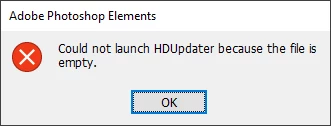
 

2020-04-02.png


Note I cannot close Photo Editor when this message is showing. I have to use Task Manager to end task.


Thanks

2.6K
Translate
Report
Community guidelines
Be kind and respectful, give credit to the original source of content, and search for duplicates before posting. Learn more
community guidelines
Community Expert ,
Apr 02, 2020 Apr 02, 2020

I believe you said in an earlier thread that you do not have Elements 2020 installed in the default location.  If that is the case, I would suggest uninstalling and installing back to your OS drive.

Translate
Report
Community guidelines
Be kind and respectful, give credit to the original source of content, and search for duplicates before posting. Learn more
community guidelines
Participant ,
Apr 02, 2020 Apr 02, 2020

Hi Greg,


True that PE2020 is installed on my "E" drive. Nevertheless, it worked very well before I was notified an aupdate was available.


Is there a way to move/copy HDUpdater to another a specific location to permit this update.


Thanks

Translate
Report
Community guidelines
Be kind and respectful, give credit to the original source of content, and search for duplicates before posting. Learn more
community guidelines
Community Expert ,
Apr 02, 2020 Apr 02, 2020

Try looking at the solutions in this thread

Translate
Report
Community guidelines
Be kind and respectful, give credit to the original source of content, and search for duplicates before posting. Learn more
community guidelines
Participant ,
Apr 02, 2020 Apr 02, 2020

Hi,


I will try that. 


Note however that this error happens only in the Editor after I click Update Now. 


It doesn't happen if I edit a picture, save it, and exit.

Translate
Report
Community guidelines
Be kind and respectful, give credit to the original source of content, and search for duplicates before posting. Learn more
community guidelines
Participant ,
Apr 03, 2020 Apr 03, 2020

Hi Greg,


May I abuse your patience a little more?


Can you indicate me why I don't receive "email" notifications for your post? I have to go to the forum and check for new nessages if I want to see new a replies.


See my notification settings here after:

2020-04-03.png


Thanks in advance,

Translate
Report
Community guidelines
Be kind and respectful, give credit to the original source of content, and search for duplicates before posting. Learn more
community guidelines
Community Expert ,
Apr 03, 2020 Apr 03, 2020

YvesB said:

Can you indicate me why I don't receive "email" notifications for your post? I have to go to the forum and check for new nessages if I want to see new a replies.

Is it possible that you unchecked the "Email me when someone replies" box when you posted your original question?  Frankly, I don't think that would make a difference as your profile settings should override that, but I'm not sure.  Plus, the forum itself is going through some updates and your settings may have got lost in the shuffle.  FWIW, I have the same notification settings as you and I am receiving your posts via email.  So, I don't really have an answer.  Maybe check your spam mail.

Ashampoo_Snap_2020.04.03_09h54m40s_001_.png

Translate
Report
Community guidelines
Be kind and respectful, give credit to the original source of content, and search for duplicates before posting. Learn more
community guidelines
Participant ,
Apr 03, 2020 Apr 03, 2020

Hi Greg,


Thanks again for your reply.


Note that the "Email me when someone replies" box is checked but I don't receive Email notifications and my Norton AntiSpam folder is empty.


I will post my problem on a forum to try to solve this.


Regards

Translate
Report
Community guidelines
Be kind and respectful, give credit to the original source of content, and search for duplicates before posting. Learn more
community guidelines
Participant ,
Apr 10, 2020 Apr 10, 2020

Hi Greg,


Note my email notifification problem is now solved.


Note also my titled problem is also fix. I had to reinstall PE2020 to its default location ("C") despite PE2020 gives a choice to install to a different drive. Make me feel the quality control is really weak.


Thanks,

Translate
Report
Community guidelines
Be kind and respectful, give credit to the original source of content, and search for duplicates before posting. Learn more
community guidelines
Community Beginner ,
Feb 17, 2021 Feb 17, 2021

YcesB,  I have the exact same issue with the HDUpdater.  Did you ever get a solution to resolve this problem?   Thanks.

Translate
Report
Community guidelines
Be kind and respectful, give credit to the original source of content, and search for duplicates before posting. Learn more
community guidelines
New Here ,
Dec 24, 2022 Dec 24, 2022

I have exactly the same problem including having to use Task Manager to close the programme.  I have gone to the other thread but the conversations don't make sense to me in this context.  Can someone give me a concise fix which works for this problem,  Has Adobe fixed it since it was reported a long time ago?  Last time I had a problem with Elements Adobe, without my permision, downloaded a huge file called Adobe Creative Cloud which I finally got rid of.  I don't want this to happen again.

Translate
Report
Community guidelines
Be kind and respectful, give credit to the original source of content, and search for duplicates before posting. Learn more
community guidelines
Community Beginner ,
Jan 31, 2023 Jan 31, 2023

Is there an answer to the question above?  I have the same irritating problem.  Photoshop elements used to be a good program but bugs appear to have crept in.  I have installed photoshop using the suggested defaults and NO, I don't want Adobe Cloud in any form.

Translate
Report
Community guidelines
Be kind and respectful, give credit to the original source of content, and search for duplicates before posting. Learn more
community guidelines
New Here ,
Feb 17, 2023 Feb 17, 2023

Exactly what John28199098tenl said.  I have the same problem; and no, I do not want Abobe Cloud.

Translate
Report
Community guidelines
Be kind and respectful, give credit to the original source of content, and search for duplicates before posting. Learn more
community guidelines
Community Beginner ,
Feb 17, 2023 Feb 17, 2023

I have exactly the same problem.  Is Adobe going to fix this bug or do I have to download a new competing program?  And No, I don't want Adobe Cloud.

Translate
Report
Community guidelines
Be kind and respectful, give credit to the original source of content, and search for duplicates before posting. Learn more
community guidelines
New Here ,
Mar 30, 2023 Mar 30, 2023
LATEST

Same here, I do NOT want Adobe Cloud

Translate
Report
Community guidelines
Be kind and respectful, give credit to the original source of content, and search for duplicates before posting. Learn more
community guidelines