


Participating Frequently
November 24, 2022
Answered

drag and drop to windows 11 taskbar not working

  • November 24, 2022
  • 1 reply
  • 935 views

A few months ago, I upgraded to photoshop elements 2022 in part because I wanted to, as I had previously been able to, drag a photo to the taskbar along the bottom of my computer screen and drop the photo on the elements icon and the program would automatically open up for editing purposes.  That quit working, apparently post windows 11.  I assumed this functionality would eventually be restored but it's still not working in 2022.  Does it work in 2023?  I'm not inclined to upgrade unless Adobe fixes this--the improvements aren't otherwise beneficial enough for my somewhat limited editing purposes (and skills).  Thanks.
This topic has been closed for replies.
Correct answer Walter_H

Hello xyz,

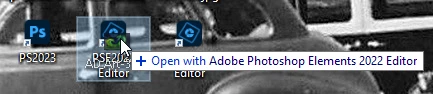
Are you possibly thinking about drag and drop to a PSE desktop icon? I use Win 10 and I've tried drag and drop to a PSE taskbar icon numerous times and it has NEVER worked. But, drag and drop to a PSE desktop shortcut icon DOES work. I can d&d several images onto my PSE 2022 icon and they all open just fine in the Editor. D&d to a desktop shortcut of the Organizer also works to import images.

1 reply

xyz1066Author
Participating Frequently
November 24, 2022

As Emily Litella famously observed, back when saturday night live was still funny, "never mind."  It turns out if you make sure you have the most current, updated, program, you get better results.  Who knew?

Walter_H
Walter_HCorrect answer
Brainiac
November 24, 2022

Hello xyz,

Are you possibly thinking about drag and drop to a PSE desktop icon? I use Win 10 and I've tried drag and drop to a PSE taskbar icon numerous times and it has NEVER worked. But, drag and drop to a PSE desktop shortcut icon DOES work. I can d&d several images onto my PSE 2022 icon and they all open just fine in the Editor. D&d to a desktop shortcut of the Organizer also works to import images.

--Walter in Davie, FL