



David da Silva Rosa
New Participant
April 25, 2023
Answered

Elements 2022: Outer Glow does doesn't display over lower layers

  • April 25, 2023
  • 3 replies
  • 3616 views

Why does an Outer Glow not display over objects in layers below it?


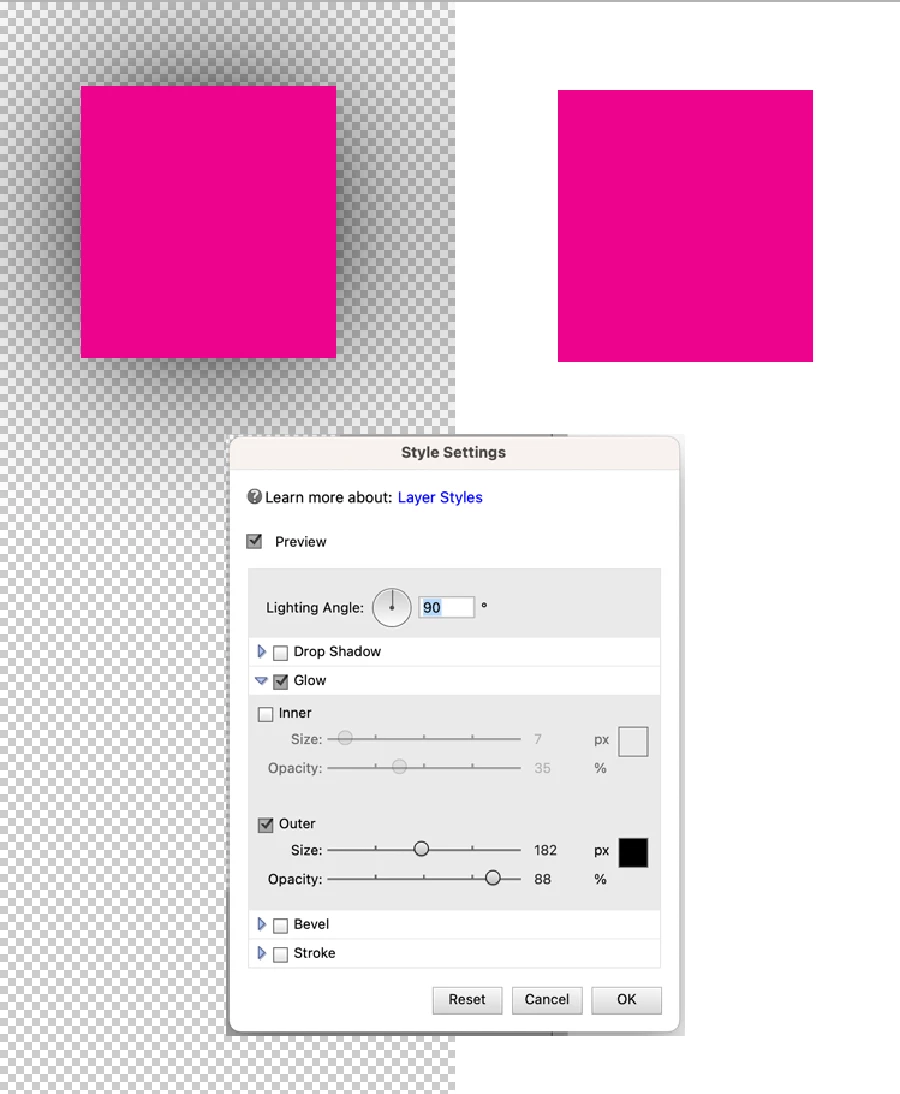
I have two identical shapes with the same Outer glow configured. But when I place a white background behind one of them, its outer glow disappears! This does not happen when I apply a drop shadow or a Stroke, it's only the Outer Glow that doesn't work.


Is this a bug? Running Elements 2022 on an M1 Pro Mac.
 

This topic has been closed for replies.
Correct answer Jeff Arola

That's because the Blending Mode for the Outer Glow is set to Screen.

That's the default blending mode for outer glows, but unfortunately unlike photoshop, photoshop elements

doesn't have the interface to change the blending mode.


You can see this in action by creating a layer filled with white then add a layer filled with black and change the layer blending mode to screen.

3 replies

Jeff Arola
Community Expert
May 6, 2023

You can try using a Drop Shadow as a substitute for Outer Glow.

In addition when then Style Settings dialog is open to the Drop Shadow settings you can move the Drop Shadow around in the document area by clicking and dragging.

David da Silva Rosa
New Participant
May 10, 2023
Thank you!
Jeff Arola
Jeff ArolaCorrect answer
Community Expert
April 25, 2023

That's because the Blending Mode for the Outer Glow is set to Screen.

That's the default blending mode for outer glows, but unfortunately unlike photoshop, photoshop elements

doesn't have the interface to change the blending mode.


You can see this in action by creating a layer filled with white then add a layer filled with black and change the layer blending mode to screen.

David da Silva Rosa
New Participant
April 25, 2023

Thanks for the explanation, Jeff. 

So there's no way to change the blending mode? Do you have any idea of a possible workaround?

Alexander290698032htt
New Participant
May 15, 2023

I found I could at least enhance the glow effect by duplicating the layer (with fx) several times, so that the cumulative overlapping effect begins to resemble a Normal blending mode. Not ideal but it does offer a workaround, and exploiting different parameters in multiple fx layers actually offers greater nuance than the single layer PS.  operation. 

jane-e
Community Expert
April 25, 2023

Hi @David da Silva Rosa 

Since your question is about Photoshop Elements, I have moved this from the Photoshop forum where you posted.

~ Jane