

Participating Frequently
February 25, 2025
Answered

Elements Organizer 2025 - How identify media in specific folder and specific album?

  • February 25, 2025
  • 4 replies
  • 851 views

Hi,

This should be pretty straight forward, but I find no way. Help, please.

//OM

Correct answer Greg_S.

You can also use the Search box to find media that is in both an album and folder:
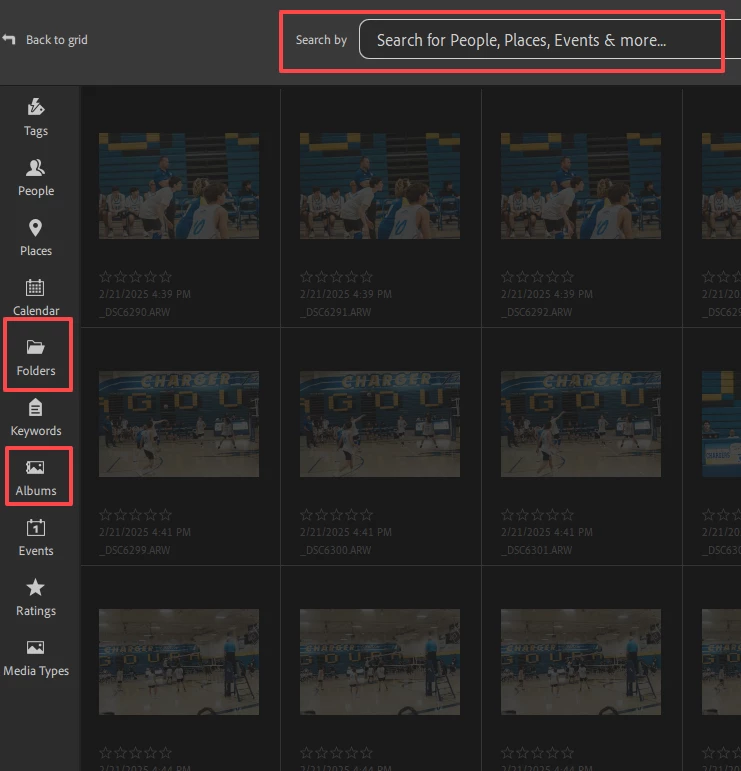
 

Note that you have to go back to the grid in order to perform any action on the search results.


4 replies

Greg_S.
Community Expert
Greg_S.Community ExpertCorrect answer
Community Expert
February 27, 2025

You can also use the Search box to find media that is in both an album and folder:


Note that you have to go back to the grid in order to perform any action on the search results.


olof_2951Author
Participating Frequently
February 27, 2025

Thank you Greg, with help of your note it finally works.

Greg_S.
Community Expert
Community Expert
February 26, 2025

You need to use the Album and My Folders panel on the left side of the screen. 

  1. If they are not visibile, click on the Show Panel button in the lower left.
  2. For folders, click on the Folders Tab.
  3. Make sure that the panel is in Tree View.  (Click on the down arrow next to the My Folders heading and select View as Tree.
  4. Right-click on the drive or folder containing your media and click on Show All SubFolders.  This will now display your media exactly as your OS does.
  5. Click on the folder that you want to view and only the media in that folder will be displayed in the grid.  Alternatively, right-click on a thumbnail in the grid and select Go to folder.  This will also take you to the containing folder and display only the media in that folder.


For Albums, select the Albums tab and click on an album in the list.  Only the media in that Album will be displayed.

olof_2951Author
Participating Frequently
February 27, 2025

Thank you, this is great but not what I look for - I need to se only media in specific map and specific folder simultaneously; i.e. those media in folder Oldcamera that are included in album Summerhouse1.

But it seems combination of first selecting folder as you propose and then Find by details (metadata) as proposed above will do the trick. Not easy to find out but with the help of you both it finally worked. Thanks again.

Greg_S.
Community Expert
Community Expert
February 26, 2025

Your question is not clear.  If you want to see the name of a file in the Organizer, you should be in the Details view.  Press Ctrl+D to toggle this view on and off.  You also need to  turn on File Name in the View menu.

You can also see the name and location of a selected file in the Information Panel on the right hand side of the Organizer's window.

If I have not answered your question, please be more specific.


olof_2951Author
Participating Frequently
February 26, 2025

Hi Greg, thanks for your fast reply. Sorry if I phrased my question wrong. I have no issue seeing file names or locations.

What I need is to filter in Meida view in such way that I select and se media in one specific folder and in one specific album, and also that I can be in a position to put tags to media so selected.

Monte307
Inspiring
February 26, 2025

I believe this is what you're after (see attached screen print), although when I run it on my machine it freezes.    


olof_2951Author
Participating Frequently
February 25, 2025

Really sorry, should be Elements Organizer 2024

//OM