

Copy link to clipboard
Copied
For some reason, the top box in the foreground/background selection is split in half and I can't get it back to normal. See pic (the top box is split black/white)
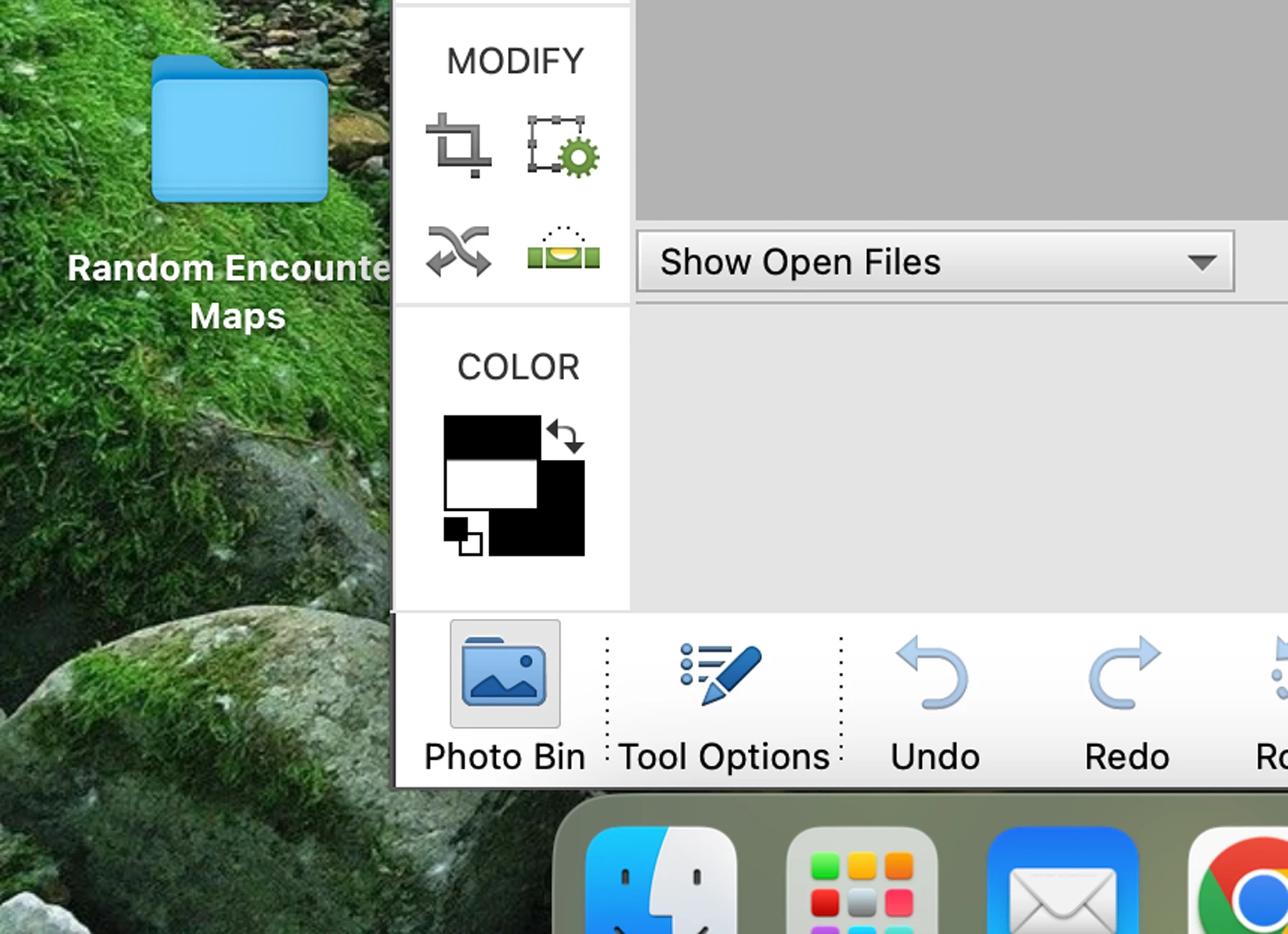
Copy link to clipboard
Copied
The buttons and controls going around the left and bottom look kind of like Adobe Photoshop Elements, but this was posted in the Photoshop community. Is the question about Photoshop Elements? If so, maybe a moderator can move this question to that community.
Copy link to clipboard
Copied
It is adobe photoshop elements 2022
Steve Lorch
[Personal information removed by moderator.]
Copy link to clipboard
Copied
OK Steve. We'll move your thread.
Copy link to clipboard
Copied
Try this:
Restore default preferences
Preference settings control how Photoshop Elements Editor displays images, cursors, and transparencies, saves files, uses plug‑ins and scratch disks, and so on. If the application exhibits unexpected behavior, the preferences file could be damaged. You can restore all preferences to their defaults.
Note: Deleting the preferences file is an action that cannot be undone.
Do one of the following:
Press and hold Alt+Control+Shift (Mac: Option+Command+Shift) immediately after Photoshop Elements begins launching. Click Yes to delete the Adobe Photoshop Elements settings file.
Go to Edit > Preferences (Mac: Photoshop Elements > Preferences > General), click the Reset Preferences on next launch button, and then click OK. When you restart Adobe Photoshop Elements, all preferences are reset to default settings.
A new preferences file is created the next time you start Photoshop Elements Editor. For information on a specific preference option, search for the preference name in Help.
from here:
https://helpx.adobe.com/photoshop-elements/kb/preference-file-locations-photoshop-elements.html
Copy link to clipboard
Copied
I am assuming you have upgraded your Mac machine to the Sonoma OS. You are experiencing a known issue with Elements 2022. Apparently, Apple doesn't worry about making its new OS actually operate programs that are only a couple of years old.
Copy link to clipboard
Copied
Copy link to clipboard
Copied
No fix yet
Copy link to clipboard
Copied
Not going to issue "a fix" for pse 2022, ever. Once pse 2024 was released pse 2022 became "unsupported"-- -It's something Adobe has always done.
Your only solution witrh pse 2022? You have to purchase the latest version. Yes, it's that simple. Be sure to thank Apple.
Copy link to clipboard
Copied
Installing the macOS Sonoma 14.2.1 update seems to fix the interface graphical issues.
Get ready! An upgraded Adobe Community experience is coming in January.
Learn more
