A lot going on here...
First, as to Organizer finding files in a different device, same drive letter, as originally cataloged, as @MichelBParis mentions, the Catalog stores the Windows VolumeID, among other things. So, yeah, though they also store drive letter, they probably first go by volid and, since the volid is still present, even if different drive letter, that may cause bad Organizer voojoo. The easy fix is to Find missing files and relocate them for Organizer. (I'd do it that way before messing with the volid in Windows. If I go solve it in PSEO, I know I'm only affecting PSEO. If I muck with Windows, who knows what all else might care?)
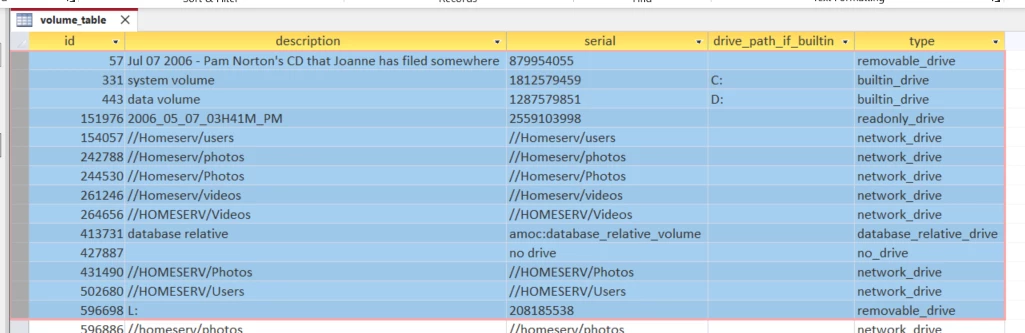
Here's an example of what's stored in the catalog for volumes in PSE2024. Note the serial column and drive_path_if_builtin. This hasn't changed much in many Organizer versions so I suspect 2022 look very similar:
On to the issue of using NAS with PSE Organizer. a) you can do it. b) Adobe enables, if barely supports, doing it. c) you can use NAS for storing media. d) you can also use NAS for storing the catalog itself. Here are the issues and my experience:
First and foremost, the Organizer has this stupid habit of thinking network volumes, despite being accessed via case-insensitive SMB protocol, are case sensitive. So it thinks, for instance, and as shown in sample above, that //Homeserv/photos, //Homeserv/Photos, //HOMESERV/Photos, and //homeserv/photos are each unique and separate network volumes. (Narrator: They are not.) Depending, near as I can guess, on how whatever was the first app/process to use the network volume in this Windows user session got to that exact same volume, anything added to PSEO will have that case-specific volume stored. This would only be mildly annoying if the PSEO Folder "View as tree" view showed each volume as separate tree roots. It does not. It only shows the first one stored. But that's not how it navigates the tree, so it has no way to display media it associates with the other volume tree roots except "View as list"--which will now show the same end folder four times, each with its own subset of the images from that folder in the catalog. it's maddening and it's been this way for many versions and Adobe couldn't care less. I can't cite any other significant issues with storing media managed by PSEO on NAS.
As to storing the catalog itself on NAS, I've done it and still do it with several small and rarely used catalogs. My primary catalog was stored on NAS for many years without significant issues, but with two downsides. First downside is performance does suffer as @MichelBParis suggests. Not hugely, but it's a drawback. Second, if you want the catalog to be accessible to any user account on the machine, PSEO makes this easy if you let it store the catalog locally in c:\ProgramData. If, however, you store it on NAS, then EACH user has to open that catalog specifically first (find it in File Explorer, then r-click or double-click Open), and not from Organizer. They can get there from Organizer, but Organizer will, IIRC, create a new catalog for them before they get far enough along to tell it where the NAS-located catalog is. On balance, for the primary catalog, I concluded that doing it Adobe's way was the path of least resistance. The downside to that, in turn, is that now you have to manage keeping C:\ProgramData\Adobe\Elements Organizer\Catalogs backed up--either by adding it to your OneDrive synced folders, Windows File History, or other means.




 AdChoices