


New Participant
August 29, 2022
Answered

How do I reverse sort order for folders

  • August 29, 2022
  • 2 replies
  • 404 views

All of my folder names are prefaced by the year and month (ex. 2020-08 Picture). The default sort order of the folder listing is lowest to highest value, so the oldest folders appear at the top and most current at the bottom. Is there a way to reverse the sort order of the folders so the most recent folder is at the top of the list and do not have to scroll down far each time I open Elements? 
This topic has been closed for replies.
Correct answer Greg_S.

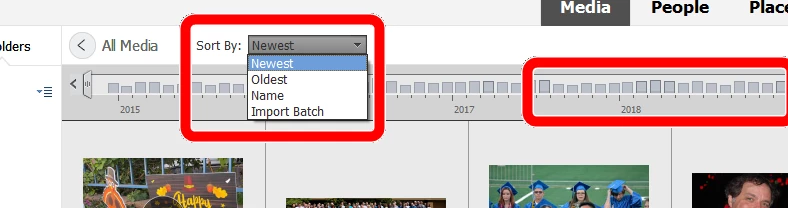
I don't know of any way to sort the folder panel in reverse order.  Elements is a database program, not a folder browser.  So, you can sort your files from oldest to newest or newest to oldest in the grid by using the Sort By dropdown.  You can also use Ctrl+L to toggle the timeline on at the top of the grid.  This allows you to jump to a month or year in your catalog.


2 replies

MichelBParis
Community Expert
August 29, 2022

You can't.

That's normal for the organizer which is built on a database and NOT on a folder structure. It can perform folder management too, but that's not where the powerful and 'custom' management resides,  with your own categories, subcategories, albums, version sets, stacks etc. You can choose your sort order by date (asc. or desc.), filename, import batch...

Greg_S.
Greg_S.Correct answer
Community Expert
August 29, 2022

I don't know of any way to sort the folder panel in reverse order.  Elements is a database program, not a folder browser.  So, you can sort your files from oldest to newest or newest to oldest in the grid by using the Sort By dropdown.  You can also use Ctrl+L to toggle the timeline on at the top of the grid.  This allows you to jump to a month or year in your catalog.