

Participant
June 1, 2023
Answered

How do I turn of notifications

  • June 1, 2023
  • 3 replies
  • 3318 views

MacOS, 2023 Elements


Pops up notifications in the lower left corner every time I run it. How do I turn this off?

Correct answer Greg_S.

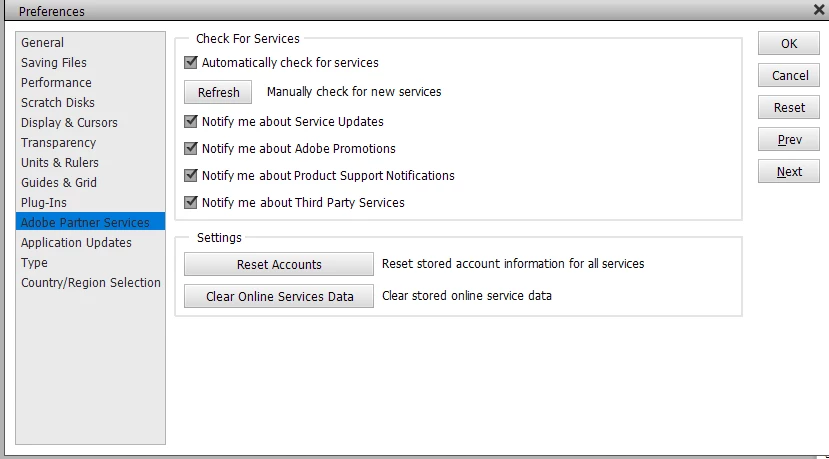
Go to Edit>Preferences>Adobe Partner Services and uncheck all the boxes.  Please let us know if that works for you.
3 replies

Greg_S.
Community Expert
Greg_S.Community ExpertCorrect answer
Community Expert
June 10, 2023

Go to Edit>Preferences>Adobe Partner Services and uncheck all the boxes.  Please let us know if that works for you.

bjbarouchAuthor
Participant
June 10, 2023

Thank you. That seems promising. It's hard to predict when a new one will pop up, so it will take a day or so of no notifications to confirm. I had hoped that disabling "soft notifications" under General would, you know, disable notifications. It never ocurred occurred to me to look at Partner Services since I don't use any. You are a genuis 🙂 Thank you.

bjbarouchAuthor
Participant
June 10, 2023

Looking good while editing files today.


Thank you, Greg!

bjbarouchAuthor
Participant
June 9, 2023

Nothing stops thesse demonic fiends. I can dismiss each one of course, but why do they show up in the first place? They always say something stupid like, "Would you like to learn about <this topic I chose at random that has nothign to do with what you are currently doing>?"

Greg_S.
Community Expert
Community Expert
June 2, 2023

What kind of pop-up?  If you haven't already done so, try clicking on it once and it should disappear after that.

Participant
December 16, 2023

I found Edit and Preferences and Adobe Parter Services and unchecked all the boxes, but I still get the pop-ups. Moslty it is "Buy Adobe Photoshop Elements 24."