


Participating Frequently
September 24, 2023
Answered

Moving layers from one image to another PSE 23

  • September 24, 2023
  • 5 replies
  • 2482 views

I've just upgraded from PSE15 and am struggling with this new version.

I use to be able to drag a layer to the tab of the tab of the other image I want to add this layer to.


I'm doing football players and I'm opening the player image in one tab and when it's ready I'm compliling all the players into one multi layered image file.


Now it seems that I have to do this 'floating window' thing and it's much more clicking and moving of images. Makes me want to go back to the way it was.


Please help, Thank you.
This topic has been closed for replies.
Correct answer Jeff Arola

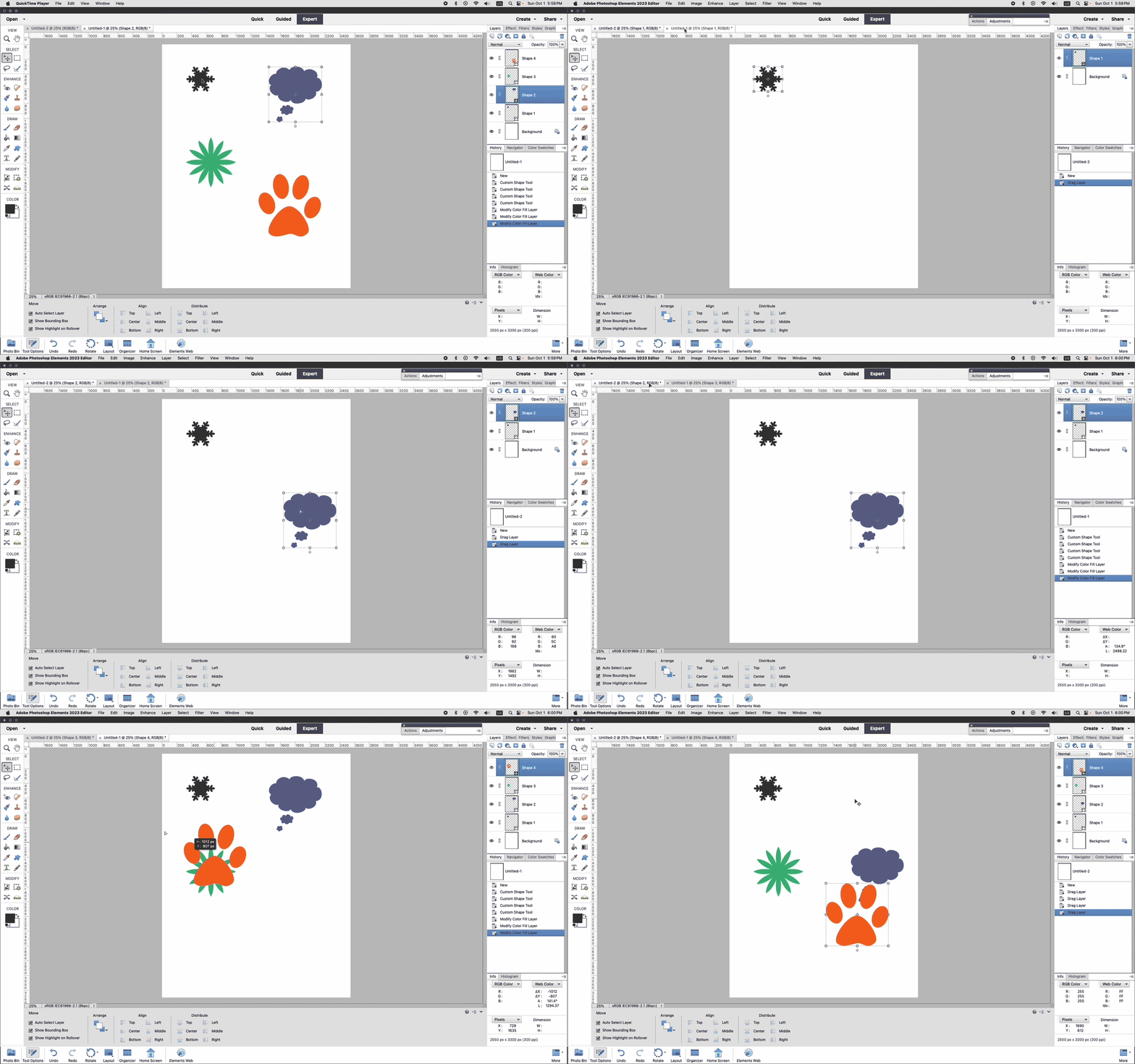
In pse 2023 you should be able to drag layers from the document area up to the tab of another document and then drop the layer in.

In the Move Tool options do you have Auto Select Layer checked?


5 replies

Greg_S.
Community Expert
Community Expert
October 3, 2023

Thanks Jeff and John.  I was dragging from the Layers panel of the source document which doesn't work in Elements 2023 but did in Elements 15.

MichelBParis
Community Expert
Community Expert
October 3, 2023

Hi @Ian Whitworth 

I did not ask before because:

- I have never used 'tabbed' view (I prefer floating windows)

- I am reluctant to reinstall PSE15...

What is described by Jeff works for me as well as using copy and paste instead of dragging.


What I am curious about is the reason of dragging layers to and from already layered files. I first supposed that was similar to creating a composite collage from different photo files of players, not from some layers. I don't see how that fits in the description of your workflow (which seems to be very repetitive?)

Participating Frequently
October 3, 2023

I'm editing player and team shots for my local football association. 50 players per team x 3 teams. I create a 5x7 blank file that has layers for the team name and the current year to be at the bottom left or right, switch based on player pose. I then open the shot I have of the player and adjust it for lighting, maybe remove some thing out of the background. When it's ready I drag its 'layer' to the tab of the other file and it is dropped in and placed in the same order as my shoot sheet. This way if I'm having to go back and look for the player that I shot 24th, I goto layer 24 and there they are.

Other instances include wanting to use a border with effects from ome file to another and all I have to do it drage that layer to the tab of ther other file I'm creating. It's all very fast and easy for me in PSE15.

MichelBParis
Community Expert
Community Expert
October 4, 2023

Thanks Ian,

Now I understand why you have to move layers from files which have already been processed to layered files. "Other instances" are common, but not a repetitive task.

Your use of layers to mimic stacks and albums in a single file is original enough.

Greg_S.
Community Expert
Community Expert
October 3, 2023

@Jeff Arola are you able to drag and drop a layer in Windows?  I can't.  When I hover over the target image tab, I get a diagonal line within a circle icon indicating that the drop area is not allowed.  I have tried various preference settings including with and without Floating Documents enabled.

Jeff Arola
Community Expert
Community Expert
October 3, 2023

Greg_S,

Yes as long as i drag from the document area.

Dragging from the Layers panel doesn't work.


This is in pse 2023 on both Windows 10 and macOS Sonoma 14.0

Jeff Arola
Community Expert
Jeff ArolaCommunity ExpertCorrect answer
Community Expert
October 1, 2023

In pse 2023 you should be able to drag layers from the document area up to the tab of another document and then drop the layer in.

In the Move Tool options do you have Auto Select Layer checked?


Participating Frequently
October 3, 2023

Well Jeff, I wish I had waited for your answer to come along. I would say that what you are showing, is pretty much what I wanted to be able to do. Unfortuantley, I have already returned my purchase of PSE23 and have reinstalled PSE15. I guess I'm just too happy doing things the same way I've done them for years and in my short time with 23, I did not see any big difference for what I do.


Thanks again, next time I'll look you up for answers.

Cheers,


Greg_S.
Community Expert
Community Expert
September 24, 2023

I'm not exactly sure why you think the floating window thing involves more work.  But here are a couple more things you can try:


  1. With multiple photos open in the Editor, go to the Window>Images menu and select Tile.  This will display all of the images on screen and you can select individual layer(s) from one image and drag them to another.
  2. If you only want to copy one entire (edited) image to another, select the target image so that it is displayed in the workspace and drag the other image from the Photo Bin panel to the target.  (If you want to transfer a single layer from a multiple layer document.  Hide all the layers except the one you want to transfer.)  This method creates a smart layer and it can be resized within the target file without affecting the picture quality.
Participating Frequently
September 24, 2023

Setting up Tiles is even worse and working with the photo bin and creating smart layers is not what I want at all.

Why can't I do what I could do in PSE 15.

Draging the layer from one to the other was so easy.

Participating Frequently
October 1, 2023

Turn off the other layers by clicking the eyeball icon. So that only the layer you need is visible in the photo bin.


Again, I appreciate you trying to help, but this new version is just not working for me and I'm only gettting more frustrated with the fact that I can't do the simple things I use to be able to do. I'm looking at youtube videos and searching the web for solutions and coming up with no answers.


Why can't I easily move a layer from one psd file to another like I did when I was using PSE15? I use to drag the layer I wanted to the tab of the other file and the program would open the other file and drop the layer in. And now I can't seem to do that.


Very frustrating.