randyl87109939
New Participant
April 9, 2024
Answered

PE 2024 EDITOR Wont open

  • April 9, 2024
  • 36 replies
  • 39478 views

Have been using PE 2024 for months. Today Editor won't open. ERROR : APP linked to Ipp Libraries.  Ver 2021.6  No DLL from list found.  ippcve9.dll (most suitable) Its been fine. What happened overnight and how to fix it?

Correct answer Greg_S.

@AnnieBleu15 thanks for confirming that the Elements 2024.3 update is now working for you.  I have also confirmed that my Windows machine has been updated.  To determine what version you have, go to Help>About Photoshop Elements.  The new update will show the following splash screen:
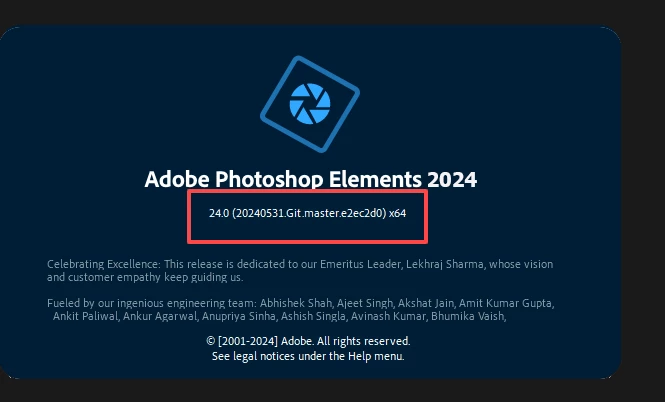


If you have turned Automatic Updates off in Preferences, you should receive a notification that an update is available.  Otherwise, turn automatic updates back on again.  It may take a little while for the update to show up on your machine.


@Philippe37799642pntu, yes this update is designed to fix the problem you describe.



36 replies

New Participant
May 30, 2024

I had exactly the same problem.

I have spoke to support today. There is a corrupt file in one of the releases of Elements 2024.

The chap there took control of my PC with my permission and replaced the damaged file. The elements photo editor now works perfectly.

I recommend anyone with the same issue emails support. They may guide you through the process, or if you are happy, let them take control of your PC remotely and they will replace the damaged file.

I'm not sure if this has been corrected in later releases of the elements software (I only purchased mine in March this year).

I hope this helps!


New Participant
June 4, 2024

Hello, the patch correcting the error at launch with the message :
‘No DLL from the list below is found on the system search path:
ippcvy8.dll (the most suitable for your CPU)
ippcvn8.dll (optional)
ippcvm7.dll (optional)
Please provide a path to at least one of them’.

is it published and how do I install it? If not, when will it be available?
Thanks for your time.

Amber B1982
Known Participant
May 30, 2024

I followed this user's steps exactly and now it is up and running again for the time being. I sure hope Adobe addresses this!

Post I am referring to:

Open >Properties for PE 2024 and change Compatibility mode to Windows 7

Then de-install and download this file:

https://download.adobe.com/pub/adobe/pse/24_0/PhotoshopElements_2024_LS30_win64_ESD.zip

Extract and install

Once installed, open Photoshop Elements and go to Photo Editor > Edit > Preferences > General > Application Updates. Then disable the automatic updates and enable the Remind me later option.


Greg_S.
Community Expert
May 14, 2024

@DaJo1307 ,  the link I provided for Adobe Support should open a Help Chat box.  If it doesn't, you should sign into your Adobe.com account, make sure you are not blocking any cookies, and click on the icon shown in my screenshot:

New Participant
May 16, 2024

Sorry, nothing solves the problem.
I deinstalled the program and re-installed the version of "PhotoshopElements_2024_LS30_win64.exe" from Dec. 27th 2023. That wasn't a success. Same error with missing ippcvy8.dll.
I downloaded the zip-File recommended here. Now I have many new files; for example set-up.exe. Does this have any benefit?
Ultimately, I guess I just need to know where the required "Ippcvy8.dll" file needs to be in the system, ok?
Please tell me the correct path for PE24. I found some under Luminar3 😉 ...
All the fidgeting is very annoying; after all, I paid MONEY for the program!
Affinity's programs don't cause any problems.

New Participant
July 15, 2024

Install the free trial,after starting in choose to buy and then choose enter code. Type in serial number and the program works fine,tried it on 2 computers

New Participant
May 14, 2024
Adobe really need to get their act together. I’ve got two computers, one a
high end one with Win11 and the other an older one with Win10. Elements
2024 works fine on my high end computer except after the ‘wonderful’
update Focus Magic doesn’t work any more although it still works
fine in my Elements 2020. Needless to say Elements 2024 doesn’t work any
more on my older computer. As a matter of interest I notice that Premiere
Elements 2024 still works fine on my older computer.
Participating Frequently
June 17, 2024

I think we have to get real. Adobe (and most major corporations) could care less about their customers. All they are interested in is the "Bottom Line".  Unlike corporations of old were good Corporate Citizens,  who put something back into Society showing their appreciation for all the America,  good customers and real Capitalism had provided for them.  Then around the mid-1980's  the "Bottom Line" mobs took over. CEO were no longer the entrepreneurs, the ones who actually built the Corporation but some Harvard MBA who was now incented by the Stock Price. That became the obsession. Anything goes to jack up the stock price. Laying off thousands. Cutting back on quality control. Cutting back on maintenance. Their  actions  had nothing to do with Customer Satisfaction. You know that by looking at the web sites of Corporations in which they proudly tell us how much Customer Service means to them?!?!.  He Doth Protest Too Much!


In the case of  Adobe it affects how we do our jobs. But Boeing is the petri dish of the end result of such madness with their 737Max abomination where their customers ended up in a large hole in the ground. And in spite of that their CEO stood upand declared the safety was their priority.


Ayn Rand predicted this in Atlas Shrugged  when the toxic mixture of Greed and Incomptence  ruled.


Known Participant
May 14, 2024

Thanks Greg for the answer.


On this page, I don't really see where i can get a personalized help. (?)

However, i did find a page where you i can re-download PSE 2024.
But on this page, you can only download an installer and not the full version of PSE 2024.

In fact, the installer will download the latest version of PSE 2024 (and therefore the one affected by the bug we're concerned about).

To my great surprise, I find that this page states that:


"Elements 2024 will only support macOS 12 and 13 (13.4)"


This annotation now makes me seriously doubt that there will ever be a solution to this problem.

I sincerely hope I'm wrong, as it would be very inelegant of Adobe.

What more can we do?
This bug has been reported for a long time now.
(Still present on Mac OS Sonoma 14.5 now)

Before April, everything worked perfectly.


Greg_S.
Community Expert
May 14, 2024

@DaJo1307, I'm sorry but I don't have a link for the Mac.  Perhaps you can get one from Adobe Support

Known Participant
May 14, 2024

@Greg_S.   

Greg, could you give us a web link to download a version of PSE2024 for Mac before the April 2024 update please ? It's been over a month since this issue was reported and no fix has been proposed. We're left with a program on which we can't make any adjustments. Thanks for your help. 

Greg_S.
Community Expert
May 10, 2024
New Participant
May 9, 2024

It has been over a month since the Flaw in PS2024 was reported.  Yeh, they have a work around, but not a fix.  Isn't about time they either fixed the program or offer a refund for a product that should not have released?

New Participant
May 12, 2024

I totally agree.

Greg_S.
Community Expert
April 24, 2024

@mwdorsey, I have no further news about a new update.  Unless you are using the German, French or Japanese versions, you are not missing much by not having the latest update (2024.2).

New Participant
May 2, 2024

Since no end of April fix, I followed directions to un & install & change preferences. On opening , get new update notify window.  Only 2 options Install now or on exit. Frustrated. Adobe customer service for Elements is poor. Got my software December 2, 23 & after April 24 got IPPCV error. Little information on Elements support other than the community. Not one mention of this issue on Adobe. Community advised to uninstall & reinstall & turn off auto update; advised Adobe fix end of April. Saw issues doing so, so waited but NO fix. omeone should sue for loss of use and aggravation. Now stuck.


New Participant
May 2, 2024

I had the same problem, but went to Live Chat and was helped. I am finally up & running again after weeks without my Adobe Photoshop that I just paid to upgrade on March 8th.

