randyl87109939
New Participant
April 9, 2024
Answered

PE 2024 EDITOR Wont open

  • April 9, 2024
  • 36 replies
  • 39478 views

Have been using PE 2024 for months. Today Editor won't open. ERROR : APP linked to Ipp Libraries.  Ver 2021.6  No DLL from list found.  ippcve9.dll (most suitable) Its been fine. What happened overnight and how to fix it?

Correct answer Greg_S.

@AnnieBleu15 thanks for confirming that the Elements 2024.3 update is now working for you.  I have also confirmed that my Windows machine has been updated.  To determine what version you have, go to Help>About Photoshop Elements.  The new update will show the following splash screen:
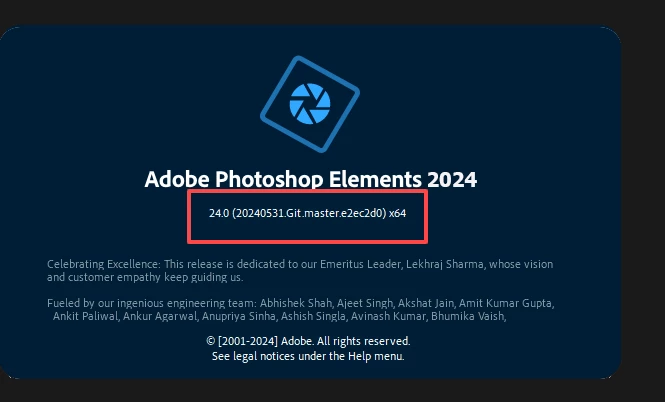


If you have turned Automatic Updates off in Preferences, you should receive a notification that an update is available.  Otherwise, turn automatic updates back on again.  It may take a little while for the update to show up on your machine.


@Philippe37799642pntu, yes this update is designed to fix the problem you describe.



36 replies

Greg_S.
Community Expert
April 10, 2024

Many users are having this problem.  I have made Adobe aware of it.

New Participant
April 10, 2024

I'm getting this same error message as of today, does anyone have a fix for this yet?

Greg_S.
Community Expert
April 9, 2024

@mwdorsey, yes, this problem seems to have been generated by the latest update to Elements 2024.

New Participant
April 9, 2024

I have the same problem; can't load Photo Editor. It has been working and now isn't. What is the fix??


New Participant
April 9, 2024

Same frustrating problem using windows 10 PE 2024

New Participant
April 9, 2024

Dear Sir/Madam,

In October 2023 I upgraded my Photoshop Elements to version 2024. The program has been working excellently until April 2nd 2024. On that date, and following your program update, the Editor cannot be started. The Organizer works without problems. Editor start attempts are resulting in the following message: “Your application is dynamically linked with Intel® IPP libraries version 2021.6 (r0xbffe3c5b). No DLL from the list below is found on the system search path: ippcve9 (the most suitable for your PC), ippcvy8 (optional), ippcvn8 (optional), ippcv7 (optional). Please provide a path to at least one of them.” In a new window: “The program could not be started correctly (0x0000142). Click OK to close the program”. System resources are in accordance with the ADOBE requirements.

I politely ask for your assistance in solving the problem.

With best regards,

Bo Magnusson


Adobe Employee
April 22, 2024

Hi,


Please refer to below article for more details around this:


https://helpx.adobe.com/photoshop-elements/kb/unable-to-launch-photoshop-elements-editor.html


Thanks,

Priyanshi Handa

Elements Team

New Participant
May 23, 2024

Hello, Priyanshi Handa. The article you reference cannot be the explanation for why the PE2024 update prevents users from accessing the PE2024 editor module. Like other users, upon checking my system info, I see that my CPU supports SSE4.1 and SSE4.2. However, after updating to the latest PE2024 version after my initial installation earlier this year, I, too, was unable to open the Photo Editor. If my initial installation of PE2024 (ver 24.0) worked fine, it's obviously a flawed update version (24.2?) that caused PE not to work. I was able to roll back my PE version to 24.0 and decline the repeated program prompts to update (per a recommended solution posted elsewhere on this thread), but this is not an acceptable long-term solution. Adobe needs to identify and FIX what changed between the intitial 24.0 verstion and the update that disrupted so many users' access to the updated PE version they purchased. This error has been allowed to continue for much too long. Adobe markets PE as a user-friendly (i.e., non-professional) version of Photoshop, and many people who purchase PE do so because they want an easy-to-use program for their photo editing. Requiring users now to carefully find and fiddle with program settings and download IPP files from Intel is truly antethetical to what a user-friendly program must be.


For over a month, I have been using my PE2021 version since PE2024 became inoperatable.  I am not willing, nor savy enough, to incorporate all the work-arounds that have been listed on this site. It is time for a easily uploaded legitimate fix or for a refund on PE2024.

Participating Frequently
April 9, 2024

I have the same problem. I've been using PE 2024 for months with the most recent Windows 10 version, and then suddenly today I can't open the Photo Editor. I get the error message "Error at loading of ippCV library" with these details: "Your application is dynamically linked with Intel(R) IPP libraries version 2021.6 (r0xbffe3c5b)
"No DLL from the list below is found on the system search path:
ippcvy8.dll (the most suitable for your CPU)
ippcvn8.dll (optional)
ippcvm7.dll (optional)
Please provide a path to at least one of them"

New Participant
April 9, 2024

Hi,

Following the recent Photoshop Elements 2024 Editor update the programme now fails to open either from withing the Organiser, or main application.

I am getting the following message, see below. Any advice would be much appreciated

Marcus


Participating Frequently
April 9, 2024

I have the same problem. I've been using PE 2024 for months using the most recent Windows 10 version, and then suddenly today I can't open the Photo Editor. I get the error message "Error at loading of ippCV library" with these details: "Your application is dynamically linked with Intel(R) IPP libraries version 2021.6 (r0xbffe3c5b)
No DLL from the list below is found on the system search path:
ippcvy8.dll (the most suitable for your CPU)
ippcvn8.dll (optional)
ippcvm7.dll (optional)
Please provide a path to at least one of them"

Greg_S.
Community Expert
April 9, 2024

Do you have an older computer that is not compliant with the Elements 2024 required specifications?  Several users are reporting this issue and I have asked Adobe for a clarification of whether this was an unintended consequence of the recent update.  In the meantime, I suggest that you contact Adobe Support.

New Participant
April 18, 2024

I have an older Win10 computer which up until recently ran Elements 2024 just fine. Now it doesn’t but fortunately I kept Elements 2020 installed which is still running ok. On my newer high-end Win11 computer both Elements still run fine which does indicate to me an older hardware issue with the latest Elements 2024 update (I could be wrong however).

