

Known Participant
December 21, 2022
Answered

Problem opening tiff file created in Elements 2022

  • December 21, 2022
  • 6 replies
  • 1697 views

I saved raw photos that  I edited in Elements 2022 and can not open them in recently installed Elements 2023.  I have also installed Add On Utitlities 2023

This topic has been closed for replies.
Correct answer Greg_S.

@Sundog 5050 said:  I have updated my Mac OS to Ventura 13.0.1 (22A400) on a Macbook Pro since creating the original panorama.

I know nothing about Macs.  But, in the Elements Save As dialog, there is an option that differentiates between Windows and Mac.  I am using Windows and here is the default setting when I save a tif file:
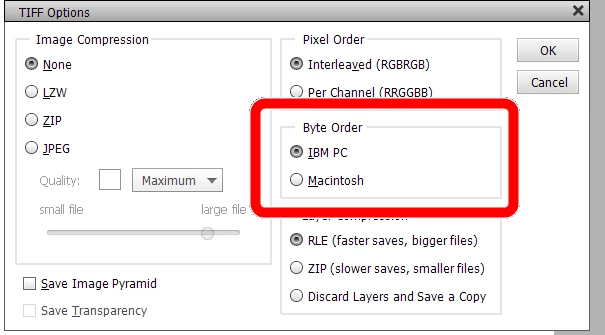
I assume that if you are using a Mac to save the file, it will default to Macintosh.  But, perhaps it was changed by accident (or a bug) to Windows.


And, perhaps, just perhaps, the problem has been caused by the upgrade of your OS to Ventura.

6 replies

Greg_S.
Greg_S.Correct answer
Community Expert
December 30, 2022

@Sundog 5050 said:  I have updated my Mac OS to Ventura 13.0.1 (22A400) on a Macbook Pro since creating the original panorama.

I know nothing about Macs.  But, in the Elements Save As dialog, there is an option that differentiates between Windows and Mac.  I am using Windows and here is the default setting when I save a tif file:

I assume that if you are using a Mac to save the file, it will default to Macintosh.  But, perhaps it was changed by accident (or a bug) to Windows.


And, perhaps, just perhaps, the problem has been caused by the upgrade of your OS to Ventura.

Known Participant
December 30, 2022
Thank you for your email. I will create a new panorama with new raw files
and see if I have problems going forward. As I said in a previous email,
this particular file I have already printed a large print and will likely
not need the file going forward.
Greg_S.
Community Expert
December 22, 2022

What exactly are you doing to bring up the message? And what are the pixel dimensions of the file? 

Can you open the file in Windows Photo app? 
Do you use the Organizer?

Known Participant
December 29, 2022

I am not using Windows. Below is an update on the status:


 I have not received a solution to the problem I identified.  I also got an email saying "Please provide PSE 2022 and PSE 2023 complete serial number and Order Number"  I thought this request was coming from someone that likely had pirated versions of the software because NO legitimate vendor would require 2 years of the requested information.  When I offered the last 4 digits of the serial number I didn't get a followup response.
 
The problem still exists.  I can not open panoramas created in 2022 and saved as a tiff file.  All other tiff files are able to be opened without a problem.  I have saved tiff files twice the size of the panorama file that were able to be opened.  I have updated my Mac OS to Ventura 13.0.1 (22A400) on a Macbook Pro since creating the original panorama.
Peru Bob
Community Expert
December 30, 2022
quote
I also got an email saying "Please provide PSE 2022 and PSE 2023 complete serial number and Order Number"  I thought this request was coming from someone that likely had pirated versions of the software because NO legitimate vendor would require 2 years of the requested information. 

By @Sundog 5050


Since Adobe doesn't offer support by email, that was a good decision to not provide that information.

Medha_Sharma
Adobe Employee
Adobe Employee
December 21, 2022

Hi @Sundog 5050,


Do these files still open in Elements 2022? Also, do you observe any error message when you try to open them in Elements 2023?


Regards,

Medha

Known Participant
December 21, 2022
The file can no longer be opened in either 2022 or 2023 versions of
Elements. 1. I converted(updated) all photos files after installing 2023,
so it’s the converted file now being read by both versions of Elements. 2.
The tiff files that can’t be opened are all files that were used to make a
panorama finished product using the “guided photomerge panorama” routine &
saved as a tiff file. All other tiff files can be opened without a problem.
3. The photo files used to make the panorama were deleted after I made the
panorama.
MichelBParis
Community Expert
December 21, 2022
quote
 1. I converted(updated) all photos files after installing 2023,so it’s the converted file now being read by both versions of Elements.
By @Sundog 5050


The files are not converted, not updated. only the catalog database structure is converted.

Greg_S.
Community Expert
December 21, 2022

@Sundog 5050 said: 

The tiff file that I tried to open WAS a photomerge panorama.


Does it exceed the maximum size limits for Elements?

Peru Bob
Community Expert
December 21, 2022

Do they have an effect applied that is not in 2023?

Do they open in any other photo viewer?

Known Participant
December 21, 2022
They were originally created as raw files in camera and edited only in
Elements 2022. No 3rd party applications were used. The tiff file that I
tried to open WAS a photomerge panorama. After receiving your question, I
checked to see if I could open other tiff files and I could.
Known Participant
December 21, 2022

Does it still open in 2022?


No, but I went through the file conversion process after installing 2023. I
assume there is only 1 file and it is the file accessed in both versions.
Known Participant
December 21, 2022

The files were saved as Tiff files