


New Participant
December 8, 2020
Answered

Question about working with layers from multiple files in PSE 2020

  • December 8, 2020
  • 2 replies
  • 626 views

I recently updated to PSE 2020 from PSE 8. (I am using Windows 10 and PSE 8 was actually working but not optimally.) I do a lot of work with layers from multiple files. In PSE 8, when I dragged a layer from one file onto another the original size of the layer was preserved, regardless of whether it was smaller or larger than the new canvas. But today when I dragged a layer from one file to another in PSE 2020, it shrank the (rather large) layer to fit the new canvas. I didn't want it to do that. Is there a way to tell PSE 2020 to keep the original size of a layer that that is moved from one file to another? I.e., if I'm dragging a layer from an image that is 6600x6600 pixels onto a canvas that is 2000x2000 pixels I don't want the entire image shrunk to 2000x2000 pixels; I want to see 2000x2000 pixels-worth of that image and be able to move it around, or re-size it myself, so I can decide what part of it to keep. I manipulate multiple photos and do a lot of experimentation with layers. I don't want PSE to automatically shrink (or expand) them when I drag them onto a file with a different canvas size. Can I tell it not to do that?
This topic has been closed for replies.
Correct answer Greg_S.

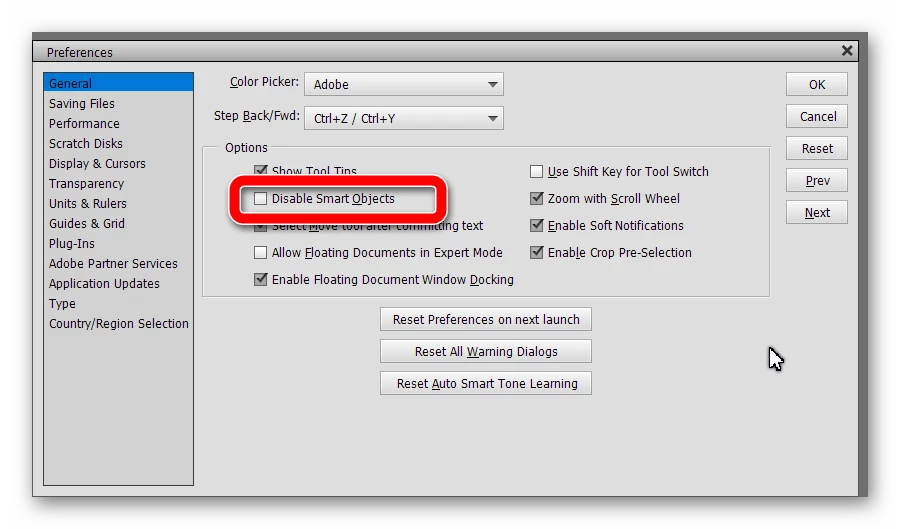
Michel's post has reminded me that you can in fact turn off Smart Objects (layers) in the Preferences>General tab.  If you check the box, I believe that dragging a file from the Photo Bin will then revert to the behavior experienced in PSE 8.


2 replies

Greg_S.
Greg_S.Correct answer
Community Expert
December 9, 2020

Michel's post has reminded me that you can in fact turn off Smart Objects (layers) in the Preferences>General tab.  If you check the box, I believe that dragging a file from the Photo Bin will then revert to the behavior experienced in PSE 8.


Karen5FD4Author
New Participant
December 9, 2020

Thank you, that is very helpful. I will give it a try.

Greg_S.
Community Expert
December 9, 2020

How are you moving the layers?  If you are dragging an image up from the Photo Bin, it will be introduced as a Smart Layer.  You can resize this layer to your heart's content without losing any resolution. 


To bring the layer in at its original resolution, you have to click and drag from the source window to the target window.  It will not be a smart layer and any changes to its size may result in a degradation of quality.

Karen5FD4Author
New Participant
December 9, 2020

Thank you for explaining the two ways to move the layers (not an option in PSE 😎 and how they're different. So far I've mostly been dragging up from the Photo Bin. So if I drag a 6600x6600 layer onto a 2000x2000 canvas I can expand it up to its original size without losing resolution? That's good to know. Clearly I need to read up on Smart Layers. It sounds like dragging from source window to target window is more like what I was used to. That may still be preferable sometimes because selecting the layers to move seems a little easier. With the Photo Bin what I've been doing is deleting whatever I didn't want to move and that can get tedious. I think I can also move a layer to the top so I can snag it without bringing along the rest. But if I want to pick out, say, three non-adjacent layers out of ten, that looks easier to do from source window to target window. Anyway, thanks again. I think I understand my options a little better now.

MichelBParis
Community Expert
December 9, 2020

The concept of dragging files from the photobin in Elements is different from dragging layers from an open window to another window with your target file. That's what you are describing. So two different purposes.

The normal use of the photo bin is to display a filmstrip of selected and loaded files (multilayer or not).

Dragging means creating a layer in the destination file from the original file. Instead of dragging a flattened version of the source file in its original pixel size, dragging the file as a 'smart' layer means something very different.

- the source file is stored in the working destination file: in Elements, the whole source file is stored, in Photoshop you also have the choice to store a link to the original source file.

- What is shown when the dragged file is included in the destination file (the 'canvas')? It's a preview rectangle displayed as big as fitting into the 'canvas' for easier resizing/moving options. The rectangle does not fit the canvas if the resolution is inferior to that of the canvas, it's shown smaller because you need to be aware of the quality you can achieve without 'upsizing' the original image.

- So, you are looking at a preview the purpose of which is to let you resize/move/tilt comfortably the dragged file into the destination one. Most of the time, when compositing various files on a canvas, the dragged files are bigger in pixel size than the canvas. No need to prepare the dragged files for the resolution of the canvas. You can change the size, position or tilt of the smart layer many times in the editing process: the change will be updated from the stored (embedded) source file to your new changed preview.

- There are a number of edits you can't do on a 'smart layer' (sharpening for instance). Many edits can be done by using adjustment layers, but to apply the unavailable edit kinds, you have to transform the smart layer into normal ones, which is called 'simplifying'. That's what you do when you are happy with the size, location and tilt angle of your smart layer. Of course, now if you downsize the layer and upsize it later, you'll lose quality.

- also keep in mind that storing smart layers increases your file size in MB in a huge proportion. You may want to simplify all your smart layers when all your edits are done.