New Participant
May 24, 2017
Question

'Regular' font looks different in PSE

  • May 24, 2017
  • 1 reply
  • 351 views

Hi everyone - I am using PSE 8.

I have installed a new font and I only have 'regular' style.

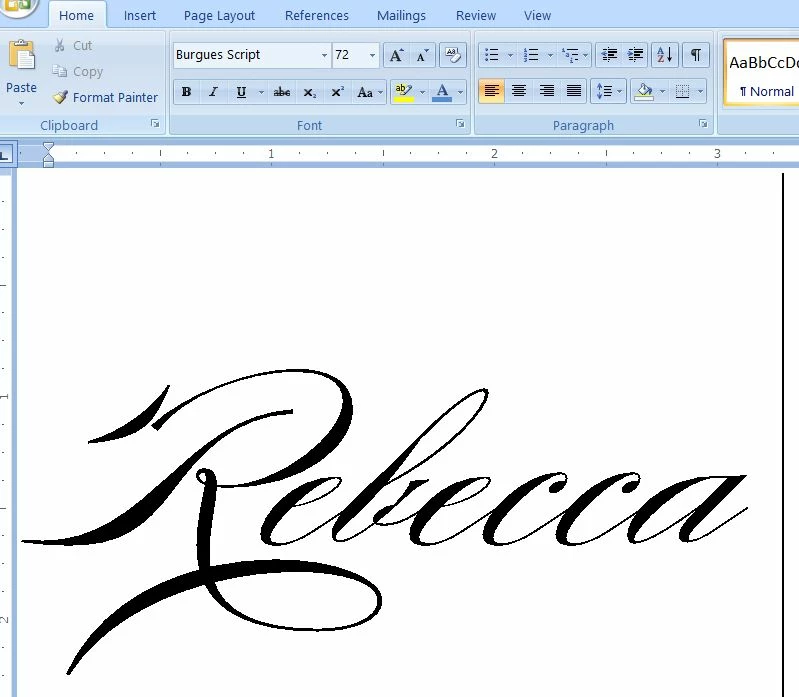
When I use this font in (eg) Microsoft Office it looks fine.

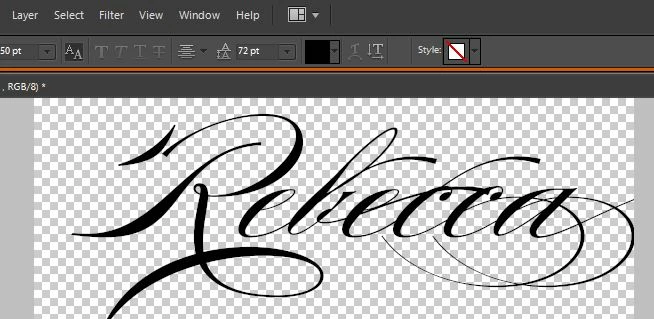
When I use it in PSE there are all sorts of flourishes that render it largely illegible.

See screenshots.

I don't appear to have any options to change - any insight?

Many thanks in advance

Jude
This topic has been closed for replies.

1 reply

hatstead
Inspiring
May 24, 2017

The checkerboard pattern surrounding the text denotes transparency. When you use the type tool, the text comes in on a separate layer. Now, you can engage the Move tool and position the text where you desire.

New Participant
May 24, 2017

Thank you hatstead but the flourishes are part of the text and as such moving the text takes them with it.

New Participant
May 24, 2017

judithglazier  wrote

Thank you hatstead but the flourishes are part of the text and as such moving the text takes them with it.

  1. Open picture file
  2. Open the Layers palette (Window menu>check Layers)
  3. Type the text
  4. Right click on the layer with the text in the layers palette, and simplify the layer
  5. Engage the move tool and drag the text or use the arrow keys on the keyboard

thank you again hatstead but this didn't get rid of the flourishes..? Are you suggesting that I now erase the bits I don't want?