


Answered
Using Font Alternate Characters and Ligatures
Hi, I use PSE 2020 on a Windows 10 PC. I recently purchased some fonts that contain alternate characters and ligatures. How do I use these alternate characters and ligatures in PSE 2020?

Hi, I use PSE 2020 on a Windows 10 PC. I recently purchased some fonts that contain alternate characters and ligatures. How do I use these alternate characters and ligatures in PSE 2020?
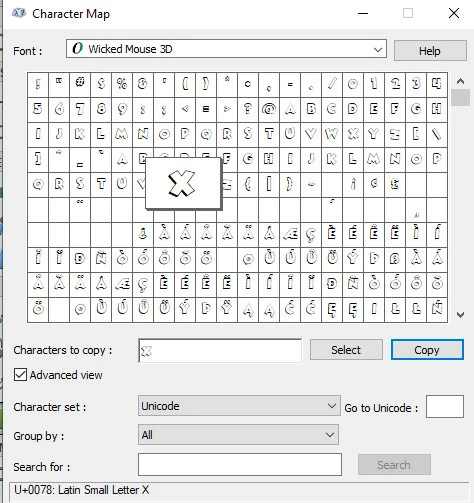
Open your character map in windows (just type "character" in the bottom left search box), copy whatever ligature you want.
Then paste it where ever you want. If using it to replace.some other letter, select that letter, then paste the ligature.
1. select the ligature.
2. be sure to click o nthe copy button.
3. paste it as needed.
Already have an account? Login
Enter your E-mail address. We'll send you an e-mail with instructions to reset your password.
 AdChoices