Inspiring
September 14, 2022
Answered

When cropping how do I change percentage to pixels?

  • September 14, 2022
  • 1 reply
  • 522 views

I'm in PE2019, and it would be so much more helpful if the crop tool showed the pixel size rather than percentages as the crop tool changes as I scroll. Any way to make that happen? Thank you.

This topic has been closed for replies.
Correct answer Greg_S.

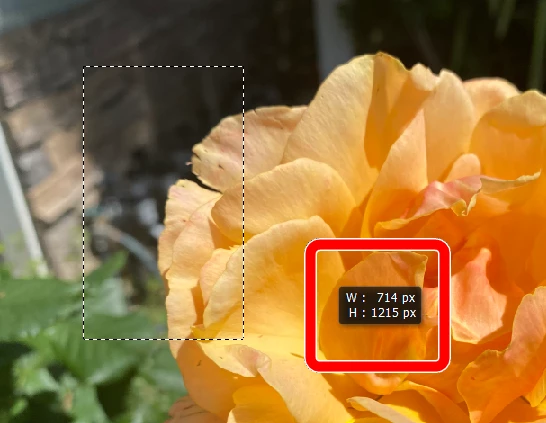
The Crop Tool only shows an aspect ratio.  So although it is possible to create a Custom size using pixels (just type in the number followed by px), the crop will vary in size based on the aspect ratio of the measurement.  If you set your ruler measurement to pixels in the Preferences dialog, when you draw out the crop the pixel size of the crop will be shown:
 

To get a crop to a specific pixel dimension, you can use the rectangular marquee tool with a Fixed Size measured in Pixels. 
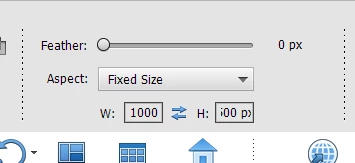
 

After drawing your desired rectangle, use the Image>Crop menu command to complete the crop.

1 reply

Greg_S.
Community Expert
Greg_S.Community ExpertCorrect answer
Community Expert
September 14, 2022

The Crop Tool only shows an aspect ratio.  So although it is possible to create a Custom size using pixels (just type in the number followed by px), the crop will vary in size based on the aspect ratio of the measurement.  If you set your ruler measurement to pixels in the Preferences dialog, when you draw out the crop the pixel size of the crop will be shown:


To get a crop to a specific pixel dimension, you can use the rectangular marquee tool with a Fixed Size measured in Pixels. 


After drawing your desired rectangle, use the Image>Crop menu command to complete the crop.

BadStarAuthor
Inspiring
September 14, 2022

Thank you so much, Greg!
