Job19_25
Participant
January 26, 2018
Answered

How do I download and install Photoshop Elements 8 on my Mac OS X High Sierra?

  • January 26, 2018
  • 2 replies
  • 6253 views

I have tried downloading from  Download Photoshop Elements 13, 12, and earlier versions.  When I try downloading, there does not appear to be any installation software. There are some read me files and the only .dmg file is a Bootstrapper.dmg file with an uninstaller (that's not helpful).  I would be very grateful of  any guidance. Thanks.
This topic has been closed for replies.
Correct answer Jeff Arola

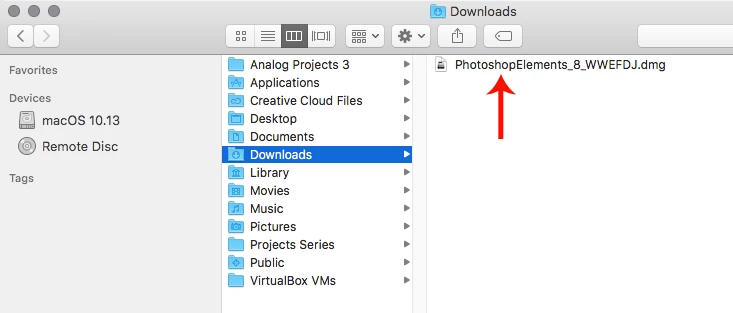
You downloaded the PhotoshopElements_8_WWEFDJ.dmg

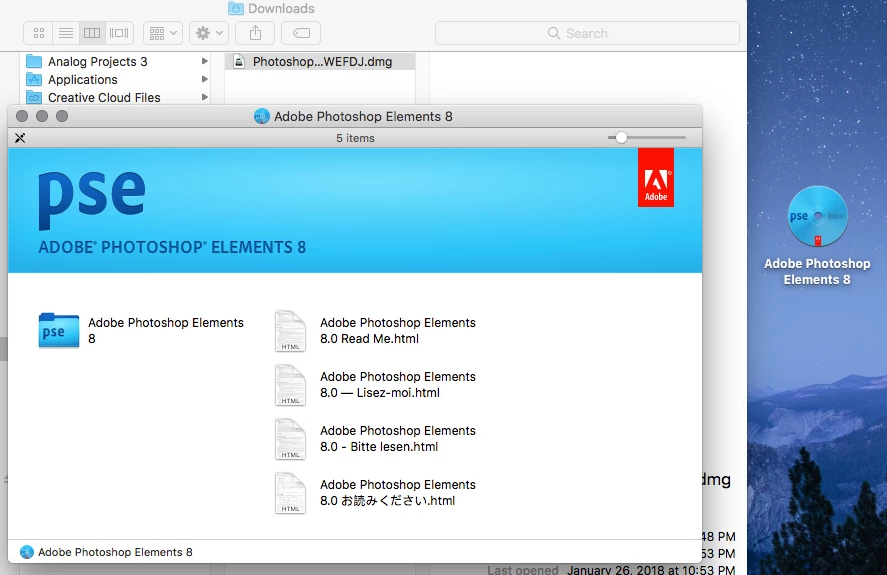
Then you should see this after double clicking on the PhotoshopElements_8_WWEFDJ.dmg

Then double click on Adobe Photoshop Elements 8 and you should see this, which has Setup.app that starts the pse 8 install.

2 replies

Jeff Arola
Community Expert
Jeff ArolaCommunity ExpertCorrect answer
Community Expert
January 27, 2018

You downloaded the PhotoshopElements_8_WWEFDJ.dmg

Then you should see this after double clicking on the PhotoshopElements_8_WWEFDJ.dmg

Then double click on Adobe Photoshop Elements 8 and you should see this, which has Setup.app that starts the pse 8 install.

Job19_25
Job19_25Author
Participant
January 27, 2018

Thank you! This helps me understan. I’ll give it another try tomorrow.

Peru Bob
Community Expert
Community Expert
January 27, 2018
Lynx_62
Participant
January 27, 2018

That appears to be the exact same as where Job19:25 was trying to download

Peru Bob
Community Expert
Community Expert
January 27, 2018

  wrote

That appears to be the exact same as where Job19:25 was trying to download

His link and my link bring me to two different web pages.