


Inspiring
January 1, 2021
Question

No Disk - 0xc0000013 - What is this error?

  • January 1, 2021
  • 3 replies
  • 3987 views

I use the digital copy of PS with the creative cloud.I've never had an issue, but now when I open ps this pops up, over and over.
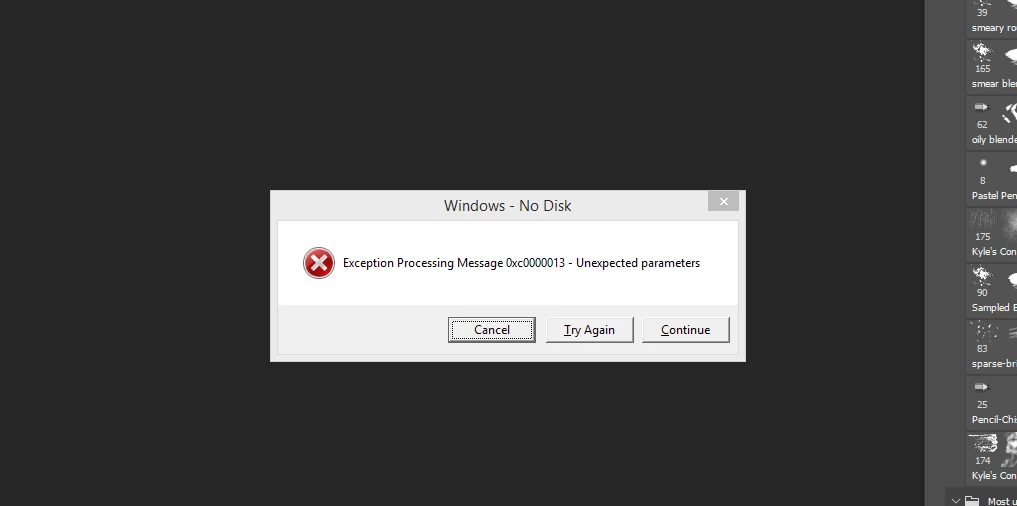


I haven't updated from Adobe Photoshop Version: 19.1.8 20190226.r.442 2019/02/26 as my internet is really bad, I will try to when I don't have a bunch of work to do.


This topic has been closed for replies.

3 replies

Participant
May 13, 2024

Here the same happens, but when I close Adobe Reader. Always on adobe exits, the error appears... I have too much free space in my disks, but the problem persists. I'm using Windows 8.1, too.

Do you have any fix?

Jeff Arola
Community Expert
Community Expert
May 13, 2024

Ricardo37,


You'll get a quicker reply if you post your question in the Adobe Acrobat Reader forum:

https://community.adobe.com/t5/acrobat-reader/ct-p/ct-acrobat-reader

clcanadyAuthor
Inspiring
January 3, 2021

Update:


So PS couldn't locate my Graphics card, at all, even after restarts. So I redownloaded drivers, and restarted. The error is gone. Weird.

Also, I cannot update PS, because my computer is Windows 8.1, and that isn't supported for the new versions, so I am stuck with the old 19.1.8 copy.

clcanadyAuthor
Inspiring
January 4, 2021

Ok, the error is back again.

clcanadyAuthor
Inspiring
January 1, 2021

That code isn't the same. Could be related maybe (I don't know much about error codes) I searched the code over and over and nothing came up that matched.


Strange, it only happens when I open Photoshop, which I'm subbed to, it's not a rip. Haven't done anything different lately, downloaded stuff.