


Known Participant
February 18, 2019
Answered

Adobe Premiere Elements Rendering all the time, and other questions

  • February 18, 2019
  • 3 replies
  • 750 views

1) This is a change, it used to only render when asked to do so. I would wait to the end of development of a video, and then render.

Lately if I import, it renders, if I play back what I have, it says rendering required videos. Seems to be doing it piecemeal rather then waiting till I ask for it?

2) I have 2018, is it worth it to go to 2019? Currently have problems with adobe not liking the NVIDA video cards and Adobe (many calls to adobe and NVIDA and Dell Pro Support). System is more that big enough to handle adobe, cards are more than enough processing, but still have problems. Software hangs every now and then, I can save my work and reboot.

3) Is there a way to get a video to "snap back" to it's original size in the frame after you and "resized" the video (stretched or shrunk) in the viewing frame?

Thanks
This topic has been closed for replies.
Correct answer Bill Sprague

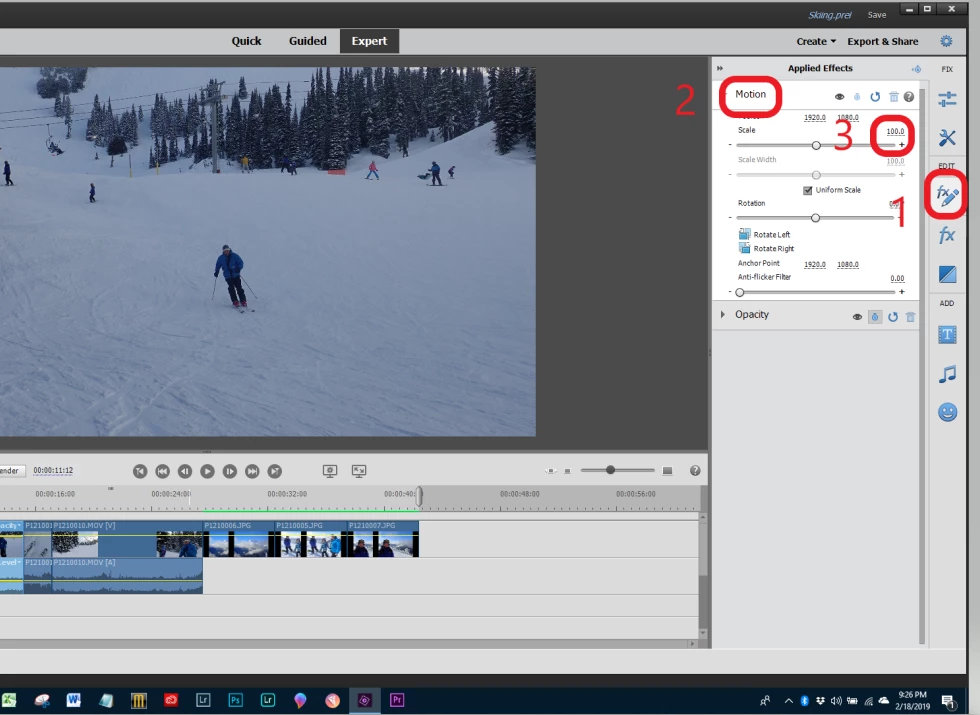
To get it back to fill the monitor....

1.  Select Applied Effects

2.  Select Motion

3.  Type in 100%

3 replies

Known Participant
February 19, 2019

Outstanding, works perfect, thanks.

Community Expert
February 19, 2019

You are very welcome.  Thanks for replying that you found something that works for you.

Peru Bob
Community Expert
February 18, 2019

glennl52077132  wrote

3) Is there a way to get a video to "snap back" to it's original size in the frame after you and "resized" the video (stretched or shrunk) in the viewing frame?

Try control-Z to undo.

Known Participant
February 19, 2019

Peru Bob,

I would like to be able to do this without using the undo. It is very possible I have made other changes elsewhere that I would not want to undo.

Thanks for your suggestion.

Bill SpragueCorrect answer
Community Expert
February 19, 2019

To get it back to fill the monitor....

1.  Select Applied Effects

2.  Select Motion

3.  Type in 100%

Community Expert
February 18, 2019

Real time preview rendering in a project is dependent on the project settings, the source media and how they match.  Can you respond with what you are editing and how you are setting up the project?

Adobe "likes" Nvidia well enough.  Adobe "graphics software" of all types uses video cards and Nvidia makes a lot of them.   That said, there are a lot of cards, drivers and computers and the companies will make "updates" without consulting each other.   Based on your first comment, I would have to guess that the system is "hanging" due to a mismatch between source media and project settings.

It is always worth an upgrade if there are features you want.  And example is that iPhone variable frame rate media is better supported in 2019 than 2018.  Some things go away.  Blu-Ray production is no longer a feature. 

Not sure what you mean by "snap back".  But, in the Expert mode, grab the end of the clip and drag it until it won't drag anymore.

Known Participant
February 19, 2019

whsprague,

I have changed no settings and am using the same cameras as I have been using.

I am using two HC-V770 Panasonic CamCorders, MP4/iframe 1080 50MP, I use expert mode, and add media.

The problems I have with the Nvidia cards and Adobe have been reduced by using a very old version of the Nvidia drivers.

I know just enough to be dangerous with talking about matching media to the project. I think I understand correctly that when you have the green bar above the clip the project has successfully match and accepted the video clip settings.

In this image I have "zoomed in" on a clip. Now image I have made some changes elsewhere in the video. I have come back to this clip and decided I want to back to it's original size. I can drag the corners back in, but am always afraid I might leave a portion of the picture not in the frame. It would be nice to hit a key stroke and have the clip "reframed" in the viewer in it's original size.

So, now how to get it back, drag the corners is not as exact as a key stroke to restore it without using "go back"

Thanks for your reply.