


ryanm90585881
Participant
October 7, 2025
Answered

25.6 is replaced with 25.4 and wont install 25.6

  • October 7, 2025
  • 6 replies
  • 1798 views

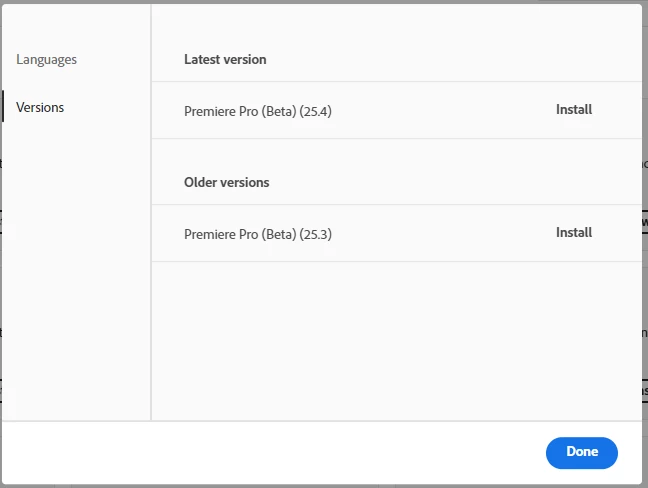
Last night I had the premire pro beta 25.6 and I opened it the next day and it said I had to re install premire pro beta and when I did it installed 25.4 instead of 25.6. Then, when I checked to see the latest version it says its 25.4. Please Help
Correct answer Ann Bens

I had the same issue: check for updates solved it.

6 replies

Francis-Crossman17221443
Community Manager
Community Manager
November 12, 2025

25.6 has been pulled.  A patch is in the works. The Masking dialog should not be showing.  See the post here: https://community.adobe.com/t5/premiere-pro-bugs/issue-with-25-6-update/idi-p/15589164

Stan Jones
Community Expert
Community Expert
November 13, 2025

@Francis-Crossman17221443,


Just FYI. This is actually an issue with the BETA 25.6 in early Oct when some issue with the cloud desktop kept it from being available for updating.


I'd be okay with you just deleting your post and this one of mine!


Stan


Stan Jones
Community Expert
Community Expert
October 7, 2025

All,


Beta 25.6.0 Build 92 is available in the cloud desktop, and that fixes the problem of 25.6 not showing as an install option.


Click "Check for updates" if you don't see it. 


Stan


Ann Bens
Community Expert
Ann BensCommunity ExpertCorrect answer
Community Expert
October 7, 2025

I had the same issue: check for updates solved it.

Participant
October 7, 2025

Similar issue. Is there a way to open a project created in 25.6 now? 25.4 doesn’t open projects, complaining that they were created in a newer version.

Participant
November 20, 2025

The very issue came up with me.., but I found a fix.. try. it worked for me.. Just make a copy of your premiere pro project file first. 


https://downgrader.elements.tv/

Talented-MrZhang
Participant
October 7, 2025

Yes, I have the same problem. In the web version of Adobe APP, I can see that the latest Beta version is 25.6. Using Creative Cloud desktop version, it only shows 25.4 as the latest version. My Creative Cloud desktop version number is 6.8.0.821.

Legend
October 7, 2025

I suspect that there will be no 25.6 in release form. All of the version 25 video apps will be replaced by the new version 26 apps (which will incorporate many, if not all, of the features of the 25.6 betas) very shortly, perhaps in conjunction with the upcoming feature update for Windows 11 (25H2). Besides, the current official release version is still version 25.5.

Stan Jones
Community Expert
Community Expert
October 7, 2025

@ryanm90585881,


My Creative Cloud Desktop is 6.8.0.821, and I see the same thing. I signed out and back in. On my other PC, I have the same cloud desktop, but it shows correctly.


What you see in your screenshot is that 25.4 is the "latest" version. It is not installed; it says only "install." As I say, I see the same thing, but the actual program that opens is 25.6.0 Build 84.


The correct information is for 25.6 to show only uninstall and to offer 25.4 as other version.


I suspect someone will tell us to uninstall/reinstall the cloud desktop, but I'm not going to worry about it just yet.


Stan


ryanm90585881
Participant
October 7, 2025

But the Auto mask feature isn't there?

Stan Jones
Community Expert
Community Expert
October 7, 2025

All, do NOT install the offered version 25.4.


@ryanm90585881,


I have not elected the new masking, but I am prompted for it. I did NOT install the 25.4 offered by the cloud desktop. I did nothing, and I still have my last version of Beta 25.6 - build 84. I am NOT prompted when opening the Beta to install an updated version, which is odd. I know there was a build after 84 a day or so ago.


I now suspect there's nothing wrong with the desktop, something has gone amiss with the updates.


Stan