



mattchristensen
Community Manager
Community Manager
July 27, 2020
Question

Discuss: New option to use Proxy media when exporting

  • July 27, 2020
  • 2 replies
  • 2045 views

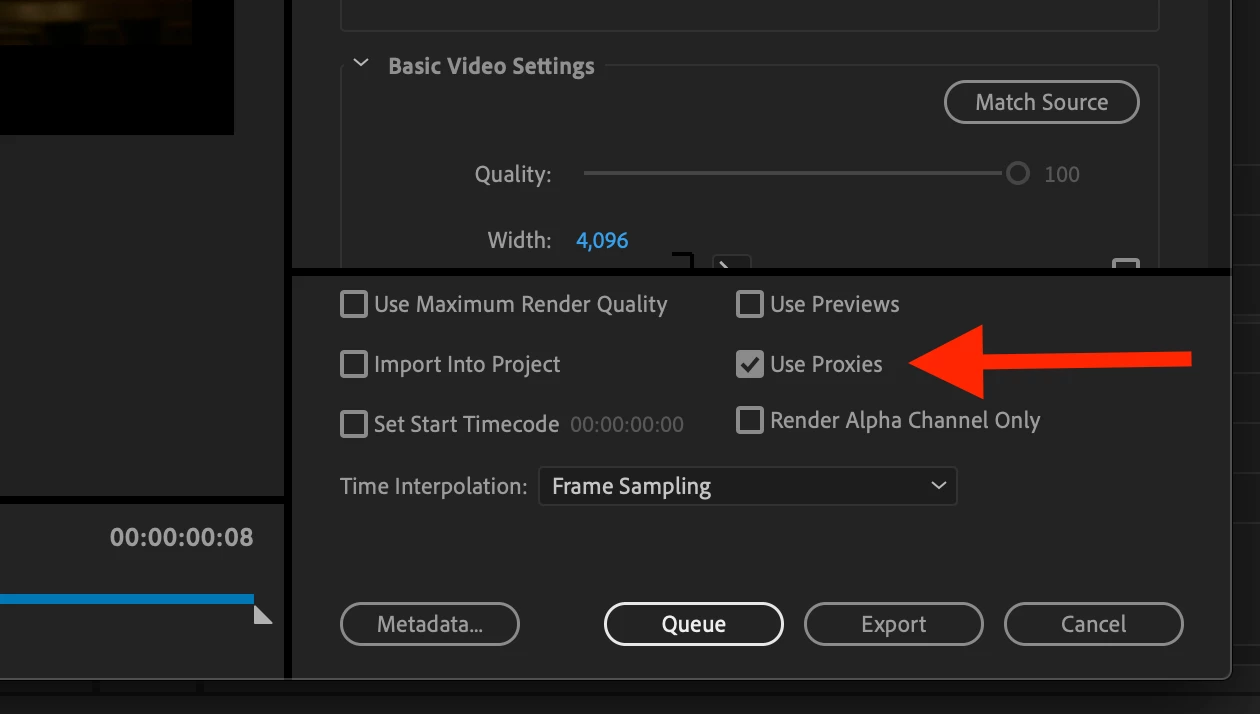
New in Premiere Pro (Beta) 14.3.2 you will find a "Use Proxies" checkbox in the Export Media dialog! Make sure you have updated to the latest build via the Creative Cloud app to try out this feature.


Checking “Use Proxies” will mean that if proxy media is attached to your clips, the proxy media will be used when exporting rather than the full resolution media. This is great for when you’d prefere a faster export and don’t require the highest visual quality.


The “Use Proxies” checkbox is not affected by enabling or disabling proxies while editing.


Note that if a section of your timeline has proxies attached and also has been rendered with previews, and you check both “Use Proxies” and “Use Previews”, the previews will be used rather than the proxies.


The “Use Proxies” checkbox state is also saved into any export presets you create.


Please let us know how this feature is working for you, and if you encounter any issues. Thank you!


Known Issues:
- If you check “Use Proxies” and then queue to Media Encoder and the Media Encoder preference to import sequences natively is unchecked, proxies will not be used.
 

This topic has been closed for replies.

2 replies

sberic
Legend
July 27, 2020

With respect to this:


Note that if a section of your timeline has proxies attached and also has been rendered with previews, and you check both “Use Proxies” and “Use Previews”, the previews will be used rather than the proxies.


Why don't you convert this to a single dropdown with the following options:

  1. Use Proxies
  2. Use Previews
  3. Use Originals

?


That would be far, far more clear and get rid of the ambiguity and confusion you have added here. I mean... these are mutually exlcusive options, no?

mattchristensen
Community Manager
Community Manager
July 27, 2020

That's a good question, but actually the options are only exclusive if they happen to apply to the same clip. They are not exclusive if your timeline has a mix of clips with and without proxies, and only some portions of them rendered.


Imagine an HD timeline and you have a combo of HD and 4K footage. You make proxies of the 4K so it's easier to play, but don't make proxies of the HD clips because those play fine. You also have complex effects on some sections and so have rendered those sections.


In a scenario like that, checking both "Use Proxies" and "Use Previews" could be a faster export than only using one or the other. Parts of the timeline with 4K clips will use the proxies so that's faster, and parts of the timeline (HD or 4K) that have been rendered will use the previews.

sberic
Legend
July 27, 2020

Makes perfect sense! Thanks for the explanation 😄

Participating Frequently
July 27, 2020

To be clear you do NOT have to use ME for this to work.

thx,


Art Bell