


johnl2129815
Participant
February 9, 2021
Answered

How to create and render CLOSED captions in beta PP

  • February 9, 2021
  • 1 reply
  • 481 views

Admit to being flummoxed here.
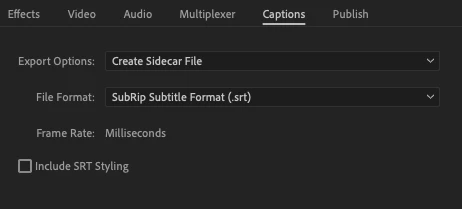
No problem generating OPEN captions with the new beta version, but either cannot or do not know how to generate closed cations for upload and view on something like YouTube. What's the secret sauce here?
This topic has been closed for replies.
Correct answer Andy Edwards

Create a sidecar file (.srt) when you export your media and attach the SRT to your upload to YouTube.


1 reply

Andy EdwardsCorrect answer
Inspiring
February 9, 2021

Create a sidecar file (.srt) when you export your media and attach the SRT to your upload to YouTube.


johnl2129815
Participant
February 9, 2021

Try as I might, the screen capture and .srt choice you show here does not appear in the beta version of Premiere Pro that I'm testing out. Is there a secret you know that I do not?

johnl2129815
Participant
February 9, 2021

Never mind--found it after some trial and error in areas I've never used before. Thanks anyway!