



Now in Beta: Add Custom Watermark & Embedded Captions Support to your Proxy Workflow
We are excited to announce the addition of two highly requested features, Custom Watermark & Embedded Captions Support, to your Proxy workflow in Premiere Pro (Beta).
Custom Watermark
With this latest enhancement, you can now personalize your proxies with custom watermarks. This enables you to maintain a clear distinction between proxy and source media, enhancing visual clarity so you’re less likely to get mixed up.
How Does it Work?
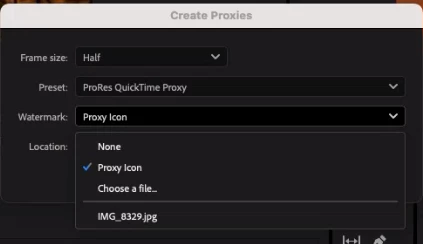
To enable custom watermark, go to the “Create Proxies” option from your media and select the “Choose a file” option from the Watermark dropdown. From there you can upload any image of choice which you can then see in your media in the Source panel after it is rendered by the media encoder.
Key Benefits:
- Visual Differentiation: Custom watermarks will help with clear identification of proxy-enabled media, minimizing confusion during the editing process.
- Personalized Editing Experience: Customize proxy watermarks provide a personalized editing experience, instead of relying solely on the default Proxy icon.
Embedded Captions Support
By enabling Embedded Caption Support, you can seamlessly create proxies from high-resolution media that contains embedded captions Maintaining captions across proxy and high-resolution files allows you to engage in uninterrupted editing sessions while ensuring accessibility and consistency in your projects.
Key Benefits:
- Streamlined Integration: Embedded caption support empowers your to work seamlessly across proxy and high-resolution media, without compromising on the presence or integrity of captions.
We invite you to explore the capabilities of Custom Watermark & Embedded caption support and share your feedback with us. Feel free to share your comments and let us know what other functionality you’d like to see us build!
 AdChoices