




Abhi Singh Principal PM
Adobe Employee
Adobe Employee
June 14, 2024
Question

Now in beta: New Project creation dialog

  • June 14, 2024
  • 10 replies
  • 3077 views

Project creation is now easier with the New Project creation dialog in Premiere Pro.
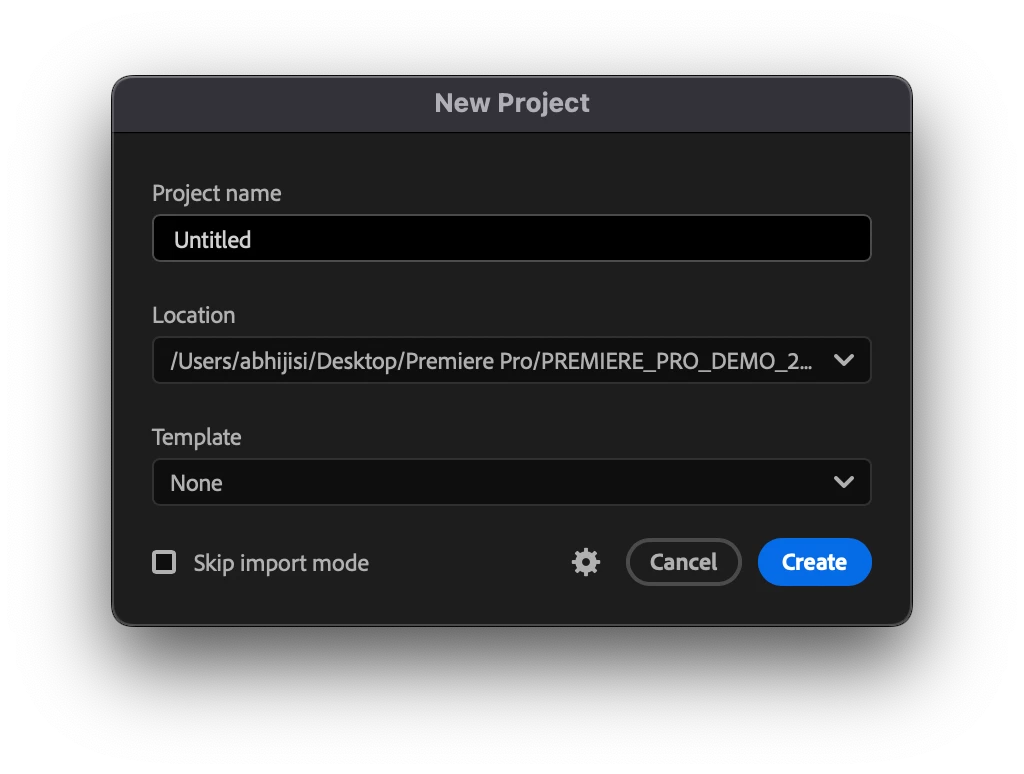
The New Project creation dialog allows you to

  • Name your project
  • Pick a location to store your project
  • Pick a template
  • Skip the Import Mode (your selection is sticky – if you select this, it will remain selected)
  • Access Project Settings including General, Color, Scratch Disks and Ingest Setting


If you don’t want to use the Import mode, you can now go directly to your project and use the Project Panel to import media. 

Please try it and give us feedback!


Abhi Singh, 

Principal Product Manager, Premiere Pro

This topic has been closed for replies.

10 replies

Known Participant
August 28, 2024

@Abhi Singh Principal PM  Forgive the late entry-- I rarely have time to play on the Beta version but with all the MXF problems in 24 it was suggested I try to see if MXF is still crashing 25 Beta, so I finally had a chance to play. Love this new dialog box vs 24's. It would be fantastic if in the template section I could create a custom template. For example in the past couple of versions I have essentially created a locked project file that acts as my daily news template. I do a Save as for each day's assignments. When I open it I have folders: Camera Raw, GFX, Stills, Audio then I have 3 premade sequences that are set to our specific broadcast specs: Camera Raw (A stringout sequence I just throw all the raw into) Package and Tease Material, since those elements I need to cut most often. If I could essentially create that file as a template and just select it from the dropdown menu that would be awesome. ( Oh and as a sidenote the MXF seems to be happy so far)

MyerPj
Community Expert
Community Expert
August 28, 2024

Hey TVP, on the FILE menu is a Save as Template, it will save your project as is, as a template, and then it will be added to the dropdown menu. Just as you mentioned. 🙂

10Eighteen Media
Known Participant
August 27, 2024

Fantastic Option! I use a tempate and tyhis makes it even easier!

Inspiring
June 26, 2024

Now do export dialog box

Inspiring
June 18, 2024

@Abhi Singh Principal PM 
Re: Beta 24.6 (Build 29) 
Saving Project Templates

The 'Save as Template' command does not capture any unsaved project changes.
Example: The editor opens a project, creates the new bin structure and sequences they want to be in the template, then chooses 'Save as Template'. The tempate that can now be recalled when a new project is created, does not contain the desired bins and sequences because the project changes were not saved prior to the 'Save as Template' command. 

I do not see a reason why an editor would make changes to their project that they would not wish to be captured when saving the project template. 

Options to fix: 
1. The 'Save as Template' command forces a project save before saving the project template. 

2. The 'Save as Template' command saves the current project state, but does not save the project. 
3. A dialogue box prompts the user that there are unsaved changes to the project, continue yes/no.


Eugene Mogrts
Known Participant
June 17, 2024

Please, add project templates to Production's creation of new projects as well


And there are templates for social and broadcast currently and there should be for feature films as well and maybe different scents for idie / major / series too


And please add somewhere Vashi Nedomanski's blockbuster template for timeline, it is specifically useful for its tracks' naming: here is the link to it: https://vashivisuals.com/blockbuster-free-premiere-pro-template-project-eddie-hamilton/


MyerPj
Community Expert
Community Expert
June 15, 2024

Fantastic! I love the changes going on, you guys are on a roll.

(This little dialog would have saved @R Neil Haugen, a lot of typing to explain the previously new dialog)

🙂

Ann Bens
Community Expert
Community Expert
June 15, 2024

Way to go! Now we can skip the awful import mode entirely and going back to how it used to be.

Participant
June 15, 2024

Rolling templates out Productions would be really handy - would also help those less confident with the. Productions workflow 

Bruce Bullis
Community Manager
Community Manager
June 15, 2024

Adding Production templates is not in our near-term plans, though we understand why it'd be useful.

In the mean time, here's some documentation (from the PPro Engagement team, who made Productions), which may help build confidence. 🙂

https://helpx.adobe.com/premiere-pro/using/long-form-episodic-best-practices.html


Participant
June 16, 2024

Thanks Bruce. It's a bit of a shame it's not being considered in the near-term - I still find a lot of editors are very wary of Productions and hesitant to use it. If there were the ability to setup presets, or even have base presets supplied by Adobe for specific workflows, I think you'd get a lot more people using them.

Participating Frequently
June 15, 2024

Does this include Production templates?

Amitzi Photography
Known Participant
June 14, 2024
I wish the Project creation dialog had an option to create folders to match
the template.
Legend
June 16, 2024

That would be a fantastic addition! I don't use the project templates for exactly this reason. I use my own project folder template (that includes folders and a project file) instead. Having Premiere Pro create the folders - much like Post Haste - would be a fantastic time saver. It would also make it much easier for beginners to get started properly with their project.

MyerPj
Community Expert
Community Expert
June 16, 2024

Hey @Jarle Leirpoll and @Bruce Bullis, how do you the form your directory structure for a production. Is it one folder, similar as you are showing, and then the project file(s?) inside their folder in the (overall) production folder. (as only .prproj files should be inside the production folder.)


2) And for backup regularly 'save as' the production project outside the production folder structure, so as not to have duplicates and a ton of unneeded XMP id's? Perhaps that last bit is not an issue?