


Community Manager
July 7, 2023
Question

Now in Beta: New project level color setting for Auto detection of log videos

  • July 7, 2023
  • 2 replies
  • 535 views

We released an ability for users to choose auto-log detection at an app preference level in Premiere early this year. Since users wanted the ability to apply this setting while exporting via Application Media Encoder as well, this setting is now available at a project level instead.  


This setting will automatically detect the media color space of log videos when you add them to a new Premiere Project where auto-detect is on and also color convert to Rec 709 if you choose the same in your timeline color space. So, you don't have to manually go and update source media or apply a LUT. You can futher use the tone mapping feature we released earlier this year to tone map your log videos when editing in Rec 709 so that the highlights don't look blown out. The auto-log detect setting is off by default for all projects. 


To apply this setting, go to color settings tab in Project settings and turn it on. So now any project exported from Premiere will have the setting applied in AME as well. 
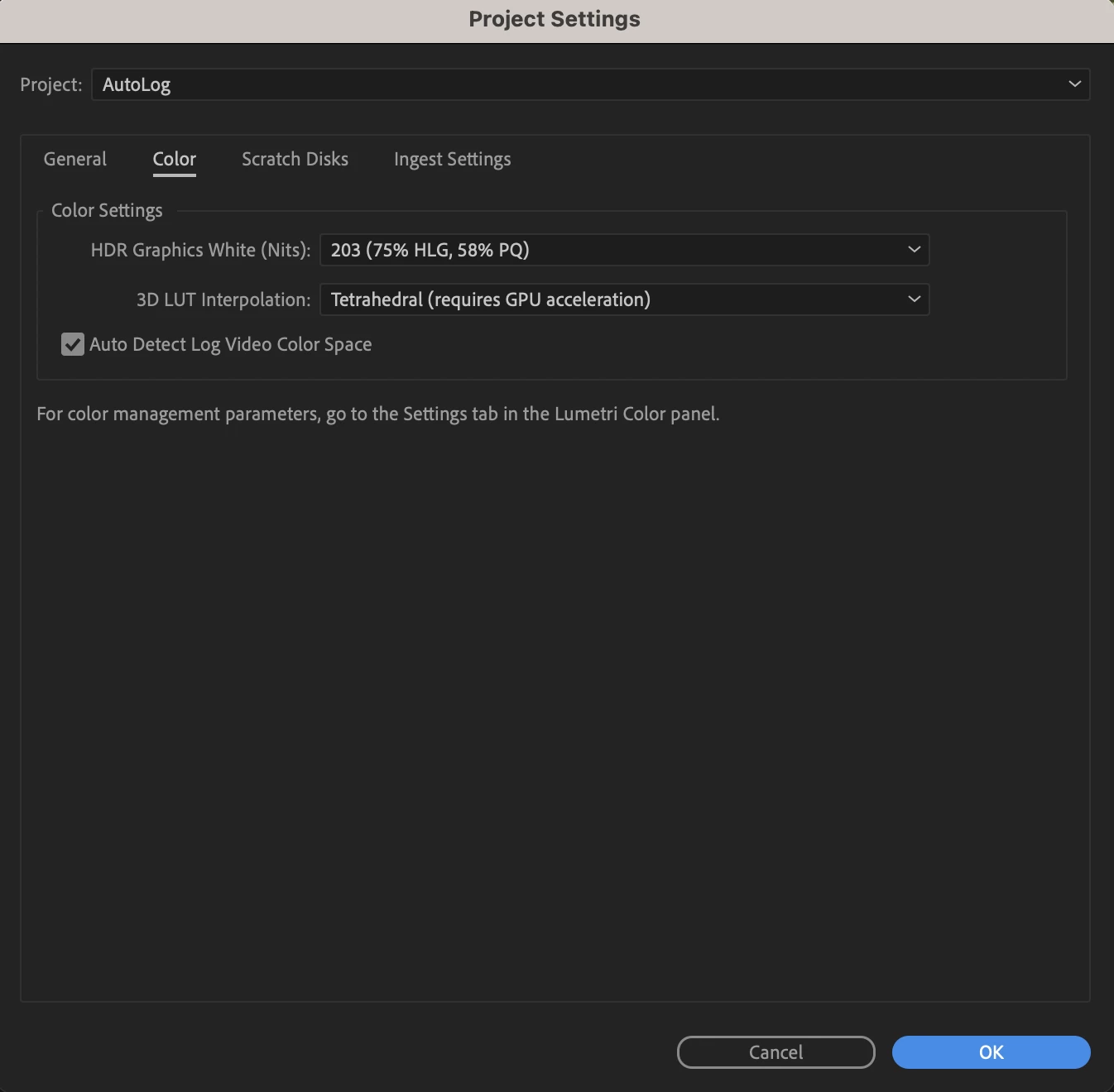

The Auto - log detection feature works for below formats today- 

Sony S-Log, 
Canon C-Log, 
Panasonic V-Log having codecs H264, Hevc, Prores, Xavc or Avc and container mxf, mov and mp4 


This setting will propagate for all users using team projects as well.  


If you would like to turn on Auto - log detection for all projects in AME, you can do so via an application-level preference in AME. 


Do let us know how you find this capability and share any feedback with us. 

This topic has been closed for replies.

2 replies

Known Participant
July 13, 2023

Will you be adding auto detect for .r3d footage?

Legend
July 9, 2023

How is it planned to work for productions? Still per project and off by default?


What happens when sequence moved/copied from project without autolog enabled to one with?


What happens when sequence edited into another sequence in a project with different autolog settings? Ditto copy/paste of timeline elements.


Likely to get messy when multiple editors sharing projects in a production. 


Suspect we need a clear indicator for autolog / tone mapping in play.

Community Manager
July 11, 2023

Hi,


Thanks for your questions and feedback. Below are our responses for your questions-


How is it planned to work for productions? Still per project and off by default?
<Response : the setting is exposed per production so should apply to all projects within a production. If a project is added to a production, the new production setting will apply to the copy within the production. >


What happens when sequence moved/copied from project without auto-log enabled to one with?
<Response: We will be applying the auto-log setting as per the new project.>


What happens when sequence edited into another sequence in a project with different auto-log settings? Ditto copy/paste of timeline elements.
<Response : Auto-log works at project level today so the project setting will apply to all sequences in the project.>


Please let us know if this helps answer. 


Thanks,

Neerja 

Legend
July 11, 2023

Thanks Neeraj

Will check it out. Most places I work are still on v22.6.4 ... Or even v15...