




Question
Now in Beta: Scroll Bars available in Program and Source monitors
From Adobe Premiere Pro Beta 25.0.0 (Build 43) onwards, users have the option to enable scroll bars in Program and Source monitors. This provides users with an additional mechanism to pan the image in the monitors.
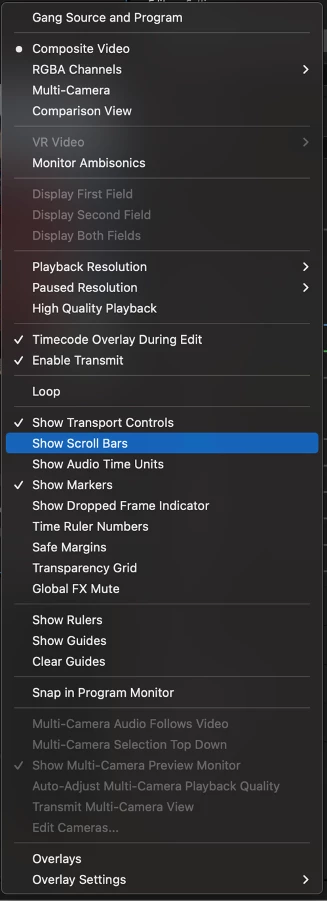
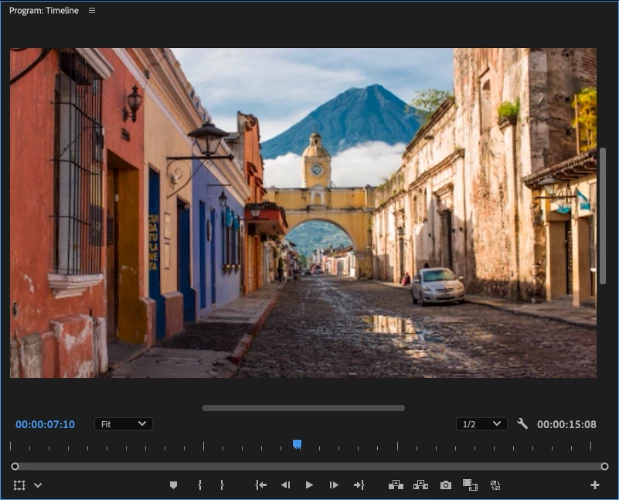
To show/hide the scroll bars in Program and Source monitors:
Users can click on Settings icon :wrench: available at bottom right of monitor and then check/uncheck ‘Show Scroll Bars’ to show/hide the scroll bars as per the requirement. Whenever checked, the scroll bars are visible, irrespective of the ‘Zoom level’ of the image in the monitor. The scroll bars are hidden by default.
Feel free to try it out and provide feedback (in case any)!
 AdChoices