Community Manager
April 18, 2023
Question

Now in Beta: Transmit using SRT Streaming to support multiple audio outputs

  • April 18, 2023
  • 7 replies
  • 26289 views

New API’s that provide a path for Transmit plug-ins to be created that allow multiple audio streams to be output from Premiere’s Mercury Transmit. Additionally, Premiere Pro has added a new SRT Transmit Streaming Plug-in. The new SRT output that can be used simultaneously with existing Transmit hardware/software devices, allowing more than one audio stream from Premiere. 
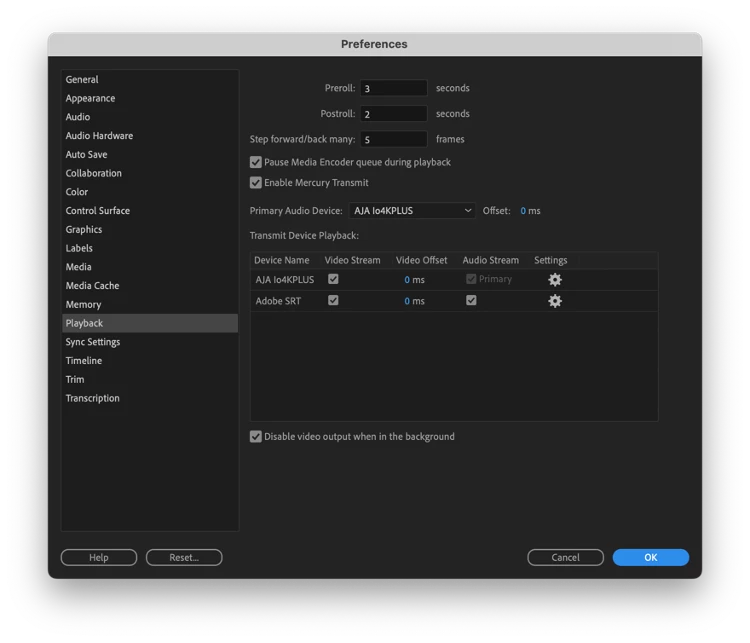


API for Push audio model:  Currently Premiere has a limitation of a single audio output, and this change allows new Transmit plug-ins to be created that will allow for multiple audio outputs to hardware or software.  


This does not affect existing Transmit Plug-ins, existing Transmit device and plug-ins will continue to work, but only as the Primary audio device (“Preferences>Playback>Primary Audio Device...”).  Any new Transmit plug-ins can be written to use the new API’s, and implement a push model of audio, allowing the new plug-in to act as the Default Audio Device, or as a secondary audio device.  This allows multiple audio outputs over Premiere Transmit outputs.

Note:  This new functionality does not affect existing Transmit hardware; Multiple audio streams will only be available as existing or new Transmit plug-ins are created.  The only exception currently is the new SRT Streaming plug-in detailed below. 


In addition to these new API’s, Premiere Pro has added a new SRT Transmit plug-in that will stream Program and Source monitor over the SRT protocol while still allowing audio output over an existing Transmit output.  Note that this is only Streaming output from Premiere Pro, and SRT ingest is not supported.  This allows the Program monitor to be viewable over an SRT stream.  SRT streaming also enables workflows such as remote viewing and playback to SRT servers for redistribution or capture, or other directly connected devices (OBS Studio, vMix, or VLC on Mac and Windows, Haivision Play Pro on iOS for example).  You can now have a remotely connected, over the shoulder viewer natively from within Premiere Pro using off the shelf software and the internet.  This allows you to have an editor in one location, using an existing hardware Transmit device locally, and stream the output of Premiere to second machine remotely over the local network or the internet, viewing the program stream on a second device.


We'll provide an updated Transmit sample that demonstrates dual audio usage, soon.


Known bugs and things to watch out for:  

  • SRT stream is currently encoded on the CPU, not on the GPU, using system resources.


We want to know what you think.  Please join the conversation below.  


7 replies

Det Scholz
Known Participant
April 3, 2025

There is an audio issue when using multitrack-timelines for srt-streams:

Streaming a multitrack-timeline to our Vmix there is no audio! Streaming a sequence with stereo-output Vmix recieve the audio.

Playing back both sequences to the haivision play pro  or a vlc-player is always  with audio. 

Tried this with Premiere 24.6 and beta 25.3 on a MacPro with M2-Chip 

mstegnerCommunity ManagerAuthor
Community Manager
April 3, 2025

@Det Scholz How many channel is audio is the sequence Mix track set to?  The SRT implementation only supports mono, stereo, and 5.1 (6 channels) of audio.

Det Scholz
Known Participant
April 4, 2025

I tried with our standard 8-track-sequence what is our broadcast standard. So I think we have to prepare a stereo-sequence for streaming as far as 8-track-audio is not supported.

Will this may come in future?

Participating Frequently
November 13, 2023

At least for the time being, I feel that the Parsec (parsecsapp.com) makes this feature irrelevant. It's free and pretty fantastic. I remote edit with it and often forget that I am actually using another machine.

Participating Frequently
June 1, 2023

I have tried to get this to work in both caller mode where I use a cloud streaming service and a test setup on my local machine with ffmpeg in listener mode.  In both cases, it seems like nothing is happening.  No indicator in the program/preview window, no connection seems to be established (certainly no errors).  Not sure if this is still in development?

mstegnerCommunity ManagerAuthor
Community Manager
June 1, 2023

Setting this up can be difficult, and really something that cannot be easily covered via a forum.  I would suggest you check that the port you are trying to use is open for traffic on UDP protocol.  

Maybe post a pictures of your Premiere SRT configuration and the full command you are using for FFMPEG and we can try to help.

Participating Frequently
June 1, 2023

Gladly, I would also be happy to have a screen share session if helpful!


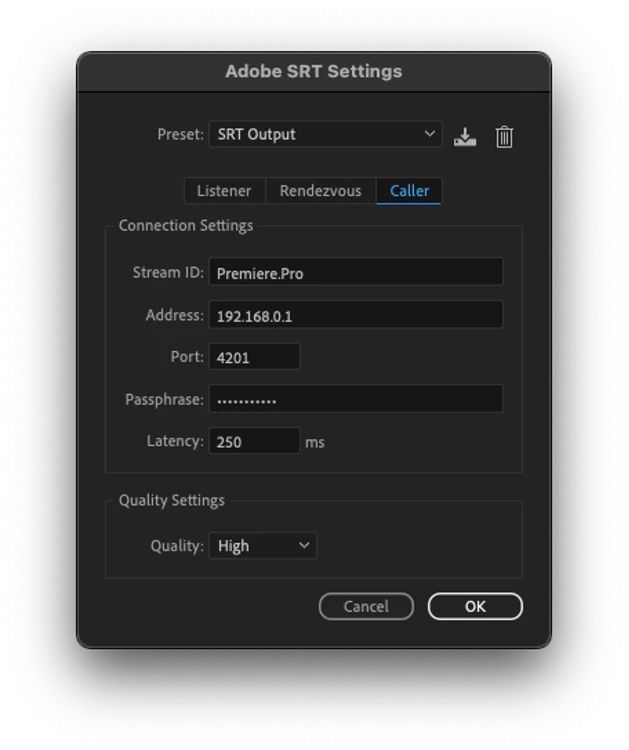
Attached screenshots:

Premiere configuration for ffmpeg ^


 ffmpeg never getting an initiation from premiere ^ (the same thing works from OBS broadcasting with SRT on my machine)


configuration with dolby.io / millicast ^ (the service never starts the stream)


premiere interface when playing after enabling SRT, no indicator of SRT streaming


Let me know if you have more questions.

Bruce Bullis
Community Manager
Community Manager
April 25, 2023

Here is a pre-release (mac & win) SDK, containing an updated Transmitter sample which exercises the new dual audio commands; updated PDF of docs included. 

https://shared-assets.adobe.com/link/c3241a3d-d5f2-4c28-401f-763a1b7e9385


New Participant
March 5, 2024

Is there some extra setup required for the StartPushAudio()/PushAudio()/StopPushAudio() callbacks to fire?


I just took the Transmitter sample from the pre-release SDK linked above, uncommented the `

outPluginInfo->outPushAudioAvailable = kPrTrue;` line, but still these callbacks aren't getting called.


The plugin is enabled under Preferences > Playback; the Primary Device is different from the plugin, and Audio Stream is checked for the plugin.


Seeing similar behavior in the main plugin we're working on. Perhaps the PushAudio part is not yet implemented in Premiere Pro? Using 24.2.1 (Build 2) on macOS 14.2.1 (arm64).


Any hints would be greatly appreciated. Thanks.

Bruce Bullis
Community Manager
Community Manager
March 8, 2024

Thank you very much for the email, Bruce. I'm terribly sorry, but looks like access is limited to @adobe.com accounts only (please see attachment)?


Hrrrmmmnn...I specifically enabled your email address. Checking...


New Participant
April 25, 2023

This could make it better to edit on a remote system. Send Audio and Video output via srt with min latency back for view while editng with remote desktop software?

New Participant
April 21, 2023

The ability to send audio to multiple destinations simultaneously is a very welcome update - great work!

I have tried streaming to both a local and remote SRT endpoint, but don't see the stream showing up in either place. I believe there is also meant to be a "streaming" text indicator in the Program monitor when SRT is enabled. Is there a way to see debug / log information related to the SRT output, so that I can figure out what's going on and what I might be doing wrong with the setup?

Inspiring
April 18, 2023

Will there be a tutorial on how to setup an SRT stream? I guess I'm not familiar with the protocol and I feel many people who are edtiors and not streamers by trade may be confused. How would I, for example, have a remote client not on my local network connect? Does it require some sort of external hosting? Would be nice if it were a bit simpler like hitting a button "start streaming" and "copy link to stream" or something. I'm glad this exists but a bit opaque on how to use at the moment. 

Brainiac
April 19, 2023

It seems that: 
PP 'Listener' = Broadcast this SRT stream and anyone with IP address & port (& any encryption) can pick up by acting as a 'Caller'
PP 'Caller' = SRT stream to specified IP address - receiver has to act as a 'Listener'
PP 'Rendezvous' = SRT stream between specified IP addresses (entered at both ends)

Receiving on OBS studio on same network:

PP - Open Preferences | Playback - 
enable Transmit, enable Adobe SRT (enabled video and audio stream)

click on settings gear icon and select listener, default port 4201, default latency 0ms, default medium quality

OBS added media source, unchecked 'local file' set input to srt://IPADDRESS:PORT so srt://192.168.0.44:4201, otherwise defaults. 

Now PP is viewable via OBS - about 2.5 seconds latency (WiFi LAN). 

Can swap so PP is a 'caller' using OBS IP address and setting OBS to be a 'listener' - using ITS OWN IP ADDRESS and ?mode=listener (so srt://192.168.0.16:4201?mode=listener). 


SRT appears to be limited to 4 channels and Multichannel PP output has 1&2 and 3&4 swapped (don't know if fault is with Adobe or OBS there).

Stereo sequence reports as 2 channels to OBS mixer and plays OK.


Seems like you have to jump through a few hoops when switching between settings to get the stream to stick between the two points. Either toggling the view icon in OBS and/or between sequences in PP seemed to do it. 

Receiving on Android phone using Haivision PlayPro app:
For android phone I downloaded the Haivision Play Pro app and got it to work by setting PP as a 'caller' - with the phones IP address in the PP SRT settings - and the Haivision set to be a 'listener' on the same port (4201, rather than Haivision default of 5000).

It then did work when I swapped them (PP as 'listener', Haivision as 'caller') - about 8" delay. 

Although then when I went to change a few things the Haivision went back to a spinning wheel. Kind of stayed there for the most part too. Could occasionally get it to see the stream but mostly not.


To setup via internet will, I suspect, require some port forwarding, although may not be needed in Rendezvous mode?

Inspiring
April 20, 2023

Yeah try explaining that to a client tho!