


Inspiring
October 21, 2024

P: Hundreds of Direct2D Drawbot error. HRESULT: -2005270494

  • October 21, 2024
  • 49 replies
  • 17521 views

I'm getting hundreds of these errors, and every time they happen the UI freezes for a second or two.
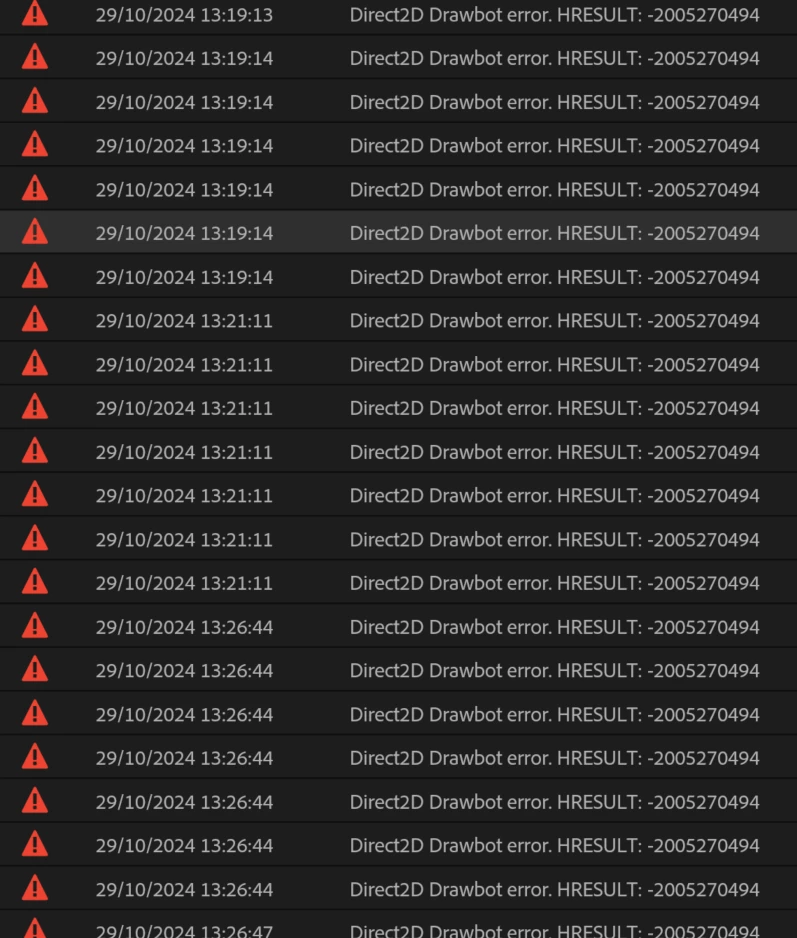
 

Not entirely sure what build I'm running but it's 25.0. Here is the extremely useful about box:


Any ideas? Thanks!


49 replies

jamieclarke
Community Manager
Community Manager
November 7, 2024

We believe we have addressed some of these crashes in version 25.1 and beta 25.2. 

If you’d like to confirm, please try installing the beta version and let us know if it resolves the issue. If not, these fixes will be included in the next dot release of Premiere Pro.

If you have tried the beta and this did not help your issue please provide detailed steps to reproduce this error on your system? This will help us better understand and address the issue.  If you need to get a project out without it crashing you can go to  Preferences > General > "GPU accelerated UI rendering" checked off

Participating Frequently
November 6, 2024

I can't even open my previous projects in Beta 25.2 - it keeps crashing once the project loads.

jamieclarke
Community Manager
Community Manager
November 4, 2024

Hi @neilgdabc @Chrisanthi Pel @Max291794530wtx - Can you try installing Premiere Pro beta version 25.2.0 build 3 or higher and let us know if it helps your issue?

Participating Frequently
October 30, 2024

Exact same issue for me. This has been going on with my system for months at this point - should also be noted that the error used to read "Premiere Pro is running low on system memory. Please save your project and proceed with caution." on earlier versions (every iteration of 24). But now since I upgraded to version 25 I get the drawbot error.

Known Participant
October 30, 2024

guys, I don't know what is happening, but the worst part is that after I started getting those event messages, Generating peaks is taking forever!! The other day, I was waiting for almost 3,5 hours to generate peaks for 2cam podcast of 1h length. And on top of that, when I added Podcast voice effect from Essential Sound, I waited another 1,5 hours and still nothing! So I ended up editing the podcast at Premiere Pro 24 version and in everything was smooth. Generating Peaks and Essential sound almost in no time. I wasted all my day for nothing. I should stay at Premiere Pro 24 from the begining. 

neilgdabcAuthor
Inspiring
October 30, 2024

@jamieclarke Actually, I am still getting them in 25.1

neilgdabcAuthor
Inspiring
October 29, 2024

@jamieclarkeThanks for the reply! In 25.1, half the UI just doesn't render - blank boxes everywhere! I've changed that setting, and it seems to have fixed the issue. Although obviously I don't have GPU accelerated UI any more.


And the 'about' box is still empty.


Inspiring
October 21, 2024

During editing: 

Many interface items of premiere pro not visible anymore.
Many panels have no text.


I have 128 Gb of Ram and 11Gb of video ram. (GTX3080)


IanB_360
Community Manager
Community Manager
October 23, 2024

Hi @Christiaan1 

Welcome to the Premiere Pro forums! We are glad to see you here. We need a few more details to try to help with the issue. Please see, How do I write a bug report ?

Thanks for submitting your bug report. I hope we can help you soon. Sorry for the frustration!

Thanks,

Ian

Known Participant
October 21, 2024

hello everyone! 

i updated my premiere to the latest version last week, and this morning, while i am trying to edit a very simple 2 multicam project, i get delay on conforming, on essential sound filter and on top of that, i just got that error message from the events that I never saw before! 


any ideas?