
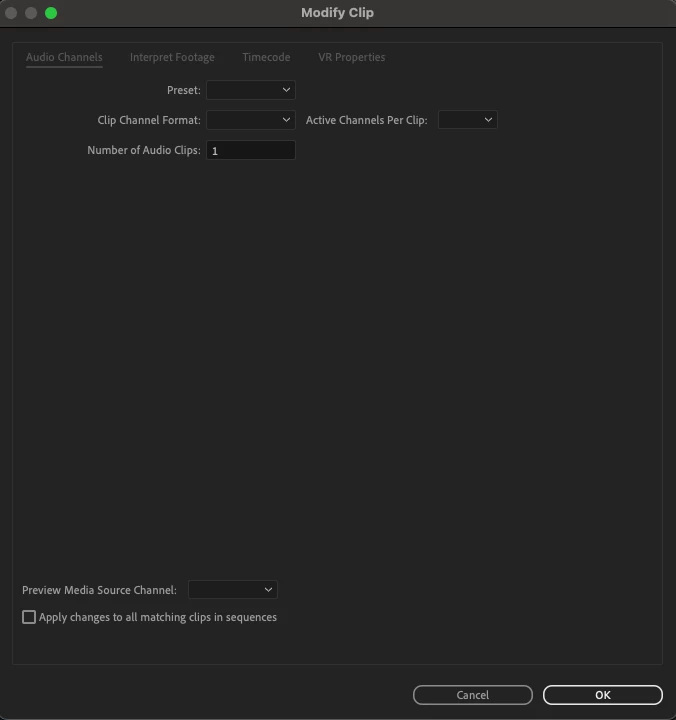
Audio Channels - Dialog Window / Interface Blank / Non-functional
Multi-channel audio is still an unhelpful opaque user-experience in Premiere Pro.
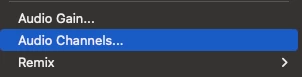
Screen cap is from a 4 channel clip in the timeline, using the "audio channels" command (command?)
Notes:
- dialog is titled “modify clip” but this is pulled up from right-click > “Audio Channels” in the timeline
- Preset, Clip Channel Format, and Active Channels Per Clip are all blank. Why?
- Preset, Clip Channel Format, and Active Channels Per Clip can all be selected (blue outline) but not changed (no drop downs)
- Active Channels Per Clip should read “4”
- Number of Audio Clips can be selected and changed, but to no effect
- “Preview Media Source Channel” is blank, it should read 1 or be editable?
- "Apply changes to all matching clips in sequence" implies that there should be things that can be done in this dialog that can be applied to other clips.
Hard to say what’s going on here because the documentation doesn’t tell you about this dialog.
( @Kevin-Monahan Documentation inadequate.)
What function is the right click > “Audio Channels” supposed to serve in the timeline? How do I get it to serve that function?
This is probably related to the general inconsistency there is in working with audio channels in Premiere Pro: see here and here and here for examples of unresolved / ongoing issues.
R.
 AdChoices