Exit
  • Global community
    • Language:
      • Deutsch
      • English
      • Español
      • Français
      • Português
  • 日本語コミュニティ
  • 한국 커뮤니티
0

Audio issue on new computer

Enthusiast ,
Apr 21, 2021 Apr 21, 2021

Hi - see below.

audio device error.jpg

I got this new computer and it works great except the audio on the timeline will not come out of my headphones or speaker. As a test I played a YouTube video and it works great, The only problem is with Premiere. Also, when the timeline plays the waveform shows the audio and when I export to MP4 audio is fine during playback.


Any help is appreciated.

TOPICS
Audio , Error or problem
899
Translate
Report
Community guidelines
Be kind and respectful, give credit to the original source of content, and search for duplicates before posting. Learn more
community guidelines

correct answers 1 Correct answer

Community Expert , Apr 22, 2021 Apr 22, 2021

Input should be set to none.

As for the rest might want to update audio driver.

Translate
LEGEND ,
Apr 21, 2021 Apr 21, 2021

How about giving us a screengrab of your Audio hardware prefernces settings?


Neil

Translate
Report
Community guidelines
Be kind and respectful, give credit to the original source of content, and search for duplicates before posting. Learn more
community guidelines
Enthusiast ,
Apr 22, 2021 Apr 22, 2021

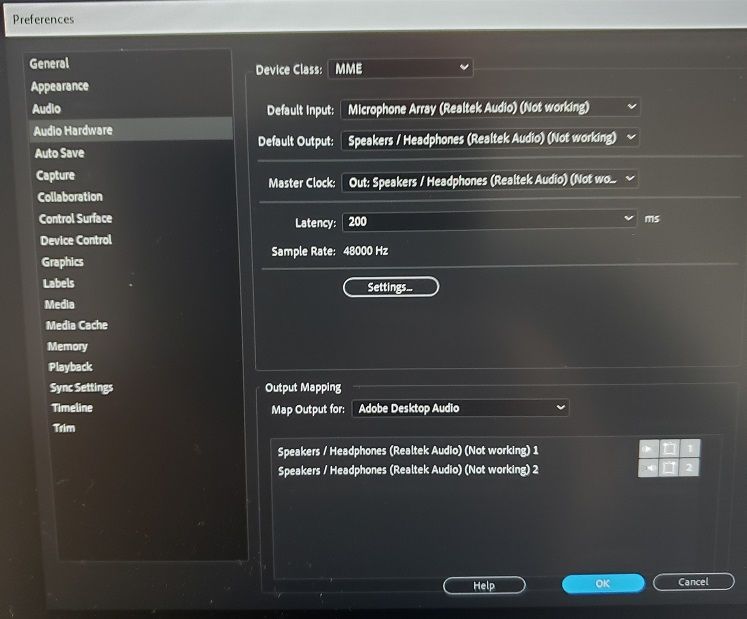
Thank you all for your replies. Here are my settings:


audio hardware settings.jpg

So change the default input to no input right? 

Translate
Report
Community guidelines
Be kind and respectful, give credit to the original source of content, and search for duplicates before posting. Learn more
community guidelines
Community Expert ,
Apr 22, 2021 Apr 22, 2021

Input should be set to none.

As for the rest might want to update audio driver.

Translate
Report
Community guidelines
Be kind and respectful, give credit to the original source of content, and search for duplicates before posting. Learn more
community guidelines
Enthusiast ,
Apr 22, 2021 Apr 22, 2021
LATEST

Thank you Ann and everyone. It works - the sound from timeline comes out of my speakers now!


Thanks again appreciate it very much!

Translate
Report
Community guidelines
Be kind and respectful, give credit to the original source of content, and search for duplicates before posting. Learn more
community guidelines
Community Expert ,
Apr 21, 2021 Apr 21, 2021

Make sure Default Input in the Audio Hardware in the Preferences is set to No Input.

Translate
Report
Community guidelines
Be kind and respectful, give credit to the original source of content, and search for duplicates before posting. Learn more
community guidelines
Community Expert ,
Apr 21, 2021 Apr 21, 2021

This is a helpful hint. Please try it.

Translate
Report
Community guidelines
Be kind and respectful, give credit to the original source of content, and search for duplicates before posting. Learn more
community guidelines