Exit
  • Global community
    • Language:
      • Deutsch
      • English
      • Español
      • Français
      • Português
  • 日本語コミュニティ
  • 한국 커뮤니티
0

Automate to sequence not working

Participant ,
Sep 03, 2018 Sep 03, 2018

Hi everyone,

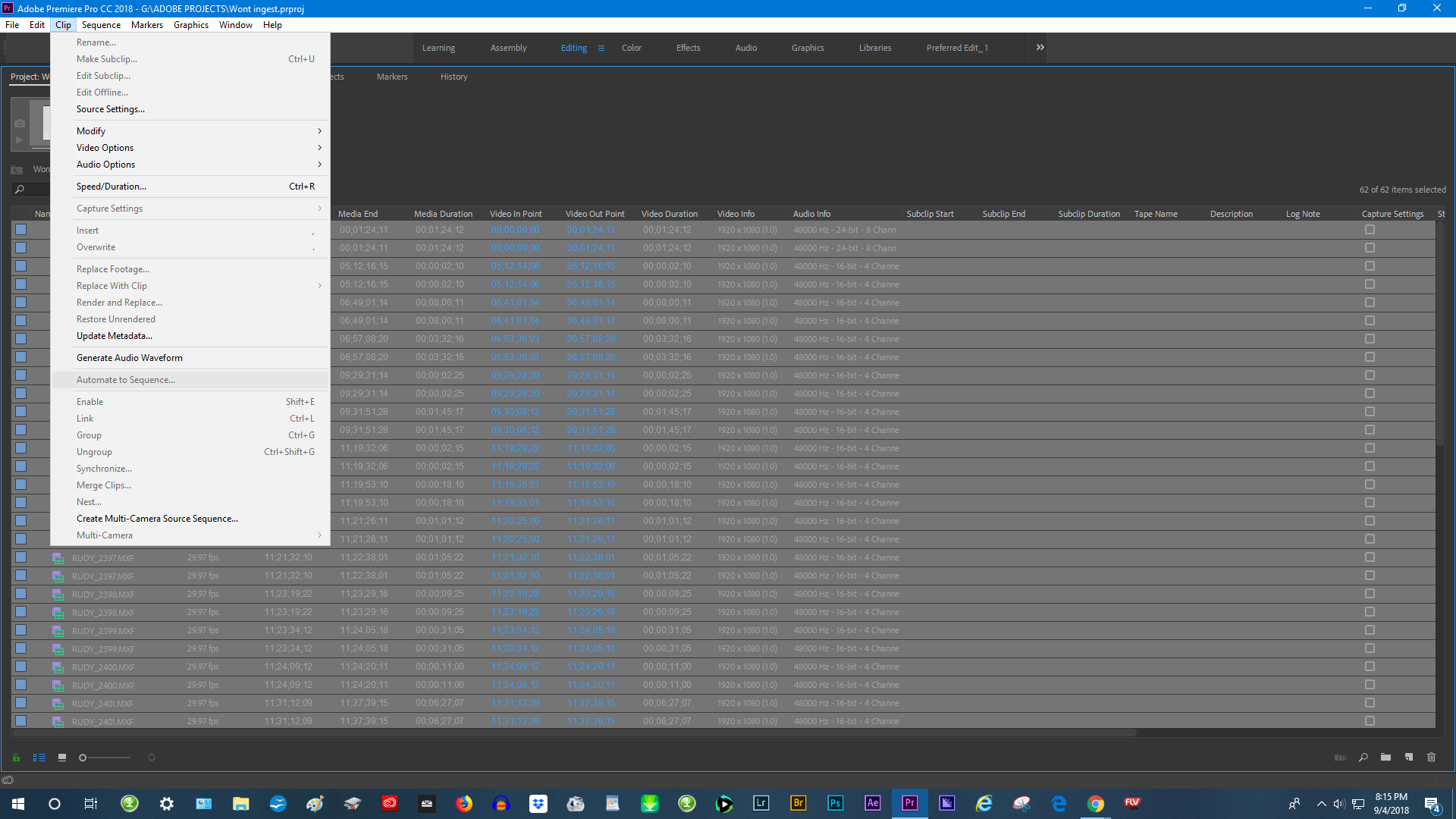
I am trying to use the AUTOMATE TO SEQUENCE  feature in the clip menu but it is completely greyed ( grayed ) out.  The clips are all of the same format etc, so I cannot understand why this is happening.

Thanks.

21.7K
Translate
Report
Community guidelines
Be kind and respectful, give credit to the original source of content, and search for duplicates before posting. Learn more
community guidelines

correct answers 1 Correct answer

Participant , Sep 05, 2018 Sep 05, 2018

Thanks very much Annie B, you are right the duplicate files were the problem. I deleted the duplicates and the automate to sequence now works perfectly. I don't know why the files were duplicated to begin with.

Thanks very much.

Translate
LEGEND ,
Sep 03, 2018 Sep 03, 2018

Have you selected any clips?

Have you created a sequence to hold them?

Translate
Report
Community guidelines
Be kind and respectful, give credit to the original source of content, and search for duplicates before posting. Learn more
community guidelines
Participant ,
Sep 03, 2018 Sep 03, 2018

Yes Sir , all of the clips were selected .

Translate
Report
Community guidelines
Be kind and respectful, give credit to the original source of content, and search for duplicates before posting. Learn more
community guidelines
Community Expert ,
Sep 03, 2018 Sep 03, 2018

Please post screenshot of project window with clips selected.

Translate
Report
Community guidelines
Be kind and respectful, give credit to the original source of content, and search for duplicates before posting. Learn more
community guidelines
Participant ,
Sep 04, 2018 Sep 04, 2018

Screenshot of clips.

2018-09-03 (1).png

Translate
Report
Community guidelines
Be kind and respectful, give credit to the original source of content, and search for duplicates before posting. Learn more
community guidelines
Community Expert ,
Sep 04, 2018 Sep 04, 2018

Now same screenshot but with clips selected .....

See what happens.

Translate
Report
Community guidelines
Be kind and respectful, give credit to the original source of content, and search for duplicates before posting. Learn more
community guidelines
Participant ,
Sep 04, 2018 Sep 04, 2018

2018-09-04.png

Translate
Report
Community guidelines
Be kind and respectful, give credit to the original source of content, and search for duplicates before posting. Learn more
community guidelines
Community Expert ,
Sep 05, 2018 Sep 05, 2018

Why do you have duplicate files in the project window?

Translate
Report
Community guidelines
Be kind and respectful, give credit to the original source of content, and search for duplicates before posting. Learn more
community guidelines
Participant ,
Sep 05, 2018 Sep 05, 2018

Thanks very much Annie B, you are right the duplicate files were the problem. I deleted the duplicates and the automate to sequence now works perfectly. I don't know why the files were duplicated to begin with.

Thanks very much.

Translate
Report
Community guidelines
Be kind and respectful, give credit to the original source of content, and search for duplicates before posting. Learn more
community guidelines
Community Expert ,
Sep 04, 2018 Sep 04, 2018

Have you created a sequence? “Have video and audio layers in the timeline area?”

Translate
Report
Community guidelines
Be kind and respectful, give credit to the original source of content, and search for duplicates before posting. Learn more
community guidelines
Community Beginner ,
Mar 31, 2020 Mar 31, 2020

Hello .. i did everyting are okey ,, 

Except for the next option. at unnumbereb markers , it is not active?

Translate
Report
Community guidelines
Be kind and respectful, give credit to the original source of content, and search for duplicates before posting. Learn more
community guidelines
New Here ,
Feb 13, 2021 Feb 13, 2021
LATEST

i also have this problem please help Screenshot 2021-02-13 at 13.37.46.png

Translate
Report
Community guidelines
Be kind and respectful, give credit to the original source of content, and search for duplicates before posting. Learn more
community guidelines