


- Home
- Premiere Pro
- Discussions
- AVI type Error Code 19 When Rendering a sequence
- AVI type Error Code 19 When Rendering a sequence

Copy link to clipboard
Copied
Hi All - Would appreciate if anyone can please assist with fixing this error message when I render a sequence clip in Adobe Premier, see error message below.
PC Windows 64bit platform. Have installed the latest Adobe Premier Pro update.
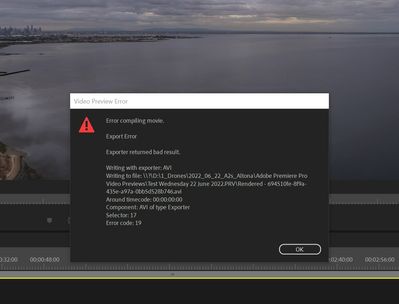
Thanks in advance!
Dennis


 2 Correct answers


Avi is usually not the way to go.
Post screenshot sequence settings and properties clip used.
Latest update is not a version: post Premiere version and build and comp specs with all drives.

Hi Ann. Thank-you for replying!! I'm only a newbie to Premier Pro.
It was only a few days ago I updated to the latest Premier update and did not have any issues with sequence rendering, but i think I've sorted it out.
I removed 'AVI' in the Sequence Settings under 'Preview File Format' and used 'I Frame Only MPEH' and changed Codec to 'MPEG I-Frame' and that seemed to work now. For some reason i don't understand how 'AVI' was used in the first place as I have never used it & not in my other video
... 20
Replies
20
20
Replies
20

Copy link to clipboard
Copied
Avi is usually not the way to go.
Post screenshot sequence settings and properties clip used.
Latest update is not a version: post Premiere version and build and comp specs with all drives.
Copy link to clipboard
Copied
Hi Ann. Thank-you for replying!! I'm only a newbie to Premier Pro.
It was only a few days ago I updated to the latest Premier update and did not have any issues with sequence rendering, but i think I've sorted it out.
I removed 'AVI' in the Sequence Settings under 'Preview File Format' and used 'I Frame Only MPEH' and changed Codec to 'MPEG I-Frame' and that seemed to work now. For some reason i don't understand how 'AVI' was used in the first place as I have never used it & not in my other video files.
Anyway - It's all good now & thank you again for prompting me to check the 'Sequence Setting'.
Regards,
Dennis

Copy link to clipboard
Copied
Same issue and your suggestion fixed mine as well. No idea how my preview format got set to AVI 🤷:male_sign:
Thank You!

Copy link to clipboard
Copied
Is there any step by step instryuctions to clea rthis error ? I could not find the steos you have written about.....Thank you

Copy link to clipboard
Copied
Scroll up, Dennis says exactly how to do it, step by step.


Copy link to clipboard
Copied
Here you go, Chris: https://community.adobe.com/t5/premiere-pro-discussions/faq-how-to-change-the-codec-for-video-previe...
Thanks,
Kevin

Copy link to clipboard
Copied
Thanks Bro, me ayudó muchísimo tu comentario, saludos desde Honduras
Copy link to clipboard
Copied
Hi Ann,
Why do you suppose this is happening with this version? I heard that the default video preview codec changed to ProRes. Why would some have trouble with AVI? Is that the fallback if ProRes cannot be installed? I'll look into it more when I get back to the office.
Thanks,
Kevin
Copy link to clipboard
Copied
I have no idea, but this is not the first time I am seeing this issue on the forum.
Reported this also on the beta but no respons.
Avi as in MS? That is imo only suited for oldfashioned SD.

Copy link to clipboard
Copied
had the same problem, used avi over 20 years ago, thanks to dennis the problem got fixed, but no thanks to Adobe support, again no help from adobe
Copy link to clipboard
Copied
can someone have step by step isntructions in clearing this error ?

Copy link to clipboard
Copied
Dennis,
Had this exact same issue and this fixed it... Thanks!
Copy link to clipboard
Copied
Lester - Happy you found my post useful. I started thinking if i was the only person having the same issue. I had never had this issue prior to the latest update.
I've tested a few new sequences and guess what .. the 'AVI' for some reason always comes up..so annoying!! I've just learnt to check the sequence and change it.. I really hope the next update they fix this bug!
Copy link to clipboard
Copied
Dennis, had the same issue and your work around fixed it. I thank Ann for mentioning it to me in my post then I searched and found your post as well! Thanks to you both!

Copy link to clipboard
Copied
Thank you so mutch you save my but

Copy link to clipboard
Copied
Thankyou both for the fix, it was the last of many methods I tried. If admin could add this fix to the generic
Copy link to clipboard
Copied
I'll see what I can do for the community, Dougla. Thanks for the suggestion.
Kevin

Copy link to clipboard
Copied
Out of no where I started having this problem very annoying to have to go into sequence settings and choose I-Frame. So I found where microsoft avi was and deleted it for PC it was here C:\Program Files\Adobe\Adobe Premiere Pro 2022\Settings\EncoderPresets\SequencePreview\9678AF98-A7B7-4bdb-B477-7AC9C8DF4A4E
Copy link to clipboard
Copied
That works, bussey88. I prefer ProRes LT, but you need to set Editing Mode to > Custom. For the video preview section, you can choose QuickTime > ProRes LT or 422. It depends on whether you want to use render files to assist your export or not.
Thanks,
Kevin
Copy link to clipboard
Copied


Get ready! An upgraded Adobe Community experience is coming in January.
Learn more
 AdChoices