Participant
October 23, 2023
Answered

Bug to delete pauses. (delete button missing)

  • October 23, 2023
  • 14 replies
  • 13707 views

When i try delete pauses, my premiere doesn't show delete button.
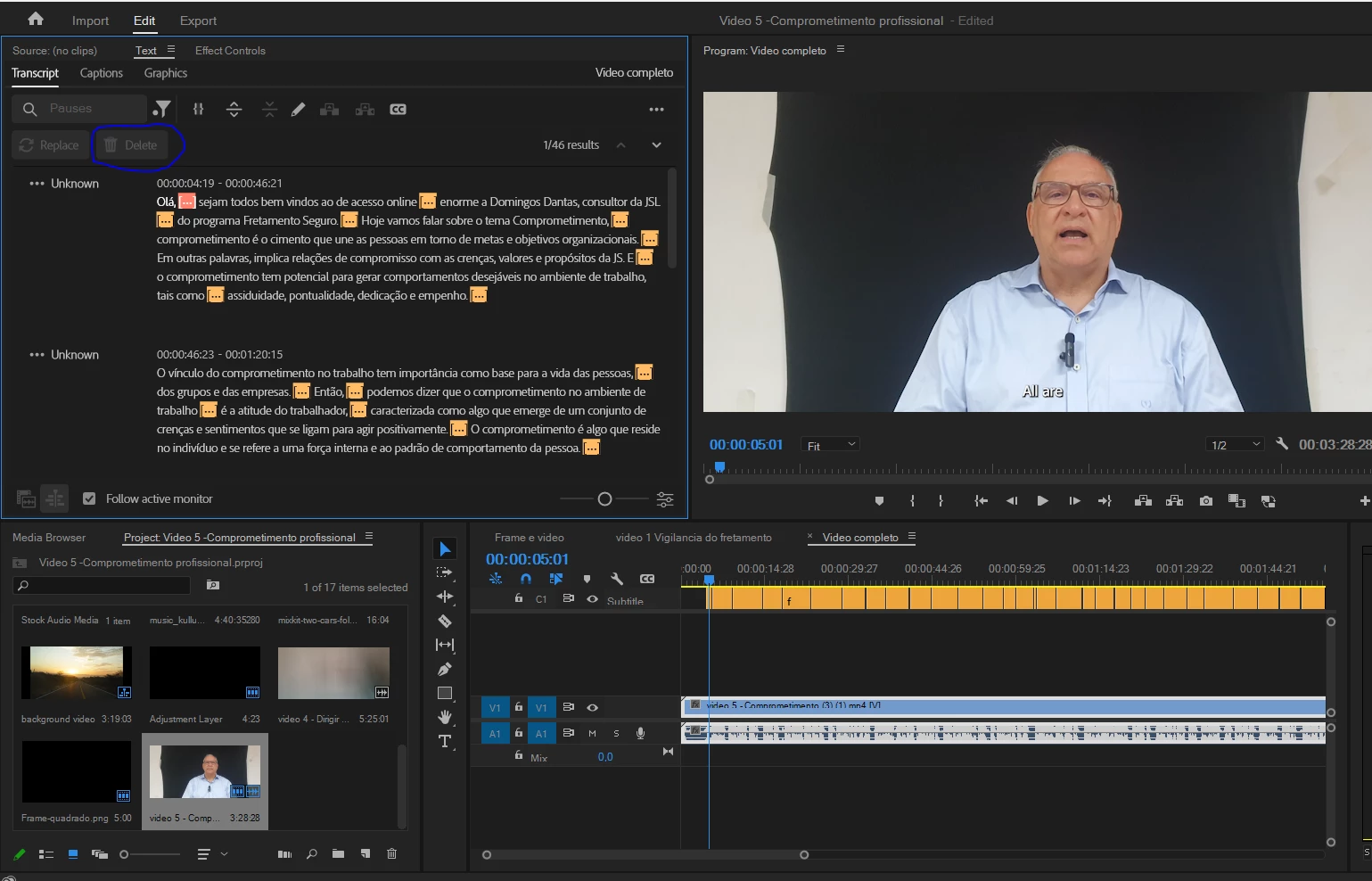

Correct answer ENKOR Films

Found the solution :

Click on the tree dots on the top right corner select Generate text-based editing transcript


Worked for me!

14 replies

Participant
May 3, 2025

I have got same problem. Please someone help me

Participant
February 29, 2024

Although the version is updated to 24.4, the problem still exists.

Participant
February 29, 2024

Using “Generate text-based editing transcript” really fixed things.

But only for use when translating into English.

Stan Jones
Community Expert
Community Expert
February 26, 2024

I edited my Beta bug report to add "In source view" to the title and to explain that I have concluded that this is not a bug, but as intended. See my post here:

https://community.adobe.com/t5/premiere-pro-bugs/quot-the-issue-of-the-disabled-delete-button-quot/i...


In part, "...this feature only allows you to delete what is in the timeline/sequence. Which means you must be in SEQUENCE/timeline view...."


My edited bug report is here:

https://community.adobe.com/t5/premiere-pro-beta-bugs/delete-button-does-not-show-for-filter-pause-or-text-search-in-source-view/idi-p/14191749


Stan


Participant
December 6, 2023

All of the video clips that have audio need to be transcribed in order for the delete button to light up. If only one, or some of them are, then you won't be able to ripple delete the pauses. 

Participant
February 2, 2024

What if i only have 1 video clip

ENKOR FilmsCorrect answer
Participant
November 15, 2023

Found the solution :

Click on the tree dots on the top right corner select Generate text-based editing transcript


Worked for me!

Stan Jones
Community Expert
Community Expert
November 15, 2023

@ENKOR Films,


Very interesting. I continued to be bothered by screenshots showing the problem in Sequence view. And did more testing after your post. I posted an update in the Beta bug:

https://community.adobe.com/t5/premiere-pro-beta-bugs/delete-button-does-not-show-for-filter-pause-or-text-search/idc-p/14236199#M1559


I now believe that the problem is in Source view with a source transcript and in Sequence view with a static transcript. And you also see the problem if you nest a Sequence with source transcripts in another sequence.


Stan


Stan Jones
Community Expert
Community Expert
November 5, 2023

I have updated the Beta bug report. The problem remains in Beta 24.2.0 Build 5.


What I see in Release 24.0.0 and Beta is that the Delete button appears in Sequence view but not in Source view.


I have no explanation for the fact that the screenshots from more than one poster show the problem in Sequenc view.


The Workaround is to work in sequence view.


If any of you are seeing this in Sequence view, please post a new screenshot and describe what you are doing.


Stan


Participant
November 6, 2023

I'm sorry for my ignorance, Stan, but I don't understand what you mean by sequence view. Would you mind giving me an example? Sorry again!

Stan Jones
Community Expert
Community Expert
November 6, 2023

Rubito,


No problem. There is a steep learning curve to text-based editing. Keep asking any questions you have.


To determine what view you have, look at the bottom left of the Text panel/Transcript tab:


It is a bit easier to have “Follow active monitor” turned on. For example, if you open a clip in the Source Monitor and then switch to the Text Panel -> Transcript Tab, you will see the transcription of that source clip, or some message about transcribing. If you have no clip open in the Source Monitor, and you select the source monitor view with active monitor off, you will see "no dialogue." If you click in the timeline, it will change the view to the Program Monitor/sequence.


Stan


Participant
November 5, 2023

I'm having the same issue. I'm on a Windows 10 home edition. 

Christian.Z
Community Expert
Community Expert
October 28, 2023

Have you tried resetting preferences and/or reseting your workspace?
Reset your preferences by holding shift+alt (or option) when you launch Premiere

Inspiring
October 28, 2023

@Christian.Z Just tried you advice now and it's still not working on my end.

Community Manager
October 27, 2023

Moving it to Discussions for troubleshooting

Stan Jones
Community Expert
Community Expert
October 28, 2023

I have filed a bug report in the Beta bugs forum. The problem is present in Release 24.0 and in Beta 24.1.0 Build 72.

https://community.adobe.com/t5/premiere-pro-beta-bugs/delete-button-does-not-show-for-filter-pause-or-text-search/idi-p/14191749


My speculation above appears to be incorrect. The problem is consistent using Source media transcriptions; it works in Sequences, with source or static transcriptions.


Stan


Stan Jones
Community Expert
Community Expert
October 27, 2023

@RamonToledo @Emil-Jan27926909ynfq,


Edited after I discovered an error in my testing and filed a correct bug report in the Beta bug forum.


I see this now in Beta 24.1.0 Build 68. And in Release 24.0.0.


I think it has something to do with having a clip with no pauses, including having the minimum pause duration set to a level that produces no pauses. Edit Added: It is true that when you have a clip with no pauses, including having the minimum pause duration set to a level that produces no pauses, the Delete button does not appear. But this has nothing to do with the bug.


In that circumstance, it would make sense for there to be no Delete button - there's nothing to delete. But that "flag" seems to stick, so that once the setting is changed and you have pauses, the Delete button does not appear.


I did not pin down the complete pattern, but I had examples of it working, then not working after changing settings; I had a source clip that did not work, but when used to create a sequence, it did work.


Unrelated to this thread, in the Beta, I had one example of a source clip that had no pauses when I first transcribed it - the pause setting was at 2.5 - and it did not work. When I created a sequence from it, it showed "no dialogue" and appeared to not be recognized by the Text panel at all. Edit (added): When I clicked on a pause, I was adding in/out to the clip. It was just the pause, so had no dialogue. When I created a sequence from the clip, it, correctly, said there was No Dialogue. lol. Mystery solved. When I removed the in/out and created the sequence, all was well.


Unrelated, but to put what I learned somewhere, I'll add the following.


In the Beta version, when you Filter "pauses," the word "pauses" appears (greyed out) in the search box and a dot appears to the lower left of the Filter icon. "Replace" and "Delete" are both greyed out. They are on the same line with the Results 1/3 and next/previous buttons (as they should be). Once I got a clip that showed the Delete button, Replace is still greyed out (as expected).


In Release 24.0.0 (or Beta), if I filter by pause or text, the Delete button on the left toggles between showing/hiding a Delete and Delete All buttons on the right. The Delete button on the left does not, in fact, delete. The Lift/Extract toggle determines what kind of delete it will be. To affect only the transcript/caption content, lock the video/audio tracks.


The "Replace" button on the left is also a toggle that hides/reveals the Replace with entry, and the Replace/Replace all buttons on the right.


@jstrawn @Alexander_DVA 


Stan