


Participating Frequently
January 20, 2024
Question

Can't drag files from file explorer to premiere pro timeline.

  • January 20, 2024
  • 8 replies
  • 4005 views

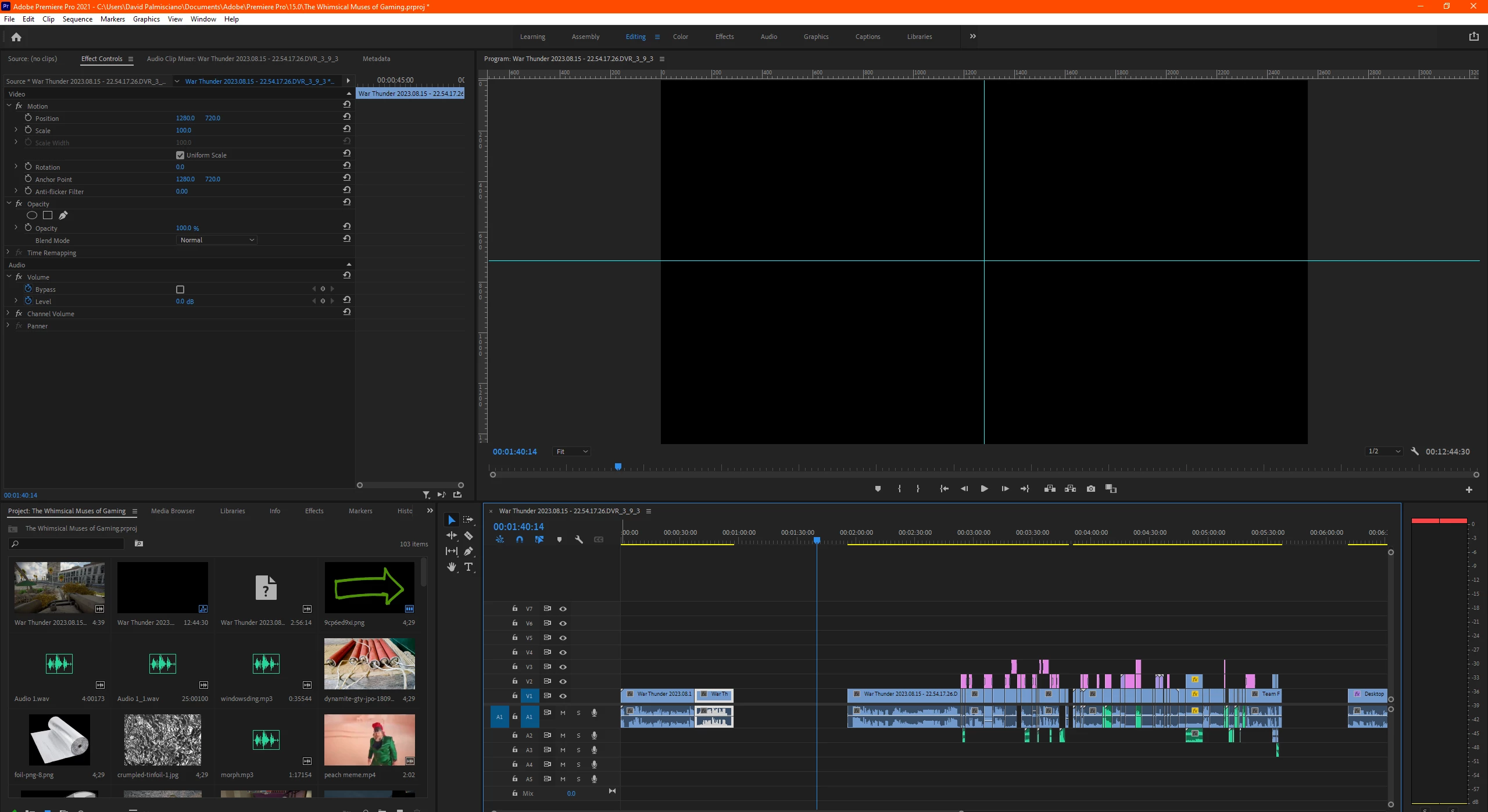
How do I get this to work? I literally cannot drag ANY video, audio, or image files into the timeline from my file explorer. I've seen source patching is the answer, but the source patch video in my timeline for the video section is just missing. I'm on windwos 10 and on Premiere Pro 2021 and I am absolutely losing it. 
8 replies

Participant
July 7, 2025

Do this bro. It worked for me. https://www.youtube.com/watch?v=khOlWm_tohQ
I've been cracking my brains how to solve this problem until I saw this video. Seriously, what's with people using import? Too much work!


laurencet23100334
Participating Frequently
October 24, 2025

Thanks for this, it helped in my case.  Highlighting / designating source tracks did nothing.

Also, in my case, I work in a shared environment where media files are all over the place.  We assemble clips provided by different sources which reside in dedicated folders for the contributors to load into (this is for security reasons, we don't want a main upload folder where providers are able to see into other contributors' folders).  Always having to re-navigate to every single folder across drives is a total time-waster and counter-productive.  Being able to drag/drop into the media source window is imperative for us.

Thanks again for this solution.

R Neil Haugen
Legend
July 21, 2024

Karl Soule had a video out a while back on YouTube about the import processes into Premiere, and that's where I found out about the Import page being for some needs the best place to bring media into your project.


It handles "spanned clips" and "complex media" with multiple parts in mulitple folders as well or better than the MediaBrowser page, and often is faster to use.


It also has several of the advanced workflow ingest options ...  such as copy or move, with included cheksums! ... that we haven't had really that easily invoked, since Prelude died.


As Karl is one of the main staffers supporting the "Hollywood" division of the Premiere team, he has the best material on ALE use, metadata processes, and importing media that you can find. But in his YouTube presentations, not in a manual.


Everyone's mileage always varies ...
MyerPj
Community Expert
Community Expert
July 21, 2024

There was an anouncment for a new feature recently, sorry I can't remember what, but it mentioned dropping into the project from Explorer and Finder. I've used that essentially only with no problems. And FWIW: Never ever directly to the timeline.

Remote Index
Inspiring
July 21, 2024

As one might expect, Adobe documentation on this issue is not well organized nor comprehensive.


Nothing helpful about this is listed under "Import Media > Importing." [ This has sections on importing still images, importing audio, transferring files between drives, but nothing about actually importing video.]


However, there is explicit information here ("Creating Projects > Start a New Project" and then under "Other Import Options") including this:

"Open the Finder window in Windows or macOS and drag media or folders into the Project panel."

[Edit: let's not pass over this without noting that Windows has no "Finder". Details. Details.]


So it is supported, though the official documentation doesn't actually say you drag directly into the timeline. This has been supported in Premiere for at least a decade. If Adobe offered actual documentation, we'd know what issues there were with drag and drop vs. the other other import workflows, but as it is users are left to guess and trial and error.


The "Import workflow" as described by Neil and Ann is also here.


[Note to Adobe: this is not where users will look when trying to learn about import options. They will look under "Importing" or somesuch. They will do this because the search tools for Adobe documentation are definitively unhelpful.]


Dave etc.;


To your point and problem: what format are the files? You say they are MP4 (the wrapper) but what is the codec they use? Please check this against the supported format list.


R.


R Neil Haugen
Legend
January 21, 2024

You need to import the clips into Premiere first. THEN apply them to a sequence.


NLEs like Premiere are only metadata ... that sequence exists only as a metadata file ... a text file of the bits of clips, the effects applied ...  that's all.


You need to import the clip into the project first, which is how Premiere gets the access to the clip metadata. THEN ... you can use the clip in Premiere.


Everyone's mileage always varies ...
Participating Frequently
January 21, 2024

I'm confused. I've always been able to drag and drop clips, audio, and images into my timeliness directly from my file explorer. Not the one on premiere, the one in windows 10. I could have my second monitor have my file explorer up, find my recorded footage, and just drag and drop. After a fresh windows install, I can no longer do that. I've never been forced to do it from inside premiere pro. 

R Neil Haugen
Legend
January 21, 2024

It may have worked for you, but it's never been a recommended process. I take it you don't worry about where, what bin, it puts the clips into in the Project panel?

Everyone's mileage always varies ...
Participating Frequently
January 21, 2024

Did what was in there already. I attatched a vid that is hopefully slightly more helpful than the single image. 

R Neil Haugen
Legend
January 20, 2024

Are you talking about Windows Explorer file management applet, or the Project panel in Premiere?


You add/import media to the project panel, then add it to the timeline from the Project panel.


And your image doesn't have a video track with a Source target active. Note the far left blue block in an audio track? You need a blue block for video also.


Everyone's mileage always varies ...
Participating Frequently
January 21, 2024
Desktop_2024-01-20_-_18-47-19-11.mp4
MyerPj
Community Expert
Community Expert
January 20, 2024

Can you drag it into the project panel? How about with a brand new project?

Participating Frequently
January 20, 2024

No and no. The moment I hover my cursor over premiere pro, it instantly turns into a cancel sign.