Exit
  • Global community
    • Language:
      • Deutsch
      • English
      • Español
      • Français
      • Português
  • 日本語コミュニティ
  • 한국 커뮤니티
0

cannot change bitrate when exporting

New Here ,
Sep 12, 2021 Sep 12, 2021

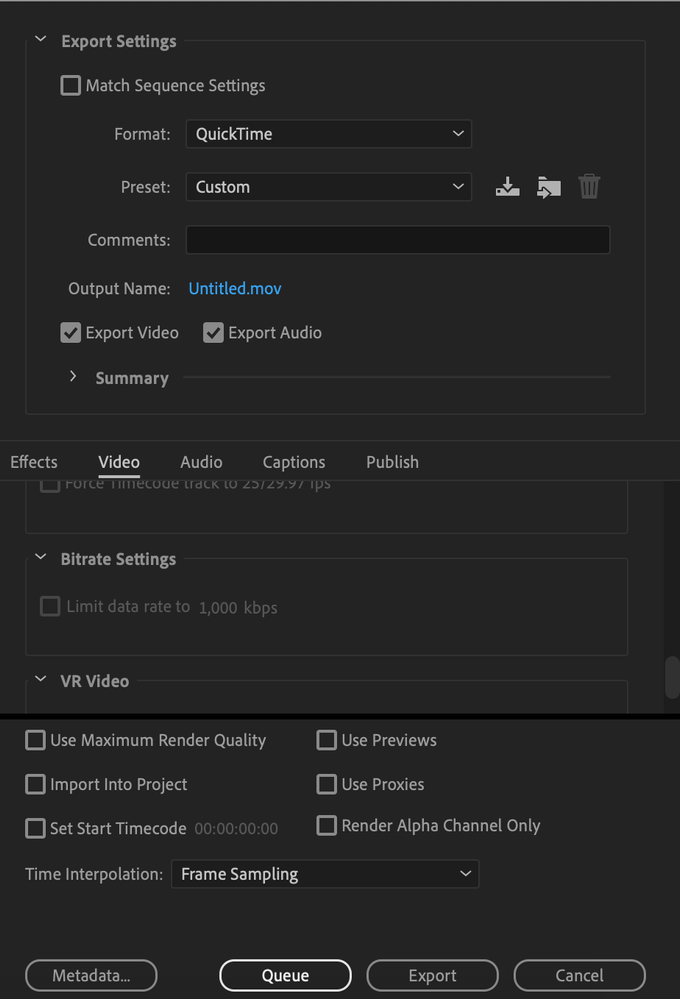
hey, I cannot change the bitrate when exporting my video on premiere pro.

tried with several source files and still same.

Screen Shot 2021-09-12 at 4.01.41 PM.png

TOPICS
Error or problem , Export , How to
922
Translate
Report
Community guidelines
Be kind and respectful, give credit to the original source of content, and search for duplicates before posting. Learn more
community guidelines
Community Expert ,
Sep 12, 2021 Sep 12, 2021

This is a result of choosing QuickTime as the export format.

I'd suggest trying H.264.

Translate
Report
Community guidelines
Be kind and respectful, give credit to the original source of content, and search for duplicates before posting. Learn more
community guidelines
Community Expert ,
Sep 12, 2021 Sep 12, 2021
LATEST

It seems Quicktime does not give you bitrate options, the actual bitrate depends on which codec preset you use. If you need to limit the data rate chose H264 or H265 as your export format.

Translate
Report
Community guidelines
Be kind and respectful, give credit to the original source of content, and search for duplicates before posting. Learn more
community guidelines