Participating Frequently
April 11, 2025
Question

Premiere pro unable to suddenly translate subtitles

  • April 11, 2025
  • 10 replies
  • 2337 views

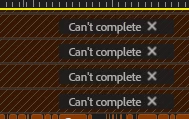
I've been translating subtitles with the new tools for a couple weeks now and everything was working fine, it worked on the beta version and now on the latest build (25.2.1) but now all of a sudden premiere shows the following error message whenever I try to translate. Even tried on a project that had been previously

translated without an issue, I went back and deleted the previous translations, tried to translate again and it's not working anymore.


Has anyone else encountered this bug or know s of a way to fix it? 

10 replies

Participant
November 7, 2025

Translating captions to any language fails at 50%. We've tried exporting to .srt file, trying in batches, updating to the beta version 25.6 (currently using 25.5 in production) This is across users, projects and systems, all runnning Windows 11 23H2 build 22631.6060. Problem started roughly 2 weeks ago.

Steps to reproduce: highlight your captions in the timeline, either click translate captions from the text window or the subtitle track.
Expected result: See a new subtitle track with the translated captions.

Actual result: A red box error message "Can't complete caption translations to Dutch. Please try again" 
Premiere Pro version: 25.5 and beta 25.6

OS version: Windows 11 23H2 build 22631.6060

GPU info: Nvidia tesla M10, driver version 572.83

Stan Jones
Community Expert
Community Expert
November 7, 2025

@lester_9851,


See these other 2 threads. Yours is the only filed as a bug report. Upvoted, even though I successfully translated English to Dutch just now - Win 11 PR 25.5.0.


https://community.adobe.com/t5/premiere-pro-discussions/caption-subtitle-translation-not-working/m-p/15530664#M572027

https://community.adobe.com/t5/premiere-pro-discussions/premiere-pro-unable-to-suddenly-translate-subtitles/td-p/15263637


As noted in my other posts, I suspect something that is cloud/server-related. But reports of no success over many days, while others have success, argues against that. It would sure help to get more information from staff about what can go wrong.


I pointed out that the "50%" is meaningless as a percentage. It just means that it has moved to the step where the actual translation is (supposed to be) happening in the cloud. That message becomes "Downloading Translation (70%)" if it succeeds.


Stan


Known Participant
October 8, 2025

Same bug - Russian to English. Was working on the same file/sequence 10 minutes ago.

Participating Frequently
October 9, 2025

Had the same issue yesterday as well, my best guess over these past months is that it has to do with the adobe servers or specific service for the translations, since it apears to happen at random. I've just been letting it rest for a day and then try again the following morning but it's still not a good solution for urgent projects.

Participant
September 18, 2025

Recently, the caption/subtitle feature that translates captions to a different language is not working. I keep getting a "Can't  complete translations to Spanish" erorr.  (screen capture below). 


Here's the process I've been using:

  1. Open the Text window and generate transcript.
  2.  Edit transcript text.
  3. Click on CC to create captions in English.
  4.  Click the three dots (Action Menu) and select "Translate Captions" then complete the fields. 


Typically this creates both English and Spanish subtitles for my project, but this recently has not been working. Please help! 

jamieclarke
Community Manager
Community Manager
September 19, 2025

Hi @whit_9027 @ryan14452@gmail.com - 
Thanks for submitting your bug report. We need a few more details to try to help with the issue.
Please see, How to Report a Problem.


Do you have an administrator of your computer?

Do you have the internet enabled on your system?


Sorry for the frustration.

Participating Frequently
October 1, 2025

Stopped working again

Participant
August 21, 2025

Hi,


I'm also having a similar issue -- running 25.4 on MacOS 15.6.1. Every time I try and translate, I get an error message. Image attached. Is this a bug with the newest version?

patricks48555507
Known Participant
August 21, 2025

I completed this task a few days ago.  The most recent work, that project completely went missing so I've been re-constructing translation and captions and though nothing has changed, suddenly I get the same message.  Tried all the above workarounds, even re-installing language pack, tried downgrading a bit to build 84, nothing is working.  Naturally I'm on deadline and I don't speak German.

Participating Frequently
August 22, 2025

I contacted HP support and had an agent connect to my computer, they say their sistem is working on their end and even did a quick translation from a transcript subtitle on my computer, but after that I've had no luck, I still get the error message with the transcript subtitles and with .srt files. they said they will check with back end and send an email, I'll keep you guys updated

Participant
August 21, 2025

Running 25.4 and only trying to translate one language (English to Spanish) and getting the same error. Tried new sequence, tried restarts. Nothing working. 

Participant
July 16, 2025

I have the same issue. I've been using this tool for three videos and now it won't work. I'm only translating into one language. Do you know what I can do?

Stan Jones
Community Expert
Community Expert
July 17, 2025

@lucas_2845,


What OS? Running PR 25.3.0? Were your successful translations using the same version?


What language transcribed to? And what language are you translating to?


Do you get an error message, and if so, what does it say?


Stan


Participating Frequently
April 16, 2025

Hi! Translating one at a time seems to be much more stable, thank you so much!

Sequence was 60 minutes long and I was trying to translate to 5 Languages at once. My install language is English in Windows 11.


I haven't encountered any more issues these last couple days


Stan Jones
Community Expert
Community Expert
April 27, 2025

@Oscar29062179w8ny,


Ran a test on PR 25.2.3 on Win 10. Single clip sequence 58:21:17, with 1,303 English captions. Translated to 7 languages at once.


Progress indicators (dashboard and Progress panel) immediately went to 50% and showed no change. At 14 minutes, it suddenly completed for all 7 languages.


There are small delays for show active/show all. It is difficult, even with track heights minimized, to see all 8 tracks (English + 7).


But it did work.


Stan


Community Manager
April 11, 2025

Hi @Oscar29062179w8ny,

Welcome to the Premiere Pro forums. We need a few more details to try to help with the issue. Please see, How do I write a bug report?

Echoing @Stan Jones' questions, is this working if you try translating it into a single language? How long is the sequence you are trying to translate?

Sorry for the frustration, hope we can help you soon.
Dani

Stan Jones
Community Expert
Community Expert
April 11, 2025

@Oscar29062179w8ny,


Working correctly for me on Win 10, PR 25.2.1, translating to similar languages.


What OS?


What language are you translating from?


What is your install language?


Try translating to one language.


Stan


Participating Frequently
April 11, 2025

I'm trying to translate to German, Italian, French, Spanish, and Portugese