


- Home
- Premiere Pro
- Discussions
- Re: color label a clip is changing all clips
- Re: color label a clip is changing all clips

Copy link to clipboard
Copied
I'm having an issue where if I am making cuts to a clip, and then change the color lable of just that one section of the clip, it changing the color of all parts of the same clip. This means that if I have a clip consisting of, say, 5 takes, and cut and change the label color to oragange, not only does that one segment change color, but so does all the remaining pieces of the clip.
It doesn't happen instantly either, but over the course of 20 seconds, and happens oddly, so I believe this is a bug.


 2 Correct answers

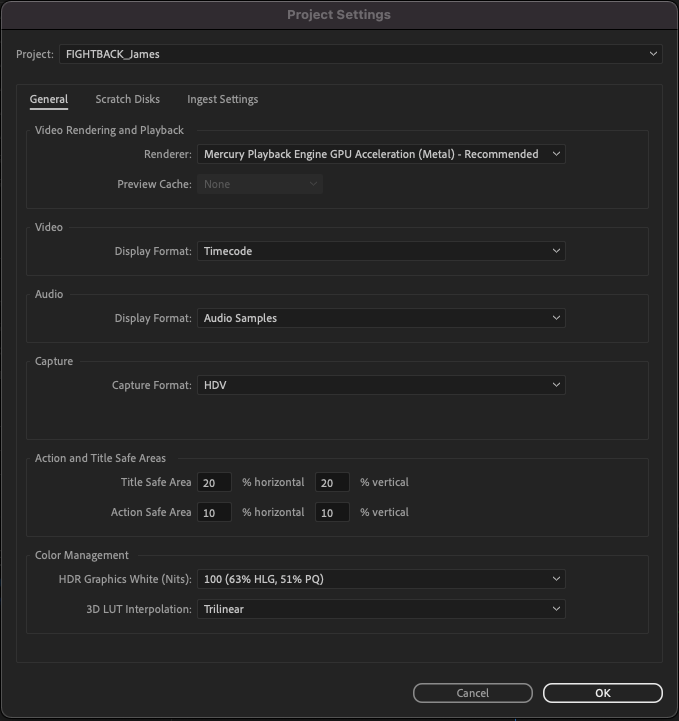
That would be because you have something checked you want to uncheck. Look in your Project file, the bottom option of the General page as shown below.
That checked option to show the same color across all instances in your project must currently be checked as below. Uncheck it.
Neil


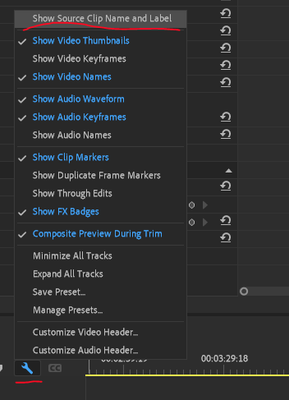
It's now over in the wrench-icon menu in the Timeline panel ... at the very top, Show Source Clip Name and Label ...
Neil
 16
Replies
16
16
Replies
16

Copy link to clipboard
Copied
That would be because you have something checked you want to uncheck. Look in your Project file, the bottom option of the General page as shown below.
That checked option to show the same color across all instances in your project must currently be checked as below. Uncheck it.
Neil

Copy link to clipboard
Copied
Oh, BRILLIANT. Thank you Neil!

Copy link to clipboard
Copied
Hmm, must have shifted it somewhere else in 2021
Copy link to clipboard
Copied
It's now over in the wrench-icon menu in the Timeline panel ... at the very top, Show Source Clip Name and Label ...
Neil

Copy link to clipboard
Copied
Thank you for this.
Is it not possible to show the clip name and still be able to label my cuts in different colors? My issue is that I named all my takes within the project window, rather than the source files (as is standard procedure), but if I disable the option to allow me to color individually, it no longer will show me the proper names of the files! And I need those to reference which take I'm dealing with and so forth...???

Copy link to clipboard
Copied
Has this moved again in 2023? I'm not seeing these options on the wrench menu settings.
Copy link to clipboard
Copied
Nevermind - I just looked for any wrench and didn't pay attention to which panel I was searching. This menu is under the timeline wrench, not the program monitor wrench. There is more on than one wrench on the screen. Hope that helps anyone else who was confused as to why that menu didn't pop up.

Copy link to clipboard
Copied
youre the best, thanks mate

Copy link to clipboard
Copied
This was it! Need to label clips seperately for my content so that was a big hurdle for me. Thanks!

Copy link to clipboard
Copied
Help! I think things have changed because I've looked all the different locations mentioned in this conversation but haven't found this option!

Copy link to clipboard
Copied
Actually this is not the solution the original post was asking for. I have that option under the wrench checked. So I see all the Clip Names and Labels. BUT: If I have one clip, cut it in various sections (instances) and try to give a specific instance of that clip a different label, the color of ALL instances of the clip are changed to the label.
Copy link to clipboard
Copied
Sorry, never mind. I had it already checked and did not understand, that I have to UNCHECK it. Then it works as desired. Sorry folks.

Copy link to clipboard
Copied
What's more confusing is how this particular menu item was selected in the first place. I have always been able to individually select and label clips, and then magically in the middle of an edit session I was no longer able to do that. I would select an individual clip try to apply a label and the label would be applied to the entire timeline. It makes even less sense when you consider the language used in the menu item we are using to adress this problem, "show source clip name and label." It does not say "apply label to everything on the timeline and maintain source clip," and selecting it does not in fact (thank god) eliminate information about the source clip, nor does it eliminate the label it simply allows me to do something I've been able to do for years before yet another completely inexplicable Adobe glitch somehow made labelling individual clips impossible. I am glad there is a solution, but I hope that Adobe can now figure out why the glitch is happening in the first place, and why a menu item that appears to indicate somehting entirely different is the solution to this problem. I have to say that since we all switched to a pay as you go model the programming and glitches have gotten worse, and less predictable. I struggle to understand why we pay a monthly subscription for programming that obviously is relatively untested, and then are expected to problem solve for the company and the expense of our own time and productivity.
Copy link to clipboard
Copied
Yea, the wording changed as the function was modified. And that caught a number of people unawares, you being one. It puzzled me at first also.
But it's operation is very functional after you use it correctly.
And between the internal testing and public betas, the app is actually tested a ton. That said, given the array of operating systems, hardware, video and audio file generative devices from cameras through zoom/obs, and the plethora of needs to get from X to what the freak ever, you cannot possible test every possible permutation.
I use a variety of "these" type apps, and ain't none of them avoiding glitches for some users. Except for Baselight, but that's very old-school.
- You choose one of three computers from them, between $14,000 and $19,000 for the computer, which will never be allowed to have any other apps or functions;
- You pay a CHUNK of change for a license to operate Baselight, and ...
- You pay a yearly fee for support or whatever.
That gets an absolutely rock solid performance.
Making software that attempt to do everything on all computers with any media on any OS ... that is by nature creating potential issues. That the several million daily users of this, and one of the main competitors, get by without troubles is pretty amazing.
Those with issues are (in relative terms) a rather small percentage. Having been one of those at times, that ain't no fun. But as I always have mulitple versions installed simultaneously ... I've never lost the ability to function an get work done because the newest version is not working correctly for me.
Which is a total pain when you really could use or need the newest features. Agreed.
Copy link to clipboard
Copied
youre the best, thanks mate!
Copy link to clipboard
Copied
thank you in korea, 2024


Find more inspiration, events, and resources on the new Adobe Community
Explore Now
 AdChoices