
matthewr927
Known Participant
April 26, 2019
Answered

Confused about Pixel Count (simple question)

  • April 26, 2019
  • 2 replies
  • 2722 views

Hi All,

I am somewhat new to photo and video and have a question that may be easy for someone to answer.

I typically work with videos shot with my iPhone , which I know the pixel count is 1920 by 1080, however, I recently made a video from a photo sequence entirely. The photos are 3024x4032 (standard iphone photo size), so when i first rendered the project out it was really blurry and quite massive, however, I resized the sequence to be 1440 by 1080 which is the same ratio but much less pixels. I then had to scale the images down by to about 50 percent and that seemed to work.

I am really looking for some clarification as to why an image has so many more pixels than a video and also when making the sequence 1440 by 1080 is the overall quality going down now because it is so much less than the original photos which are 3024 by 4032?

I appreciate help!

Matt
    This topic has been closed for replies.
    Correct answer Warren Heaton10841144

    What exactly are some established frame sizes and what is the standard bit rate for HD?


    Matthew:

    I initially suspected it was a bit rate issue (or some other settings issue), but I tried re-creating what you're doing with some photos I took of plants over the weekend and came across something that might be causing your loss of picture quality when you export at 100% rather than 50%.

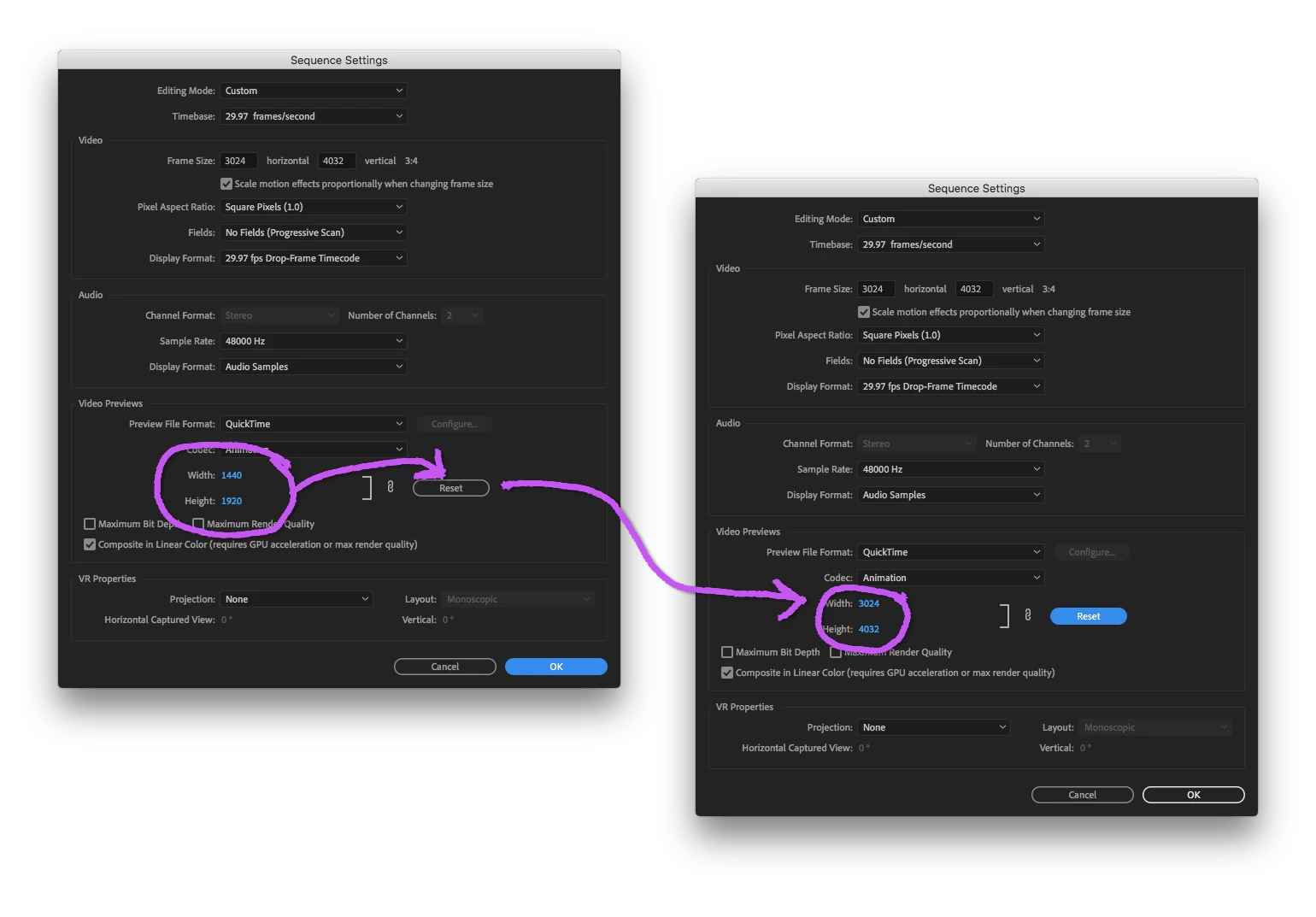
    Go to your Sequence and double-check what the Video Previews setting is for Width and Height.  If it's 1440x1920, then that is the likely cause.

    Here's what I did:

    1. Take photos at 3024x4032.
    2. Import photos in to Premiere Pro.
    3. Select all of the photos in the Project panel and drag and drop them onto the New Item icon to create a Sequence at settings as close to the still images as possible.
    4. Chose Sequence > Sequence Settings to check the Custom settings.
    5. Under Sequence > Sequence Settings > Video Previews clicked "Reset" to change 1440x1920 to 3024x4032.
    6. Add fade in at head, fade out at tail and transitions along with a push in on each image.
    7. Chose File > Export > Media..., setting the Format to H264 and the Preset to Match Source - High Bit rate.

    The rendered movie looks great as an H264 mp4 with a target bit rate of 10mbps and maximum of 12mbps at 3024x4032.

    It seems with this workflow Premiere Pro automatically sets the Video Preview to half the width and half the height which would cause previews to render faster, but it commits you to either changing it later or being sure not to use the rendered Video Previews on export.

    -Warren

    2 replies

    Community Expert
    April 26, 2019

    One technical consideration, you're effectively turning your still images that have a still image aspect ratio into video.  Rather than maintain the still image aspect ratio, I'd go with an established video aspect ratio at an established frame size.  For example, at 1440x1080, you're using an established aspect ratio but not an established frame size (1440x1080 is actually the non-full raster size for HDV video that's presented at 16x9).  

    So, I'd go with 1920 x 1080 (16x9) or 1080 x 1080 (1x1).  Of course, this means repositioning each still image to best fit the chosen aspect ratio or at least scaling to fit the width while cropping the top and bottom.  Your stiles are close enough to 3840 x 2160 that you could opt for that instead of 1920 x 1080.

    Inspiring
    April 26, 2019

    matthewr58346897  wrote

    I am really looking for some clarification as to why an image has so many more pixels than a video

    Because a still camera only has to capture, process and store 1 frame, while a video camera has to do that 24,30,60 or more times in a single second. Historically, the hardware available was hard pressed to do so with high pixel count images.

    With advances in hardware, we now have video cameras that record (capture, process and store) images at 7680×4320 (8K) so this is becoming more and more moot.

    when making the sequence 1440 by 1080 is the overall quality going down now because it is so much less than the original photos which are 3024 by 4032?

    There are certainly less pixel per image, but it should look quite good and playback. Image quality is subjective and the device the video is being played back on has an impact - an iPhone versus theatrical projection, for example. If it looks good to your eyes, then it is good.

    The smaller the image is displayed, the sharper it will look.

    MtD

    matthewr927
    Known Participant
    April 26, 2019

    Thank you for the answer which leads to another question . what happens to all the extra pixels when the image is dropped into the standard video timeline? It is almost half the pixels?

    Inspiring
    April 26, 2019

    Not sure I understand your question. If you are asking how the smaller images is derived from the larger, if you had a 1000x 500px image and resized it to 500x250px, Premiere drops (does not use, ignores) every other pixel in the image to create the smaller one.

    The reduction of pixel count to a smaller sized image (displayed appropriately) is much, much less consequential to the apparent sharpness of an image than going the other way - enlarging an image, where Premiere needs to add pixels and guess exactly what those added pixels should look like.

    MtD