


Copy link to clipboard
Copied
Hi guys!
I've had the same problem lately I always try to cut videos to the millisecond.But for example when i try to cut to 0.060 milliseconds it won't let me it will automatically make it 1 second long.Or if i cut less it will make it 0.025 milliseconds.So between 0.025 milliseconds to 1 second seems like impossible to cut is there anthying i could do?
Thanks


 1 Correct answer


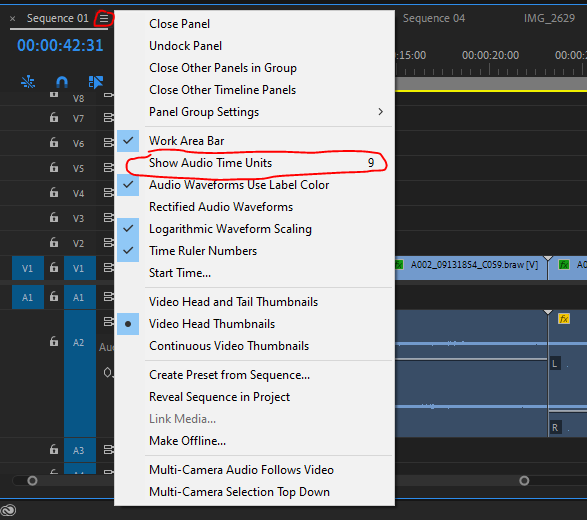
Select 'show audio time units'.
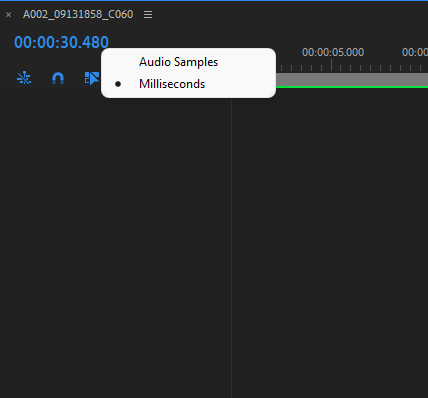
Then right click on the timecode numbers and select milliseconds.
When working with video it is often worth thinking about traditional film and how you can only cut between whole frames and not in the middle.

 7
Replies
7
7
Replies
7

Copy link to clipboard
Copied
I thnk you'll find they are frames not miliseconds.
HH:MM:SS:FF, It looks like you have 30 frames/sec so the frames will count to 29 then the seconds will increase by one and the frames will reset to zero.
Copy link to clipboard
Copied
And is there anyway i can change to miliseconds ?

Copy link to clipboard
Copied
You can change the timline to audio time base in milliseconds, and can of course cut audio clips that way. And of course slide an audio track one way or the other to better time it with a video track.
However you can't cut video tracks in less than one frame increments. So say with 24fps sequence, the shortest cut you could make is 1/24th second.
Neil
Copy link to clipboard
Copied
So if I understand correctly if I raise the fps I can maybe achieve the 0.60 milliseconds?
Copy link to clipboard
Copied
Each frame at 30fps is 33ms, at 25fps 40ms, at 60 fps 16ms. Why do you want to work in ms?
Copy link to clipboard
Copied
I want to work in second/milliseconds but i don't know how to do that
Copy link to clipboard
Copied
Select 'show audio time units'.
Then right click on the timecode numbers and select milliseconds.
When working with video it is often worth thinking about traditional film and how you can only cut between whole frames and not in the middle.


Find more inspiration, events, and resources on the new Adobe Community
Explore Now
 AdChoices
